



Small studios need a POS system built for fitness, not a generic retail terminal. If you run fewer than 200 members, expect to pay between $79 and $199 per month for a gym-specific POS that handles memberships, recurring billing, class bookings, and retail in one place. The best POS for small studios in 2026 includes Wellyx, PushPress, Gymdesk, and Zen Planner.
That shortlist matters more every year: the gym management software market is projected to grow from roughly $2.03 billion in 2025 to $2.23 billion in 2026, on its way to about $4.02 billion by 2032, according to Research and Markets. As more studios move billing, booking, and access onto one platform, choosing the right POS early avoids an expensive switch later.
Most gym owners never get to that shortlist. The search usually starts with “what is the cheapest POS for small businesses?” and ends with Square, a general business system designed for coffee shops and pop-up markets.
After 15 years in the fitness industry, running a 550-member studio in California, helping 200+ studio owners set up their operations, I have watched this pattern repeat dozens of times. A new owner signs up with Square because the software is free and the card reader costs $49. Six months later, they struggle with three separate tools for memberships, scheduling, and billing. They manually chase failed payments and lose track of which members still have sessions left on their class packs.
The real cost of Square is not its 2.6% + $0.10 processing fee. Every POS charges processing fees. The real cost is the revenue you lose when failed payments go unrecovered because no dunning system exists, and when class packs are not deducted automatically. This is not a small leak. Research by GoCardless found that 20% to 40% of subscription churn is caused by payment failure, not by customers choosing to leave, and every month, subscription businesses lose between 1% and 4% of customers to it needlessly.
That is not a pricing problem. It is a functionality problem. And it is the reason this guide exists: to help small studio owners choose a POS based on what it actually does inside a gym, not just what it costs on paper.
What is a gym POS (Point-of-sale) system?
A gym POS system is the checkout and transaction layer of your gym management software. It processes in-person and online sales, but it also connects those transactions to member accounts, billing rules, class packages, inventory counts, and staff permissions.
Unlike a generic retail POS that simply records a sale and moves on, a gym POS tracks whether a member’s package still has visits left, whether a payment should trigger door access, and whether a trainer’s commission needs to be logged. That payment-to-door link is what connects a POS to biometric access control for gyms and other entry systems, so a failed charge can quietly restrict access without staff intervention.
That distinction separates a gym POS from a general one. A single front-desk transaction at a studio can involve a membership renewal, a retail purchase, a class booking, and a failed payment follow-up, all at once. A system that does not understand those relationships forces your staff to switch between tools or track things manually, which is where revenue leaks start.
How a gym POS system works
See how a gym-specific POS handles memberships, retail sales, and payment processing in one system.
Why small studios cannot rely on generic POS systems
Most online searches start with something like “cheapest POS for small business,” and the results often recommend POS systems like Square, PayPal Zettle, and Helcim. Those are solid answers for retail shops, food trucks, and pop-ups. But they are not suitable for fitness studios, and here is why.
A yoga studio with five membership types, three class-pack options, and a retail shelf of mats and supplements is not a coffee shop. The transaction logic is fundamentally different.
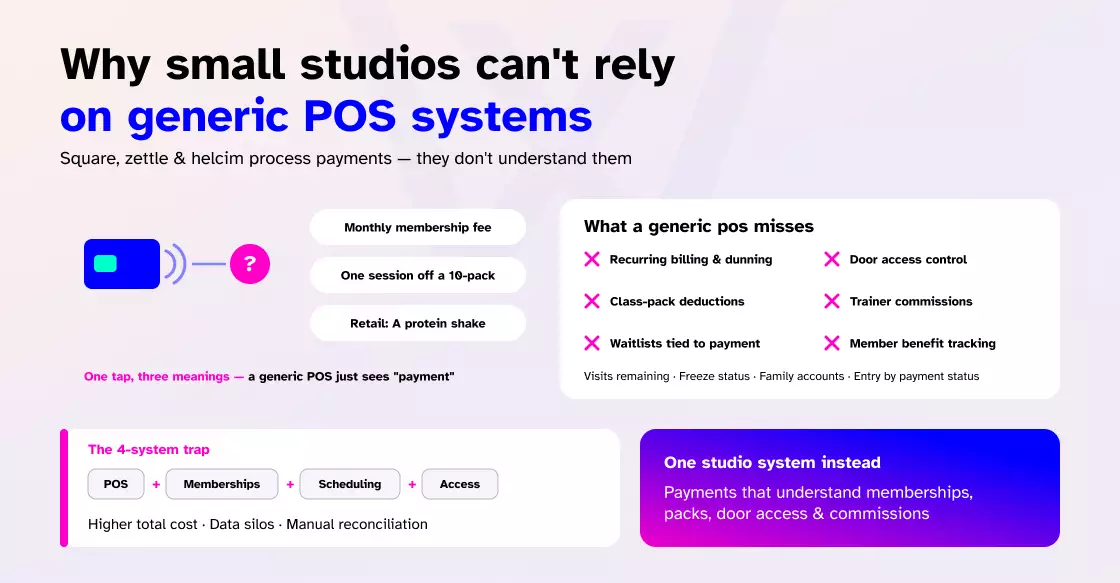
When a member taps their card at the front desk, the system needs to know whether that tap means “charge their monthly fee,” “deduct one session from a 10-pack,” or “sell them a protein shake.”
Square cannot do that natively. Neither can PayPal Zettle or Helcim. They process the payment, but they do not understand what the payment means inside a studio’s operations.
Here is what a generic POS misses in a fitness context:
- Recurring membership billing with automated dunning for failed payments.
- Class pack and session deductions tied to each transaction.
- Integrated access control (granting or denying door entry based on payment status).
- Trainer commission tracking linked to specific sales.
- Waitlist management connected to booking and payment.
- Member benefit tracking (visits remaining, freeze status, family accounts).
If you use Square as your POS, a separate tool for memberships, another for scheduling, and yet another for access control, you end up managing four systems. That setup costs more in aggregate, creates data silos, and requires manual reconciliation.
Best gym POS systems for small studios in 2026
The right gym POS system depends on your studio’s size, class model, and growth plans. Here is how the top options compare for small studios under 200 members.
Wellyx
Wellyx is an all-in-one gym management platform with a native POS built for fitness business workflows. The POS connects directly to membership billing, class scheduling, access control, and CRM without requiring third-party integrations. It supports card, cash, digital wallet, and split payments through integrated processors like Stripe, GoCardless, and PayTabs.
Pricing: Plans start at $99 per month (Excel plan covering memberships, bookings, POS, and scheduling). The Exceed plan at $199 per month adds inventory tracking, lead management, and premium access control. The Ultimate plan at $299 per month includes marketing automation, loyalty programs, and gift cards.
Best for: Small to mid-sized studios that want one system for POS, memberships, bookings, access control, and CRM. Studios that sell retail alongside memberships will benefit from the inventory sync and automated receipt system.
What stands out: Transparent published pricing with no long-term contracts. 24/7 human support (no bots). The POS supports parked sales, custom receipts, tipping, partial payments, and automatic refund processing. It also integrates directly with door access systems, so a member’s payment status controls whether they can enter the facility.
To see how the Wellyx POS works in practice, this video walks through the full system:
PushPress
PushPress is popular among CrossFit boxes and boutique gyms for its straightforward interface and focus on billing and class management. It does not try to offer everything in one place, which makes it a practical choice for small gym businesses with limited operations.
Pricing: Starts at approximately $159 per month for the base plan. The processing rate in this plan is 2.89% + $0.30 for credit card transactions, and 0.79% + $0.30 for bank transfers.
Best for: Small class-based gyms and CrossFit boxes that want simple recurring billing and basic POS functionality without enterprise complexity.
For those boxes, the software is only one lever; the bigger question of how to make a CrossFit gym profitable usually comes down to retention and pricing, not the POS alone.
Limitations: The POS is relatively basic compared to platforms like Wellyx. It may not be adequate for studios with significant retail operations, as it lacks deeper inventory features, such as barcode scanning and supplier purchase order tracking. Similarly, reporting is basic and functional but lacks deep customizable analytics.
Gymdesk
Gymdesk offers transparent, published pricing and a lightweight system that covers scheduling, memberships, POS, and attendance tracking. With just the right tools and features in place, it gives gym owners the core tools they need to run their gym without adding unnecessary complexity.
Pricing: Plans start around $75 per month for small studios. Gymdesk Payments is the built-in processing option with its own rate structure. Gymdesk does not add fees on top of the processor’s base rate.
Best for: Small martial arts schools and fitness studios wanting an affordable, straightforward system. The company is known for billing ease and active support.
Limitations: The member-facing app experience is fairly basic compared to platforms with branded apps. Some users also report issues with bulk actions and family signups.
Zen Planner
Zen Planner is an all-in-one management platform tailored for multi-location gyms, fitness studios, and martial arts schools. It handles membership tracking, automated billing, class scheduling, and POS transactions. Zen Planner, with its built-in payment processing system, claims to save 15% per transaction.
Pricing: Plans start from $99 per month (Zen Planner Studio) and $248 per month (Engage), and an additional $99 per month for website design and optimization.
Best for: Mid-sized studios and growing martial arts academies that need robust automation abilities besides scheduling, billing, member retention tools, and POS.
Limitations: Users find the backend and UI complex and dated. Unlike Wellyx and other flexible platforms, Zen Planner does not allow users to choose multiple payment gateways. It charges a higher processing fee than standard providers like Square or Stripe, which is a turnoff for small gym businesses. Owners weighing it up usually work through the same Zen Planner FAQs before committing, especially around contracts and processing rates.
Vagaro
Vagaro is not typically a fitness-only platform and is widely used across salons, spas, and smaller studios as well. It bundles scheduling, POS, and client management into one system at a lower entry price. For smaller gym studios just starting, Vagaro is a good option to consider.
Pricing: Vagaro pricing starts at $30 per month. Processing fees for merchants doing over $4,000 per month are 2.2% + $0.19, plus a $10 monthly fee.
Best for: Solo practitioners, personal trainers, or very small studios that need basic scheduling and payment processing without enterprise overhead.
Limitations: Designed more for salon and spa workflows. The POS and retail functionality may feel limited for studios with more complex membership structures.
How much does gym POS software cost?
Pricing for gym POS systems follows a subscription model with monthly fees that scale based on features, member count, and location count. Here is what the market looks like in 2026 for small studios.
| Platform | Starting price | POS included at the base tier? | Processing fees | Contract required? |
| Wellyx | $99/mo (including POS) | Yes | Via Stripe/GoCardless (processor rates) | No |
| PushPress | ~$159/mo | Yes | Integrated processing | No |
| Gymdesk | ~$75/mo | Yes | Gymdesk Payments (no markup) | No |
| Zen Planner | $99/mo | Yes | Integrated processing | No |
| Vagaro | $30/mo | Yes | 2.2% + $0.19 (above $4K/mo) | No |
| Mindbody | $129/mo+ | Yes | 2.75-2.99% + fees | Yes (12 months) |
| Glofox | Custom pricing | Yes | Custom | Yes (12 months) |
The total cost of ownership goes beyond the monthly subscription. Factor in payment processing fees (typically 2.2% to 3% per transaction), hardware costs for card readers or terminals ($99 to $349), onboarding and data migration time, and the staff hours lost if the system requires training or workarounds.
A studio processing $18,000 per month in card transactions at an effective rate of 2.8% will pay roughly $6,048 per year in processing fees alone. That number makes the monthly software fee look small by comparison, which is why understanding your processor’s rate structure matters as much as the subscription price.
Comparing gym management software packages side by side makes hidden inputs like onboarding, hardware, and processing easier to see before you commit.
Gym POS vs generic POS: a direct comparison
Most gym owners search online, asking “cheapest POS for small business,” and the responses keep surfacing: Square, Helcim, and PayPal Zettle. Those are great systems for retail, but they miss the operational requirements of a fitness studio.
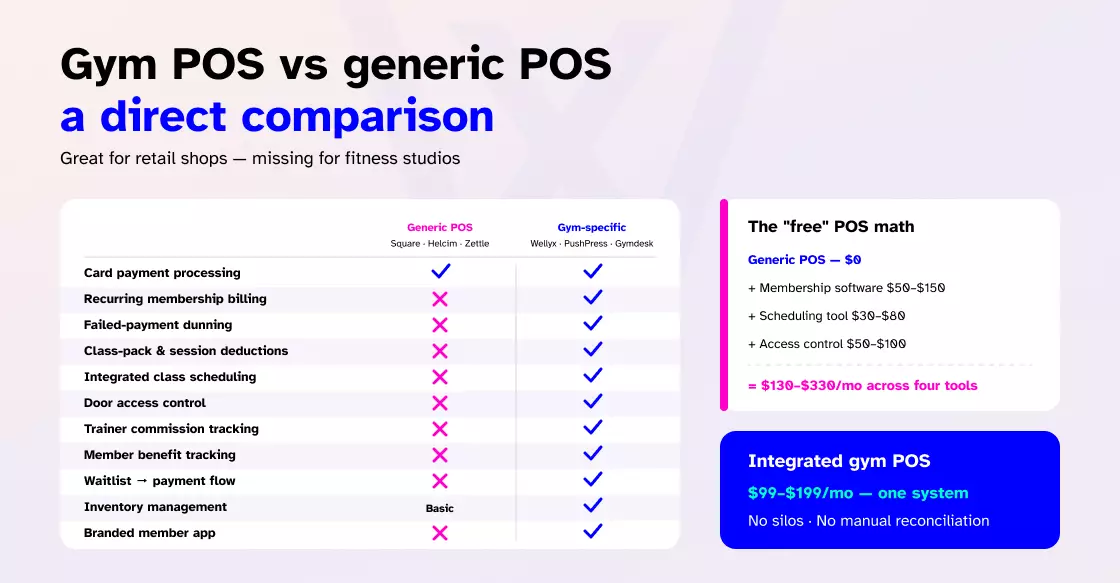
| Capability | Generic POS (Square, Helcim, Zettle) | Gym-specific POS (Wellyx, PushPress, Gymdesk) |
| Card payment processing | Yes | Yes |
| Recurring membership billing | No (requires third-party add-on) | Yes (native) |
| Failed payment dunning | No | Yes (automated retries and notifications) |
| Class pack/session deductions | No | Yes |
| Integrated class scheduling | No | Yes |
| Door access control integration | No | Yes (in platforms like Wellyx) |
| Trainer commission tracking | No | Yes |
| Member benefit tracking | No | Yes |
| Waitlist to payment flow | No | Yes |
| Inventory management | Basic | Fitness-specific (memberships + retail) |
| Branded member app | No | Yes (varies by platform) |
The price gap between a free generic POS and a $99 to $199 per month gym-specific system disappears once you add the third-party tools needed to cover what the generic system cannot do.
Separate membership software ($50 to $150/mo), a scheduling tool ($30 to $80/mo), and an access control system ($50 to $100/mo) can easily push the total past what an integrated platform costs.
What to look for when choosing a gym POS
Before evaluating specific platforms, get clear on what your studio actually needs from a POS. Not every feature matters for every business model.
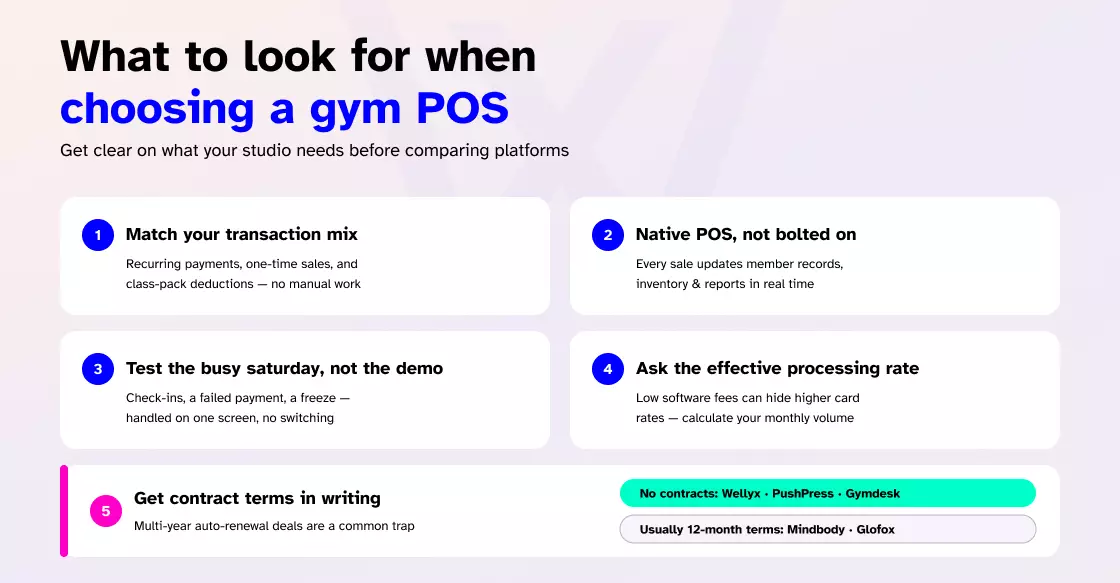
- Match the POS to your transaction types. A yoga studio running on class packs has different POS needs than a 24/7 gym selling monthly memberships and retail products. Ask whether the system handles your specific mix of recurring payments, one-time purchases, and package deductions without manual intervention.
- Check whether the POS is native or bolted on. Some platforms advertise a POS feature that is actually a third-party integration with limited sync capabilities. A native POS that lives inside your gym management software means every transaction updates member records, inventory, and the reports every gym owner should be running in real time. A bolted-on POS often creates data gaps.
- Test the front-desk workflow, not the demo. The sales demo is designed to look smooth. What matters is how the system performs during a busy Saturday morning when three members need to check in, one wants to buy a class pack, another has a failed payment, and someone is asking about a frozen membership. If the staff has to switch screens or log into a separate system to handle any of those, the POS is not doing its job.
- Ask about processing fees explicitly. Some vendors quote low monthly software fees but charge higher credit card processing rates to compensate. Others pass through interchange rates with no markup. Request the effective rate, not just the headline number, and calculate what your monthly card volume would actually cost.
- Confirm contract terms in writing. Multi-year contracts with aggressive auto-renewal clauses are a common trap in this market. Platforms like Wellyx, PushPress, and Gymdesk operate without long-term contracts. Mindbody and Glofox typically require 12-month commitments.
The bottom line
The cheapest POS for a small business is not the cheapest POS option for a small gym. Generic systems save money on the subscription but cost more in operational gaps, third-party tool stacking, and manual workarounds.
A gym-specific POS that handles memberships, billing, classes, and retail in one place will almost always be the better financial decision once you factor in the total cost of ownership.
If your studio is under 200 members and you want a single platform that covers POS, memberships, scheduling, access control, and CRM without long-term contracts, Wellyx starts at $99 per month with POS.
Book a demo to test your real front-desk workflows, not a scripted sales pitch.
Common questions about gym POS systems
1. Can I use Square as my gym’s POS?
Square works for processing card payments and selling retail items, but it does not handle recurring membership billing, class bookings, session deductions, or access control. If your studio only needs basic payment processing with no membership management, Square can work as a stopgap. For anything beyond that, a gym-specific POS saves time and prevents revenue leaks from manual workarounds.
2. How much does a gym POS cost per month?
Budget-tier gym POS systems for small studios start around $79 per month and go up to $199 per month for comprehensive POS with inventory, access control, and CRM. However, platforms like Mindbody and Glofox range from $129 to $500 or more per month, depending on location count and feature tier. Processing fees (2.2% to 3% per transaction) are also separate from the software subscription.
3. What is the cheapest gym POS system?
Vagaro starts at $30 per month and includes basic POS and scheduling, excluding the processing fee on monthly sales volume. Gymdesk starts around $75 per month with more robust gym-specific features. However, being the cheapest POS is misleading if the low-cost system lacks features you need, forcing you to add third-party tools that inflate the total cost. Compare total cost of ownership, not just the subscription price.
4. Do I need a gym-specific POS or can a general system work?
A general POS (Square, Clover, Helcim) can process payments. Still, it cannot manage the transactional logic unique to fitness businesses: membership renewals, class pack deductions, failed payment dunning, access control sync, or trainer commissions. If you run classes, sell memberships, and want automated billing, you need a gym-specific system.
5. What POS do CrossFit gyms use?
CrossFit boxes most commonly use PushPress, Wodify, or Zen Planner, all of which are built for class-based fitness businesses with recurring billing. PushPress is the most frequently recommended option among newer CrossFit boxes due to its simplicity and no-contract terms.
6. What is the best POS for a yoga or Pilates studio?
For yoga and Pilates studios that run class packs, drop-ins, and retail, Wellyx and Vagaro are strong options. Wellyx offers deeper membership management, POS, and access control integration. Vagaro is a lower-cost entry point with solid scheduling. Mindbody is the industry incumbent but comes with higher pricing and contract commitments, worth reading a full Mindbody review before signing a 12-month term.
7. How do gym POS systems handle failed payments?
Most gym-specific POS platforms include automated dunning management, which means the system retries failed card charges on a schedule, sends automated notifications to the member, and can restrict access until payment is resolved. This is a critical revenue-protection feature that generic POS systems do not offer, and it works: payment processors like Stripe’s automated retries and dunning recover 57% half of failed recurring payments that would otherwise be lost.