



Gym self-service apps improve the member experience by giving people on-demand control over bookings, payments, check-ins, membership details, and everyday tasks that no longer require a phone call or a trip to the front desk.
The real benefit is not the technology itself. It is the time, uncertainty, and frustration that disappear from the member’s day.
A reddit user described an experience after attending a CycleBar class. They arrived on time, checked in with staff, completed the workout, and left believing everything had gone as expected. Later, they discovered they had been marked as a no-show because a separate app had not registered their check-in.
Their booking privileges were automatically suspended, leaving them unable to reserve another class until the issue was resolved. The problem was not that they missed the class. It was that two connected systems failed to recognize the same visit.
Members rarely think about databases, integrations, or synchronization. They simply expect the gym to remember what they booked, paid for, and attended. Whether someone reserves tomorrow’s spin class at 9:45 p.m., updates an expired payment card in private, or walks straight into a 6 a.m. session using their phone, every interaction shapes the overall gym member experience.
When self-service works, members hardly notice the technology. They simply think, “That was easy.”
Why does the member experience begin before the front desk?
A member can form an opinion about the gym before entering the building. They may be checking tomorrow’s schedule during lunch, comparing memberships at home, or updating an expired card before an early class.
The app often becomes the first point of contact for these routine decisions. Every tap either removes friction or creates it.
| Member moment | What the member needs | How self-service helps |
| Considering membership | Clear options | Lets them review plans and join |
| Planning a workout | Current availability | Shows classes, spaces, and waitlists |
| Arriving at the gym | Dependable entry | Supports mobile or kiosk check-in |
| Fixing a payment | Privacy and clarity | Allows card and balance updates |
| Looking for help | A quick answer | Offers FAQs, guides, or staff contact |
A strong self-service journey is not one where members never speak to staff. It is one where they do not need staff for every small task.
What is a self-service gym member app?
A self-service gym member app is a mobile platform that allows members to complete common tasks without asking an employee to process every action. It usually connects with memberships, scheduling, billing, communication, check-in, and access control.
A website mainly supports discovery. A member portal gives account access through a browser. A mobile app stays on the member’s phone and supports repeated actions such as booking, paying, checking in, or reviewing an account.
Common functions include:
- Booking and canceling classes
- Joining waitlists
- Viewing membership details
- Updating payment information
- Buying packages or training sessions
- Checking credits and attendance
- Receiving reminders
- Using a digital membership pass
- Accessing support information
A connected gym mobile app can bring bookings, purchases, profile management, check-ins, and membership information into one place.
Where does a self-service app remove friction?
The clearest way to understand the app is to follow the member rather than the feature list.
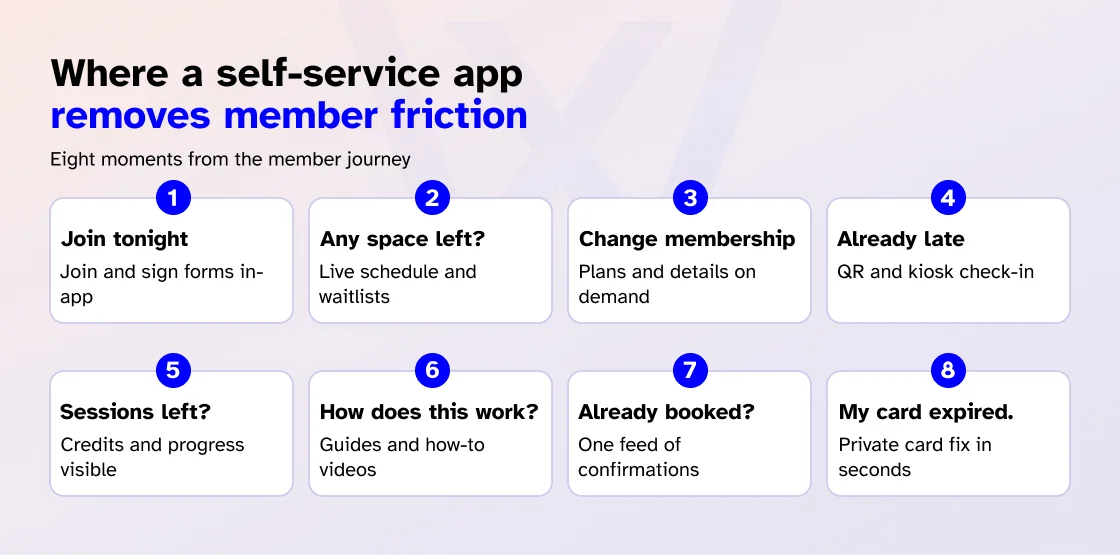
“I want to join tonight.”
A prospective member may decide to join after work or after their children are asleep. Self-service can let them compare plans, complete registration, sign digital forms, add payment details, and receive confirmation that evening.
Convenience should not hide important terms. Prices, renewals, commitment periods, and cancellation conditions must remain clear. Family plans, medical considerations, or contract questions may still need a person.
The goal is not to automate every decision. It is to stop simple decisions from becoming slow ones.
“I hope there is still space.”
A commuter checks the evening schedule during lunch. A parent remembers a Saturday class between school drop-offs and pickups.
A useful booking screen shows the time, instructor, available spots, eligibility, required credits, cancellation deadline, and waitlist status. If the app displays a space that no longer exists, trust disappears.
Members should also be able to cancel within the permitted window without calling to explain an ordinary change of plans. The system can then offer the place to the next person on the waitlist.
Clear rules matter. Booking limits, late fees, and waitlist response windows should be visible before confirmation.
“I need to change my membership.”
A member may simply want to check a renewal date, replace a payment card, update contact details, or see how many sessions remain.
Self-service makes routine information visible, but not every change should be instant. Freezes, refunds, cancellations, and medical holds may need approval. The app should show whether a request has been received, is pending, or has been completed.
Members should never leave the screen wondering whether their membership is still active.
“I am already late.”
Every gym member has had that moment. Traffic took longer than expected. Parking was a struggle. Class starts in three minutes, and the last thing anyone wants is to stand in a line or search for a membership card.
A good self-service app helps members get through the door quickly using tools such as QR codes, digital membership passes, NFC, bluetooth credentials, or self-service kiosks. Instead of slowing people down, the check-in process confirms membership, records attendance, and gets them onto the gym floor.
This guide to mobile-powered kiosk check-in explains how mobile credentials, entry verification, and attendance tracking work together to create a smoother arrival experience.
The benefits are simple:
- Faster entry
- No separate card to remember
- Easier early or late access
- More consistent attendance records
The risk is equally clear. A valid member who is denied at the door will remember the failure more than dozens of successful check-ins.
“My card expired.”
Cards expire, banks block transactions, and members change accounts. A self-service app may let members replace a card, retry payment, review charges, buy sessions, access receipts, or check balances.
This gives the member clarity and privacy. Refunds, duplicate charges, and contract disputes still need a visible route to staff support.
“Did I already book?”
The app can become a dependable record for bookings, reminders, waitlist changes, cancellations, payment alerts, and facility closures.
Notifications help when they are timely. They become noise when every offer is treated as urgent. Members should be able to manage promotional preferences while still finding essential updates inside the app.
“How do I use this machine?”
A searchable knowledge base, short video, or animation can answer basic questions about setup, facility rules, or reporting a broken machine. A QR code near the equipment can direct members to that guidance.
This should support coaching, not replace it. A video can show where an adjustment is located. It cannot decide whether a movement is safe for a particular member.
“How many sessions do I have left?”
Members may use the app to view credits, package usage, attendance, rewards, workout routines, progress records, or on-demand classes for travel days.
These features should simplify the next decision, not turn every screen into an upsell or present generic data as professional coaching.
Apps can also support ongoing engagement through useful content and communication. This guide explains how gym apps can support member engagement and business growth.
Branded gym app vs. marketplace app
A branded gym app focuses on one business. A marketplace app may list several gyms or studios. Neither is automatically better, but they create different relationships.
| Area | Branded app | Marketplace app |
| Brand visibility | Focused on one gym | Multiple businesses appear |
| Member journey | Follows the gym’s services | Follows the wider platform |
| Communication | Direct messages | Competes with other providers |
| Discovery | Supports an existing relationship | Helps members find new options |
A branded app can create consistency. A marketplace may offer variety. Branding still comes second to usefulness; a custom logo cannot rescue a broken booking or check-in.
What makes members continue using a gym app?
Downloads are easy to count. Habit is harder to earn.
Members keep using an app when it is the easiest route to a frequent task. Staff can introduce it during onboarding. Trust then grows when schedules stay current, bookings appear, payments update, check-in works, and help remains easy to find.
Apps survive through useful habits, not download numbers. Thirty features mean little when members cannot find the three they use every week.
What are the benefits beyond convenience?
Convenience is the first benefit members notice. Control, confidence, privacy, and better human service sit underneath it.
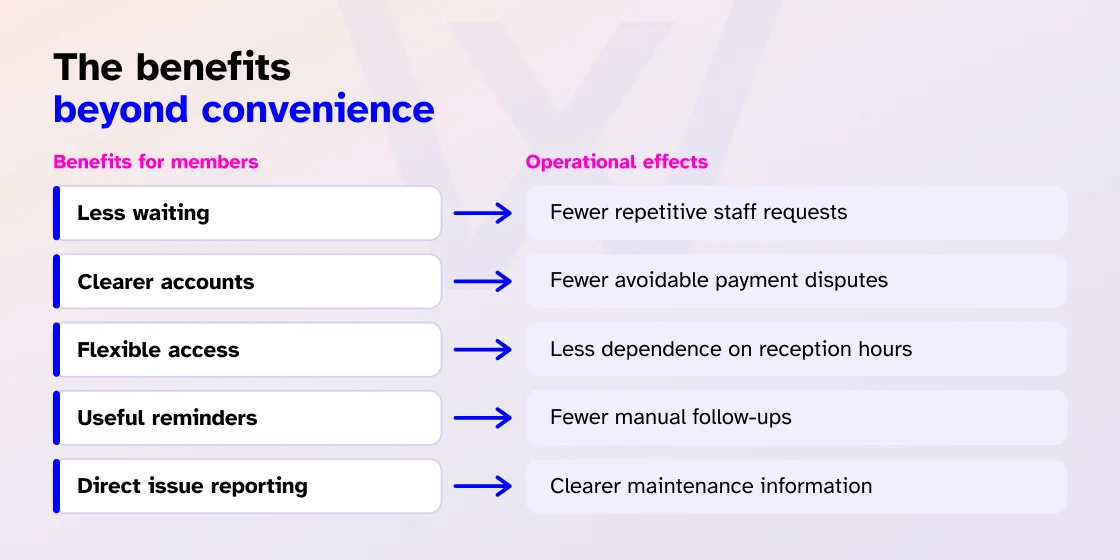
| Member benefit | Operational effect |
| Less waiting | Fewer repetitive staff requests |
| Clearer accounts | Fewer avoidable payment disputes |
| Flexible access | Less dependence on reception hours |
| Useful reminders | Fewer manual follow-ups |
| Direct issue reporting | Clearer maintenance information |
Self-service should not mean less service. A member canceling a class may prefer the app. Someone worried about an injury, confused about a charge, or uncertain about a program may want a person.
Good self-service protects time for those conversations.
Where can self-service fall short?
The strongest app strategy includes a way out of the app.
Some members prefer human interaction, especially when an issue is unfamiliar or complicated. Others may find that a kiosk cannot handle a specific request as flexibly as a staff member.
Common problems include:
- Confusing menus or repeated logins
- Outdated schedules or incorrect balances
- Failed payment updates
- Excessive notifications
- Check-in failures
- No clear support route
A bad app does not remove work. It moves the work from staff to members.
Accessibility also matters. Not every member can comfortably read a small screen, scan a QR code, hear a video, or use a touch-only kiosk. Owners should look for readable text, clear buttons, screen-reader support, captions, staff assistance, and an alternative check-in method.
The question is not whether every member can be forced through one process. It is whether each member has a practical way to complete the task.
Self-service needs boundaries. A knowledge base can answer a common question, but it should not diagnose pain. A payment screen can update a card, but it may not resolve a disputed contract.
Why should the app connect with everything else?
A member books a class. The available capacity should update, the correct credit should be deducted, the member’s name should appear on the instructor’s attendance list, access should work on arrival, and attendance should be recorded automatically.
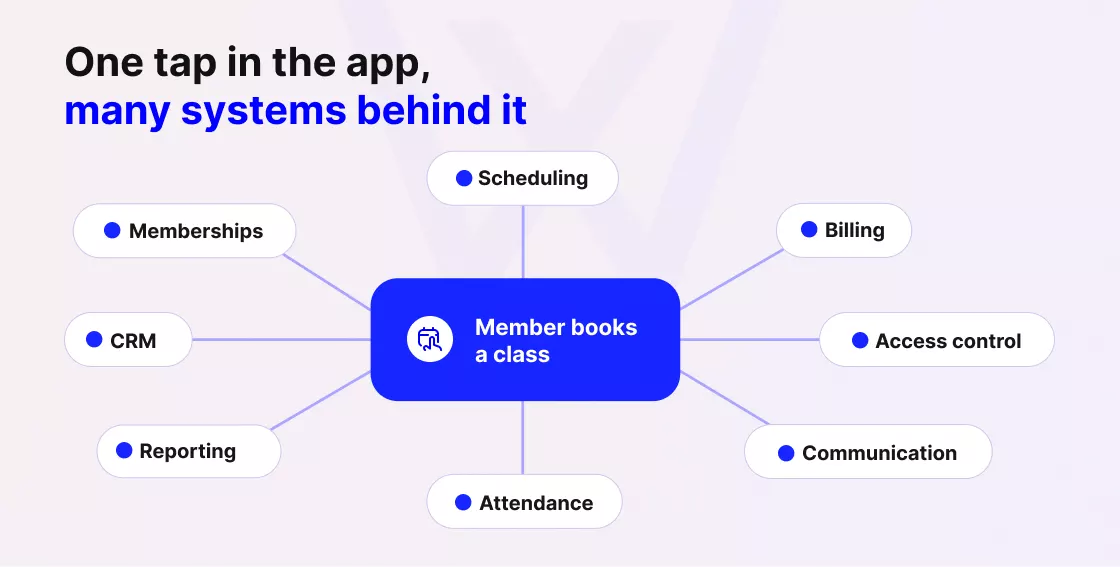
To the member, it feels like a single action. Behind the scenes, the gym needs several connected systems working together.
The app should connect with memberships, billing, scheduling, CRM, check-ins, access control, communication, rewards, reporting, and feedback.
With Wellyx, every member action extends beyond the app. A booking, payment, check-in, membership update, or purchase automatically connects with scheduling, billing, CRM, access control, communication, attendance, and reporting. This keeps members and staff working from the same up-to-date information rather than from separate records.
When these systems are disconnected, the member notices quickly. A class may appear available when it is already full, a payment update may never reach the billing system, or a valid booking may not appear at reception.
The member does not think about integrations or synchronization. They simply expect the gym to remember what they booked, paid for, and can access.
What should owners verify before choosing an app?
A polished demo is not enough. Follow normal member tasks from beginning to end and test what happens when something goes wrong.
| Feature | What owners should verify |
| Class booking | Availability updates in real time |
| Mobile check-in | Membership status updates correctly |
| Payment tools | Changes reach the main billing record |
| Knowledge base | Content is current and searchable |
| Accessibility | Alternatives and staff support exist |
| Offline behavior | Limits and synchronization are clear |
| Support access | Members can reach help easily |
Ask providers to show failure cases:
- What happens when a payment fails?
- Can check-in continue during an outage?
- How does a member report broken equipment?
- What happens when a membership is frozen?
- Can a member reach staff without leaving the app?
The quality of these answers often reveals more than the size of the feature list.
How does self-service support satisfaction and retention?
A gym app cannot create loyalty by itself. Members still judge coaching, cleanliness, equipment, safety, community, policies, pricing, and progress.
Self-service supports the relationship by removing smaller frustrations. Easier booking reduces effort. Payment visibility builds trust. Reliable entry creates confidence. Useful reminders support consistency. Accessible support prevents people from being left behind.
A dependable app cannot solve every reason a member leaves, but it can stop the software from becoming one of them.
The member simply thinks, “That was easy.”
Return to the member who opened the app at 9:45 p.m.
They booked tomorrow’s class, checked their remaining sessions, and returned to their evening. They did not think about integrations, databases, or access rules.
They simply thought, “That was easy.”
The best self-service apps do not remove people from the gym experience. They remove unnecessary waiting while leaving staff more time to coach, welcome, listen, and help when the human part matters most.
Frequently asked questions
How does a gym member app improve the member experience?
It gives members direct control over bookings, payments, check-ins, membership information, and routine support. This reduces waiting and keeps common tasks available outside front desk hours.
What features should a self-service gym member app include?
It should include real-time booking, waitlists, payment updates, membership details, mobile check-in, notifications, support content, and a clear route to staff. Progress tracking and on-demand classes may also help.
What is the difference between a branded gym app and a marketplace app?
A branded app focuses on one gym. A marketplace app presents several fitness businesses. The right choice depends on whether the priority is a direct relationship or wider discovery.
What should owners look for in a gym management system with a member self-service app?
Many modern systems include member apps. Owners should verify whether the app connects with scheduling, memberships, payments, check-in, access control, communication, and staff workflows.
How do member app requirements differ by gym type?
The right option depends on the business. Studios need strong schedules and waitlists. A 24/7 gym needs dependable mobile entry. Multi-location businesses need shared accounts and centralized control.
Which gym software allows members to book classes themselves?
Self-service booking software should show live schedules, capacity, eligibility, cancellations, and waitlists. The booking should update staff calendars and attendance lists immediately.
Can a gym member app work without internet access?
Some gym member apps support limited offline functionality. Wellyx allows members to continue checking in during a connectivity interruption, and the system synchronizes attendance once the connection is restored. Owners should verify which other features remain available offline before choosing a system.
Can members manage payments and memberships through a gym app?
Many apps let members update payment details, review charges, buy services, and view membership information. Freezes, refunds, cancellations, and contract changes may still require approval.
What if a member cannot use the app or kiosk?
The gym should provide staff assistance, an accessible web option, or another check-in method. Self-service should expand convenience, not make support dependent on one device.