





The line at your front desk is rarely just a line. It starts with one member buying a drink, another asking to restart a frozen membership, and a trainer requesting a quick charge for an extra session. Then someone says,
“I already paid online.”
But their account still shows unpaid. Staff switch between systems, check bookings, verify billing, and try to remember how a package should be applied. By the time the rush ends, nothing looks broken. But your gym has already lost time, trust,Build vs and revenue.
That is what a weak POS system looks like in real life.
A modern gym POS system should do far more than process payments. It should connect memberships, recurring billing, inventory, reporting, and access control into one seamless system. Instead of juggling multiple tools, everything works together in real time.
This matters more than ever. The fitness industry is growing fast, with millions of active members and increasing demand for flexible payments, online purchases, and hybrid services. More transactions mean more chances for errors when systems are disconnected.
This guide closes those gaps. It explains not just how POS systems work, but why they matter, how they impact revenue, and how to choose, set up, and use one effectively. So your gym runs smoothly, even during peak hours.
What is a gym POS system (and how it actually works)

Before talking about pricing, ROI, or software comparisons, it helps to get very clear on what a gym POS system is supposed to do. That matters because a lot of buying decisions go wrong right at the start. Owners compare readers, terminals, rates, and dashboards before they answer the real question.
What job is this system doing inside the business? That question matters more than any hardware brochure.
A gym POS system is the sales and payment system your business uses to sell memberships, products, packages, and services while recording those transactions and sending the right updates into the rest of your operation. That sounds simple until you compare a gym to a normal store.
A regular retail POS mostly needs to know what the item costs and how the customer wants to pay. A gym POS needs more context.
It needs to know whether the member is active. Whether their package still has visits left. Whether their pass should be deducted automatically. Whether this is a one-time charge or part of a recurring membership relationship. Whether the sale should affect access. Whether the stock should drop. Whether a trainer commission needs to be tracked. Whether the member should receive a receipt, invoice, reminder, or update.
That is why a gym POS system is not really a till with a tablet attached to it. It is the point where front-desk operations, payment logic, member records, and revenue control all meet.
Simple definition
The simple definition is this: a gym POS system is the checkout and transaction layer of your gym management software.
It handles in-person and sometimes online sales, but it should also connect those sales to member accounts, billing rules, inventory, reporting, and permissions. That is what separates a gym POS from a generic payment tool.
That distinction matters because “sale” means more than one thing in a gym.
A sale might be:
- A monthly membership
- A joining fee
- A class pack
- A PT bundle
- A drop-in session
- A smoothie
- A hoodie
- A guest pass
- A workshop ticket
- A reactivation after a freeze
- A late fee
- A towel charge
- A supplement at the desk
If the system treats all of those like generic line items, staff end up carrying the logic in their heads. And once that happens, mistakes stop feeling unusual. They start feeling normal.
That is when gyms begin to say things like:
“We always have to double-check that. Just ask Sarah, she knows how to fix it. Do the payment here, then update the account there. It should sync later.”
Those are not harmless habits. They are warning signs.
Step-by-step: how a POS transaction works
Once you see POS as part of the operating system, the transaction flow becomes easier to understand. Every strong gym POS follows the same rough path, but the difference is in how well each stage handles gym-specific rules.
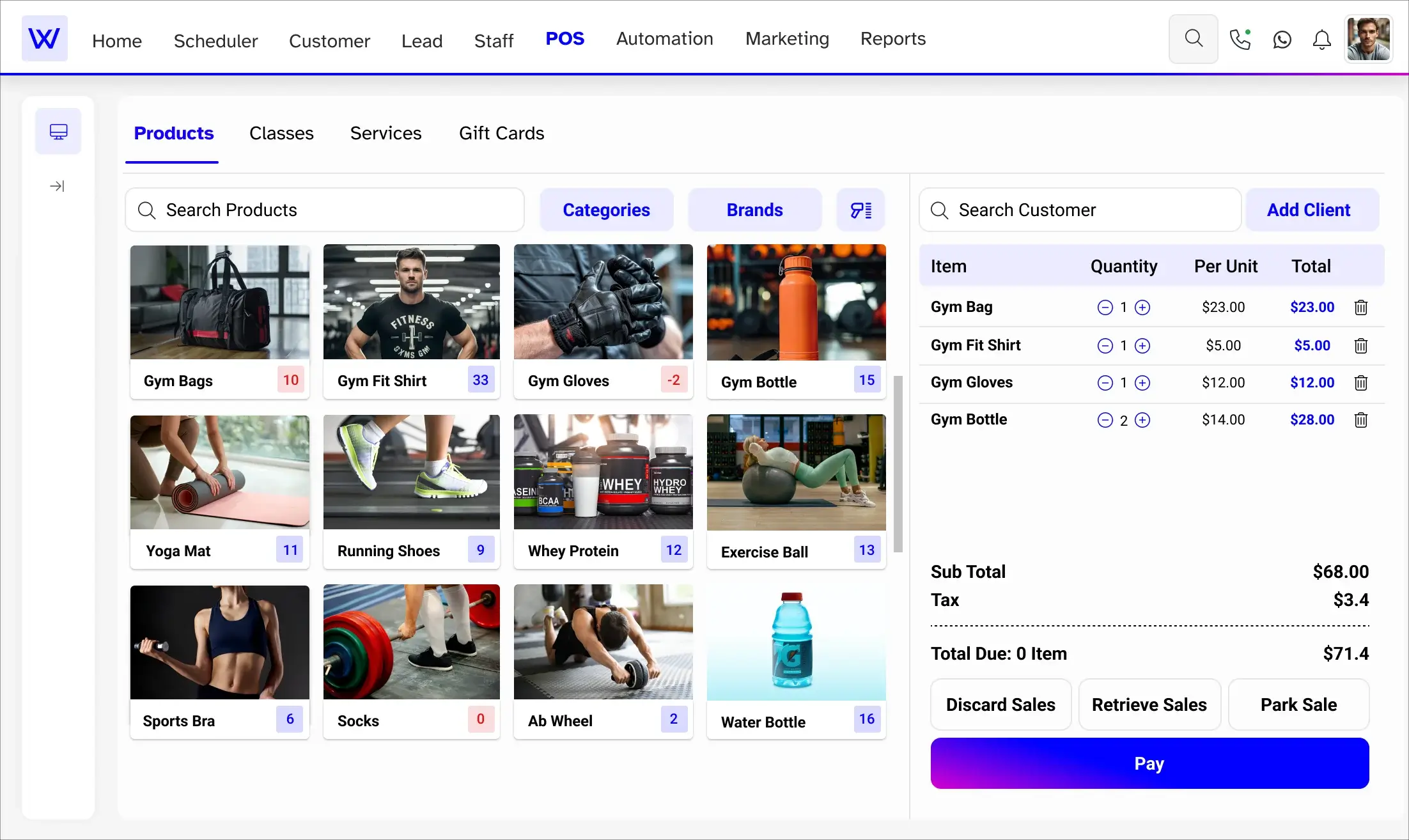
Scan or select the service, product, or package
Picture a member finishing a session and stopping at the desk to buy a protein shake, a bottle of water, and a guest pass for tomorrow. The staff member should be able to tap or scan those items in seconds. The system should already know what each item is, what it costs, how it is taxed, and whether it belongs to that member’s account.
That spend matters more than most people think.
At the front desk, even small delays feel bigger than they are. A slow sale creates a queue. A queue creates hesitation. Hesitation kills easy purchases. The drink does not get bought. The guest pass gets put off. The add-on does not happen. So the first step in a good POS flow is not just about selection. It is about momentum.
The sale should start quickly and clearly.
Fetch the right price
The next step sounds boring, but it is one of the biggest hidden causes of front-desk errors.
The system needs to fetch the right price, not just a price.
That can include:
- Standard item price
- Member discount
- Tax treatment
- Package price
- Limited-time promotion
- Staff discount
- Trainer-linked sale rules
- Bundle price
- Guest pricing versus member pricing
In a gym, the number itself is not always simple. If staff have to remember who gets what rate, which products are taxable, which services should be deducted from a package, or when a joining fee should apply, then the POS is not doing its job fully.
A working system removes memory from the transaction.
That is one of the quietest ways to improve accuracy.
Process the payment
The payment stage is where most vendors spend their demo time, because it is visible and easy to show. But in a real gym, the important part is not just that the transaction goes through. It is that the system can handle the range of ways members actually want to pay.
- Some members tap a card
- Some use Apple Pay or Google Pay
- Some pay cash for retail
- Some pay in person today, but need recurring billing set up for next month
- Some want to split one sale across two methods
- Some want to use the saved card already on file
A good gym POS should handle all of that clearly.
That matters even more now because payment behavior has changed. More members expect contactless options. More people are comfortable paying with phones or watches. More businesses run hybrid models where online and in-person payment behavior overlap. A gym that still behaves as if every member will insert a physical card at the desk is already behind how people actually pay.
And when payment feels awkward, people notice quickly.
They may not say,
“This gym’s checkout experience is creating friction in the payment moment.”
They just feel the drag.
Mobile POS for floor staff and PTs
Fixed front-desk checkout is not the only place revenue gets captured in a gym. Personal trainers finishing a session on the floor, coaches running a small-group block, and staff handling a quick retail sale near the changing rooms all represent moments where a sale is most likely to happen — and most likely to be lost if the only checkout point is a terminal at the front desk.
A mobile POS capability allows staff to complete sales on a tablet or phone from anywhere in the facility. A PT can sell a session top-up immediately after the session ends, while the member is still engaged. A floor coach can charge a drop-in without asking the member to queue at the desk. A quick gloves-and-wraps sale can happen at the bag rack instead of being deferred until the member walks past reception.
The practical impact is not just convenience. It removes a conversion step. Every time a sale depends on the member walking to the desk, there is a window for the decision to reverse. Mobile POS closes that window by keeping the transaction where the intention already is.
Where member self-serve checkout is available — for simple purchases like drinks, day passes, or retail top-ups — it can also reduce desk queues during peak hours without adding staffing cost.
Update inventory
If a member buys a product, the stock should update immediately.
That sounds obvious, but it is still one of the easiest places for gyms to drift into bad habits.
Retail often starts small in fitness businesses. A few drinks. A few bars. Some wraps. Some branded apparel. Some supplements. Because the stock list is smaller than a full retail shop, owners sometimes assume it can be managed casually.
That usually lasts until the first few inventory headaches:
- The shelf is empty, but the system says there are six left
- The best-selling flavor is always out
- No one knows what was actually sold during the weekend
- Someone sold the wrong item code repeatedly
- The owner orders too much of one product because the reports were unreliable
A good POS removes that drift by lowering stock the moment the transaction happens. It makes the inventory record feel believable. That is what matters most. Staff do not need a beautiful stock dashboard. They need one that tells the truth.
Generate the receipt and update the member record
The final stage of the sale matters more than it looks.
A receipt is not just for the member. It is also for refunds, disputes, reporting, audits, tax handling, and follow-up later. The transaction should be easy to find, tied to the right member or guest, and recorded clearly enough that staff do not have to reconstruct what happened from memory.
That is especially important in a gym because one sale can affect more than one thing at once. A membership purchase may affect recurring billing. A package sale may affect visit balances. A refund may affect reporting. A failed payment may affect access. The more connected the system is, the more important it becomes that the sale is logged cleanly.
That is the basic transaction flow.
Simple on paper. Operationally important in practice.
POS hardware explained in the real world
Gym owners often say “POS” when they really mean “the card machine on the desk.” That is only the visible part.
The hardware usually includes:
- A tablet or screen
- A card reader or terminal
- Sometimes a barcode scanner
- Sometimes a receipt printer
That is the physical layer.
The exact setup depends on how the gym operates.
A small boutique studio may only need one tablet and one reader. A busier gym with front-desk retail, day passes, and heavier footfall may need a more stable counter setup with a scanner and printer. A semi-staffed or self-serve facility may need a lighter but more durable payment flow that reduces desk dependency.
Here is the simplest way to think about the hardware.
| Hardware | What it does | Best fit |
| Tablet or screen | Builds the sale, shows the member record and runs checkout | Nearly every gym |
| Card reader/terminal | Takes chip, tap, and wallet payments | Every in-person checkout point |
| Barcode scanner | Speeds up retail checkout | Gyms selling drinks, supplements, or apparel |
| Receipt printer | Prints paper receipts when needed | Busy desks or locations where members expect printed receipts |
The right setup depends on workflow, not aesthetics.
That is worth repeating because owners often buy hardware by looking at the object instead of the job. A sleek terminal is not necessarily useful if the front desk still needs to switch screens to finish the sale. A cheap reader is not necessarily smart if it slows down peak-hour transactions. Hardware should follow the business model, not lead it.
POS software explained
If hardware 8 must-have features in a is the visible layer, software is the layer that decides whether the gym feels organized or messy.
It should:
- Track sales
- Handle memberships
- Apply discounts
- Process refunds
- Deduct class packs
- Update stock
- Store receipts
- Generate invoices
- Show reports
- Connect payments to member records
- Limit actions based on staff role
This is also where digital invoicing becomes important. Good billing does not stop at a completed card tap. Digital invoices, emailed receipts, reminders, and clear transaction history help the desk move faster and make follow-up cleaner.
The important point is this: software should reduce the decisions that staff need to make in real time.
It should not ask the front desk to remember the rules. It should contain the rules.
That is what creates consistency.
Native POS vs standalone POS
This is one of the most important buying distinctions in the entire category.
- A standalone POS can process payments
- A native POS understands the business
That is the shortest and clearest way to say it.
A standalone POS often works fine at the visible part of checkout. It can take payment, record the sale, and print the receipt. But it may have no live understanding of membership status, booking eligibility, class pack balances, or access-control rules.
That means staff often end up checking another system before they can finish the transaction with confidence.
A native POS sits inside the same environment as memberships, bookings, billing, and reporting. When someone pays, their account updates. When a class pack is sold, the usage logic is already there. When a payment fails, the next action is clearer. Staff do not have to guess which tool has the current truth.
That difference sounds technical, but it feels practical.
At the desk, it can mean:
- Fewer manual checks
- Fewer “let me just verify that”
- Fewer member disputes
- Faster refunds
- Cleaner reports
- Better trust between the payment status and the access status
If a vendor says their POS “integrates,” that is not the same as saying it is native. Integration can still mean delays, sync windows, or partial data sharing. Native usually means the sales, member records, billing rules, and reporting live in one logic system.
That is why one of the best demo questions is still: What happens when a payment fails?
The answer tells you more than the feature list.
Cloud-based vs local POS systems
A cloud-based POS runs online and syncs data across devices and locations. A local POS depends more heavily on one machine or a local network.
For most gyms now, cloud-based is the practical choice because owners and managers need visibility outside the desk itself.
They may need to:
- Review sales from home
- Check a refund without being on site
- Compare location performance
- Look at retail patterns across branches
- Manage staff permissions remotely
- Make sure front-desk sales, billing, and access all stay aligned
That advantage is not just convenience. It is control.
A cloud-based system makes the business easier to manage because the information is easier to reach and easier to keep in sync. A local setup may still work in some cases, but for growing gyms, multi-service businesses, and any operator who wants remote visibility, the cloud usually fits the reality better.
Why gym POS matters in 2026
Once you understand what a gym POS system is, the next question is obvious: why does this matter enough to become a whole buying category instead of just another admin tool?
Because gyms have moved past the point where scattered systems are merely annoying.
The market is larger. Members expect faster service. Payment methods are more varied. Many gyms now sell both online and in person. Businesses mix memberships, class packs, personal training, events, merchandise, and automated access under one system. This creates more transactions, more stored cards, and more chances for friction when systems are disconnected.
The front desk is now a revenue center
In earlier years, a gym could manage with basic tools and workarounds. That is no longer enough.
The front desk is now directly tied to revenue. It is where members renew, upgrade, ask questions, and make purchases. It also shapes how professional your business feels.
Suppose payments are slow, and sales drop. If accounts are unclear, trust fades. If staff seem unsure, the business looks disorganized.
Friction at checkout reduces sales
There is a simple truth behind all transactions: friction reduces conversions.
Even though gyms are not e-commerce stores, the same behavior applies. When the payment process feels slow, confusing, or manual, people hesitate. Easy decisions become difficult when the system gets in the way.
Small frictions lead to big retention loss
Retention is not lost in one big moment. It fades through small issues over time.
- Confusing renewals
- Failed payments not fixed
- Packages are not deducting properly
- Staff are unable to explain the account status
Each issue seems minor. Together, they damage trust and push members away. A modern gym POS system is no longer just a payment tool. It directly impacts:
- Revenue
- Retention
- Member trust
- Staff efficiency
- Inventory accuracy
- Access control
- Reporting quality
The old view of POS is outdated.
A gym POS system matters because it controls what happens at the most critical moment in your business, when a member expects everything to work smoothly.
8 must-have features in a gym POS system (2026)
Once the “why” is clear, features become easier to judge. The best feature list is not the longest one. It is the one that removes the most friction from the way gyms actually sell, bill, and serve members.
A lot of POS demos make everything look easy because they show the cleanest version of a sale. The real test is whether the system still works well when the transaction is more like the day-to-day reality of a gym.
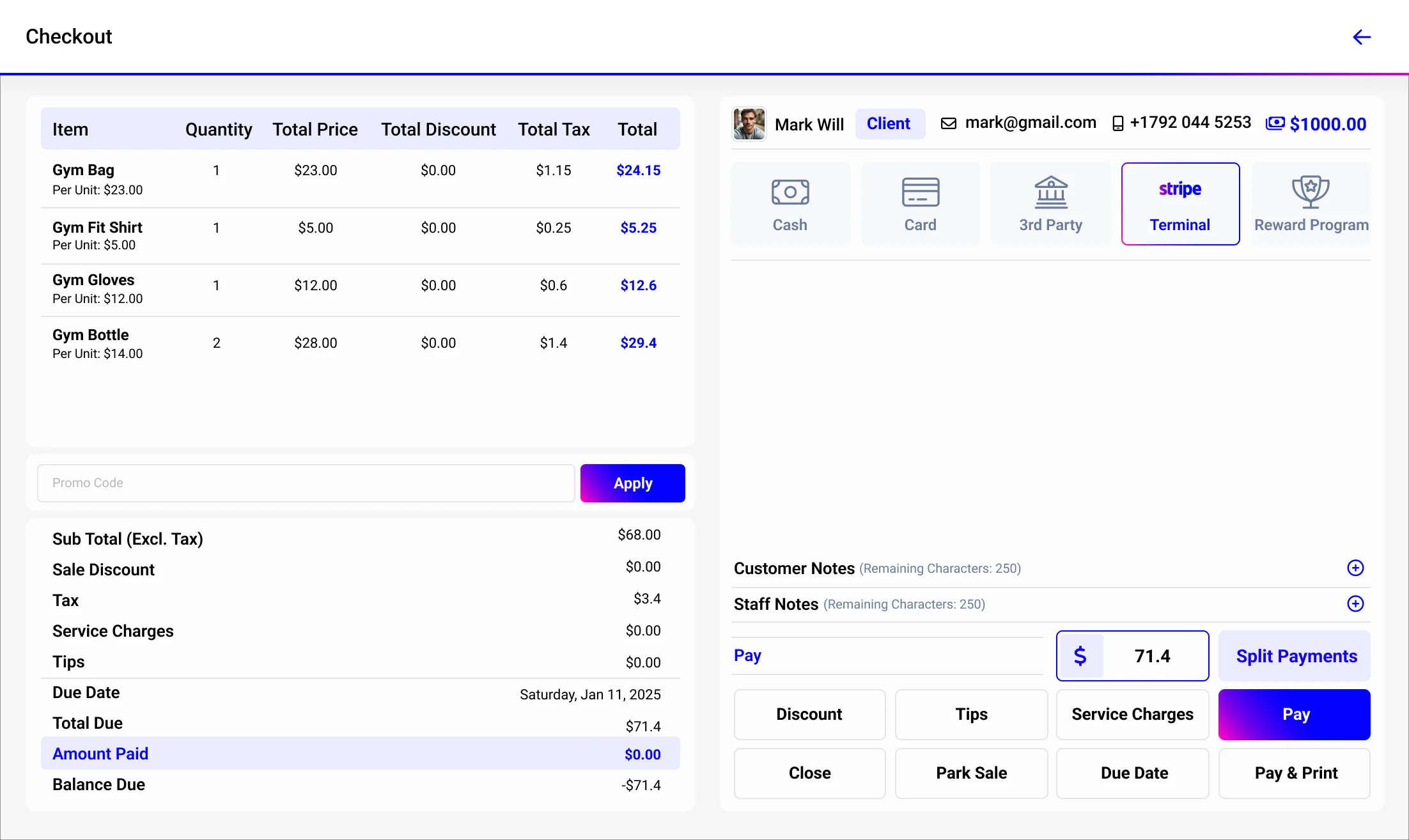
- Multiple payment methods and flexible checkout
A gym POS should support cash, card, contactless and NFC wallet payments, Apple Pay, Google Pay, saved-card charges, split payments, and partial payments.
That flexibility matters because member behavior is not uniform. Some people pay the same way every time. Others switch methods. A member may buy retail with a phone, then ask to use the saved card on file for a membership restart. A parent may split a youth package across two cards. A member may pay cash for a drink but wants recurring billing attached to the account for the future.
If the system handles those cases cleanly, checkout feels easy.
If it does not, staff become the workaround.
This is also where self-checkout capability can matter. It will not fit every gym, but in the right model, self-serve payment flows can shorten desk queues for simple purchases like drinks, day passes, or top-ups. Lower-touch businesses, semi-staffed spaces, and convenience-led setups often benefit most from this.
Park-and-resume belongs here, too. A front-desk employee may need to pause one sale, answer a quick question, then come back and finish it without rebuilding the basket. It sounds like a small feature, but during busy periods it protects speed and reduces frustration.
The real point of this feature is not only payment variety. It is flow protection.
- Membership and recurring billing automation
A gym does not only take payment. It also controls what happens after payment. If it bills US members on saved cards, three compliance requirements sit inside the recurring billing setup. Most operators only notice them after a chargeback or a processor query.
At the same time, recurring billing is not limited to cards. It may also include direct debit or bank transfers, depending on the region. A strong POS and billing system should keep this clear, especially when memberships, freezes, retries, and overdue follow-ups all depend on the same payment record.
For US ACH billing, the same discipline applies. The system should collect clear member authorization, store that authorization securely, and manage bank account changes, retries, and notifications in line with NACHA rules. If ACH payments sit outside the main member record, it becomes harder to track overdue payments and explain disputes.
Stored credential mandates come first. Card networks like Visa and Mastercard require recurring charges on saved cards to be flagged correctly as stored credential transactions, not standard sales. This affects how payments are approved, routed, and disputed. If the system does not support this, each billing cycle carries higher chargeback risk.
Next are account updater services. These allow card networks to refresh expired or replaced card details before a charge is attempted. This reduces failed payments at the source. Even a small 1–2% increase in success rates can create noticeable annual gains.
Then comes the Federal Trade Commission (FTC) negative option rule. A gym must clearly show billing terms before signup, provide an easy way to cancel, and confirm cancellations properly. This is a compliance requirement, not just a customer experience step. If the system cannot handle this, it increases regulatory risk.
Before choosing a system, it is important to check if it supports stored credential flagging, account updater services, and clear billing disclosure and cancellation flows.
- Class packs, PT bundles, and session billing
This is one of the clearest reasons generic POS systems fail gyms.
A lot of systems can sell a package.
Fewer systems understand what the package means after the sale.
Gyms need systems that understand:
- 10-class packs
- PT bundles
- punch cards
- drop-ins
- workshop access
- small-group coaching credits
- package expiry logic
- usage deduction rules
That matters because the problem is rarely in the sale itself. The problem comes later, when the member turns up, and the staff member has to check whether the pack is active, whether there are visits left, whether the session should deduct automatically, or whether the member owes extra.
If the system handles only the first half of the transaction, the gym still ends up carrying too much manual work.
- Inventory and retail tracking
Retail is one of the easiest places for a gym to lose clean profit through weak systems. Drinks, supplements, wraps, socks, shirts, towels, and accessories all look small on their own, but together they can become a useful revenue stream if the stock is real and the checkout is fast.
A good POS should:
- lower stock instantly after the sale
- show what sells fastest
- show what sits too long
- help spot dead stock
- support product variants such as size or flavor
- connect online and in-person inventory in one view
That dual-channel view matters more as gyms diversify how they sell. A member may buy a pack online, pick up a product in person, redeem a session later, and attend a one-off event next month. The more those revenue streams live together, the easier it is to see what the business is actually earning.
Retail only feels “small” until the system makes it messy.
Then it becomes a drain on trust and time.
- Discounts, refunds, and partial payments
Real front-desk work is not a stream of perfect transactions.
It includes:
- Discount approvals
- Line-item discounts
- Full-order discounts
- Part refunds
- Full refunds
- Split tenders
- Pricing corrections
- Member credits
- Balance adjustments
This is where a weak POS exposes itself fast. If the system behaves well only when everything goes right, it will feel bad very quickly in a live gym environment.
A strong system should let trained staff fix ordinary problems without turning every correction into an admin escalation. That does not mean everyone gets full access. It means the actions themselves should be simple, controlled, and traceable.
- Staff roles, permissions, and audit trails
This feature rarely gets top billing at the start, but it becomes one of the most important once the gym is live.
“We love the layout and how in-depth staff positions could be in terms of their access abilities.” — Chelsea Garner, Elev8 Performance
Good POS software should let owners control who can:
- Issue refunds
- Apply discounts
- Change prices
- Charge stored cards
- See sensitive reports
- Edit memberships
- Override standard payment rules
Why does that matter so much?
Because not every revenue leak looks like theft. Some of it looks like:
- Inconsistent discounting
- Staff over-correcting member issues
- Untracked manual changes
- Refund actions no one remembers later
- Junior staff are doing things they should not be doing yet
When permissions are clear, the front desk becomes more consistent. Staff feel safer because they know what they can and cannot do. Owners feel safer because the system tells a clearer story.
That is not just a design compliment. It is a control compliment.
- Reporting, analytics, and built-in marketing tools
A good gym POS should tell you what happened, but it should also help you do something with that information.
Basic reporting matters:
- Daily sales
- Refunds
- Discounts
- Retail performance
- Payment method split
- Package sales
- Member purchase patterns
But on its own, reporting is passive.
The more useful layer is what happens next.
Built-in gym marketing tools make POS data more valuable because they help turn transaction information into action. That can include:
- Targeted promotions
- Member reactivation messages
- Loyalty offers
- Birthday rewards
- Retail campaigns
- Win-back flows after lapsing
- Nudges after package use drops
- Follow-up after no-shows or stalled buying patterns
This is where POS becomes more than a reporting screen. It becomes part of how the gym grows revenue and protects retention. If the system can show which offers sell, which members buy retail, or which package buyers tend to return, it can also support smarter follow-up.
- Native integration with gym management software
This is still the most important feature underneath the rest.
Without strong native integration, every other feature becomes less reliable.
- Payments may work, but membership updates may lag
- Refunds may be processed, but reporting may break
- Access may depend on another sync
- Class-pack sales may need manual verification
- Staff may stop trusting the system because one part always seems slightly behind another
That is why native integration is not just another item in the feature list. It is the thing that determines whether the rest of the list behaves like one system or several tools pretending to be one system.
A good gym POS should not feel like it is “talking to” the membership system.
It should feel like it belongs to it.
Expert tip: Ask every vendor to show one failed payment in the demo, not just one successful one. If access, billing, and member status do not update cleanly after failure, the integration depth is probably weaker than it first appears.
How a gym POS system increases revenue
Gym owners often first see POS as a cost.

It does not create money out of nowhere, but it does reduce the friction and leakage that stop revenue from being collected, protected, and expanded. That is a much more useful frame.
Faster checkout protects buying intent
Speed matters because small sales are fragile.
A long, clunky front-desk flow kills impulse purchases and delays easy decisions. The member who would have bought a drink decides to do it later. The guest pass does not get added. The member skips the towel. The class top-up gets postponed.
When checkout is smooth, more of those small decisions become real transactions.
That matters because in gyms, secondary revenue often depends on convenience. People do not usually plan their protein bar purchase all day. They buy because the moment is easy. They top up because the desk made it simple. They renew now because the path is clear.
Every extra step weakens that moment.
Better upselling turns POS into a quiet salesperson
A well-structured POS gives staff a cleaner moment to suggest the next logical purchase.
That could be:
- Wraps with gloves
- A drink with a session
- The second package before a promotion ends
- A day pass upgrade
- A branded bottle at sign-up
- A workshop ticket before the class fills
The point is not to make the front desk sound like a telemarketing team.
It is to make natural follow-on sales easier to surface. That is why the old phrase “silent salesperson” works here. The system supports the moment without making the interaction feel forced.
The gym does not always need more sales effort.
Sometimes it needs better sales timing.
Recurring billing protects cash flow
This is where POS stops being retail and becomes financial control.
The cleaner the recurring billing setup is, the less time is burned on:
- Failed renewals
- Stale cards
- Late follow-up
- Membership confusion
- Awkward reactivation moments
- Staff are manually chasing money
Recurring billing protects cash flow because it helps the gym collect earned revenue more consistently, without staff spending hours chasing overdue accounts by hand.
Retail optimization reduces waste and lifts margin
Good POS not only helps you sell more stock. It helps you stop buying the wrong stock.
If you can see what flavors move, what sizes sit, and what products turn fastest, you reorder with less guesswork. That protects the margin.
A lot of gyms buy retail emotionally. They order what seems like it should sell, what looks good on the shelf, or what someone said members wanted. Strong POS reporting lets them buy based on actual behavior.
That is a better habit.
And because retail usually carries cleaner margins than many people assume, getting it right can add meaningful profit without adding complexity.
Loyalty, retention, and better member experience
Loyalty should not sit in the guide as a vague add-on. In gyms, it usually works best through three practical mechanics:
- Points-based rewards: members earn points for purchases, renewals, referrals, or retail spend, then redeem them for small benefits.
- Threshold rewards: after a defined number of visits, renewals, or purchases, the member unlocks something specific, such as a guest pass or retail credit.
- Triggered offers: the system sends a timed reward when behavior changes, such as a top-up offer when visits drop or a retail reward after a package renewal.
A simple operational example: a member renews a PT bundle, earns points automatically, and receives a same-week offer on gloves or recovery products at checkout. That is not just a nice perk. It turns the POS into a cleaner repeat-purchase system.
Dual-channel sales and revenue diversification
A good gym POS should help owners see both in-person and online sales in one view, because revenue no longer comes from one channel or one product type.
A gym may now sell:
- Memberships
- Class packs
- PT
- Workshops
- Merchandise
- Events
- Online top-ups
- Mobile pop-up sales
- Temporary guest access
- One-off campaigns or seasonal offers
For gyms, that matters in real operations. A member may buy a package online, pick up retail in person, redeem a session later, and attend an event next month. The more those revenue streams live together, the easier it is to understand what the business is actually earning and what mix is growing.
This is also where operators can become more creative.
A good POS does not force a gym to stay locked inside one old revenue model. It makes it easier to add or test new ones.
Time saved is real operating capacity
This point matters because time leakage is easier to ignore than revenue leakage, even when it is happening every day. If weak POS workflows cost the gym 10 hours a week in manual corrections, stock checks, refund clean-up, payment follow-up, and system-switching, that is roughly 40 hours a month lost to preventable admin.
That is not a side issue. That is a part-time workload created by the software itself.
A gym can lose the equivalent of many hours a week to:
- Manual corrections
- Refund clean-up
- Inventory checks
- Payment follow-up
- System-switching
- Front-desk confusion
- Reporting work done outside the system
Recovered desk time turns into:
- Follow-up time
- Lead time
- Coaching time
- Staff training time
- Better owner oversight
- Fewer late nights fixing preventable issues
That is not an abstract value. It is the operating capacity.
POS pays back in cash and in attention.
ROI example: failed payment recovery
Failed payment recovery should already be built into your billing setup through retries, reminders, and saved-card updates. At the automation level, the real question is whether those actions happen without staff chasing each case manually.
Recovered revenue = Failed payments × Recovery rate
As an example, suppose your gym bills $45,000 a month in memberships and packages. If 6% of that fails, you have:
$45,000 × 6% = $2,700 in failed payments
Now, suppose your billing workflows recover 70% of those failed charges through retries, reminders, and card updates.
$2,700 × 70% = $1,890 recovered per month
Annualized:
$1,890 × 12 = $22,680 recovered per year
That example matters because it makes the value visible fast. A better POS-billing setup is often not about getting members to pay more. It is about letting the gym actually collect the money it already earned.
ROI example: payment method shift
Worldpay reports that digital wallets accounted for 32% of global point-of-sale spend in 2024 and 33% in 2025, which is another reason gyms should treat wallet-ready checkout as a core payment path, not an extra. Wallet-ready checkout matters financially too.
If contactless and digital wallet use keeps rising, then a gym that still makes those payment paths awkward is not only outdated. It is making it easier for checkout intent to slip away.
This is not just about looking modern. It is about reducing friction in the exact moment where revenue is either captured or lost.
A real-life front-desk scenario
Imagine a mid-size gym at 6 p.m.
Three members are in line. One wants to buy gloves and wraps. Another is trying to restart after a freeze. Another has a class pack issue. A lead walks in and wants a trial day pass. The front-desk staff member has two options.
In the weak system, they:
- Open one tool for billing
- Another for membership status
- A third to check the class or package history
- Manually confirm the price
- Take the payment
- Then correct the record later
In the stronger system, they:
- See the member record in one place
- Apply the right price immediately
- Charge the right payment method
- Let the sale update the account
- Move to the next person
The difference between those two desks is not only convenience. It is conversion, staff confidence, and member trust.
POS metrics every gym owner should track
Once you know where a gym POS system can protect and grow revenue, the next step is measuring whether it is actually doing that after launch.
Formulas alone are not enough. Owners also need a practical scorecard for what to watch after launch. That scorecard is what turns POS from “something we bought” into “something we manage.”
This section matters because a lot of gyms install software, then never define what success looks like. They know the system exists. They do not know whether it is improving the business.
Failed payment recovery rate
This tells you how much failed billing you actually win back.
Failed payment recovery rate = Recovered failed payments ÷ Total failed payments × 100
If this number is low, the gym is not only having payment failures. It is failing at the follow-up system around them.
This is one of the clearest revenue-protection metrics in the whole business because even small improvements can create real annual gains.
Average transaction value
This helps you see whether the desk is moving one-off low-value sales or building fuller baskets.
Average transaction value = Total POS revenue ÷ Number of POS transactions
If this number rises over time, upselling, packaging, or front-desk retail strategy may be improved. If it falls, the desk may be discounting too aggressively or failing to attach secondary items to common sales moments.
Retail revenue per member
This is one of the simplest ways to see whether retail is a real line of business or just shelf decoration.
Retail revenue per member = Total retail revenue ÷ Active members
If this stays very low, it may mean:
- The stock is wrong
- The desk is not surfacing products
- Members do not find the retail offer relevant
- The checkout path makes small purchases feel inconvenient
Refund rate
Refunds are normal. A growing refund rate is not.
Refund rate = Refunded transactions ÷ Total transactions × 100
A sudden spike can point to:
- Staff training issues
- Checkout errors
- Wrong product fit
- Poor package explanation
- Duplicated charges
- Confused billing rules
This metric matters because refunds are usually a signal, not just a cost.
Payment method split
You should know how much of your POS revenue comes from cards, wallets, cash, ACH or direct debit, and other methods.
Payment method share = Revenue by payment type ÷ Total POS revenue × 100
This matters because processing cost, checkout speed, and member preference all live inside this mix. A gym that does not understand its payment mix cannot properly evaluate its fee exposure or checkout design.
Checkout conversion rate
This is especially useful for sites that start many sales or issue many day passes and retail recommendations.
Checkout conversion rate = Completed POS sales ÷ Started POS sales × 100
If many sales start but do not finish, the desk process may be too slow, too awkward, or too dependent on staff switching systems mid-transaction.
That is a useful metric because it captures friction before it becomes invisible lost revenue.
Staff discount frequency
This is less glamorous, but it reveals control.
If one staff member is applying far more discounts than everyone else, that may be totally legitimate. Or it may tell you:
- Policies are unclear
- Training is inconsistent
- Discounts are being used to solve product or pricing confusion
- The front-desk authority is too loose
A POS with proper permissions and reporting helps owners spot that early.
Churn rate and member lifetime value (LTV or CLV)
Churn rate and LTV, or CLV, belong in the metrics conversation too, even though POS does not control them by itself.
A simple version of member lifetime value is:
LTV = Average monthly revenue per member × Average months retained
POS contributes to LTV by reducing billing friction, improving checkout, supporting repeat purchases, and making package use clearer.
If the payment side of the member journey feels messy, LTV usually suffers somewhere downstream.
What good metrics practice looks like
Most gyms do not need a giant KPI dashboard with 50 indicators.
They need a small set that they review consistently.
A useful monthly POS scorecard might include:
- Failed payment recovery rate
- Average transaction value
- Retail revenue per member
- Refund rate
- Payment method split
- Staff discount frequency
- Top five retail products
- Churn rate trend
- Package sales trend
That is enough to spot whether the system is helping the business or whether the business is still compensating for the system.
POS automation and tools: what gym software should do for you
A gym POS system should not only record transactions. It should reduce the amount of manual follow-up your team needs to do after the transaction.
That is where automation becomes valuable.
Renewal communication
The second workflow is renewal communication. Members should receive reminders before renewal, warnings when payment methods are about to expire, and follow-up messages if an account becomes overdue. If those actions depend on a manager remembering to send them manually, they will happen inconsistently.
Loyalty and retention logic
The third workflow is loyalty and retention logic. A better system should let you trigger birthday rewards, renewal offers, points-based perks, or win-back messages based on purchase behavior and membership history. This is especially useful for gyms that want POS to support retention, not just checkout.
Marketing segmentation
POS data should help you separate active retail buyers, package buyers, lapsed members, high-value members, and members whose attendance or spending is slowing down. That gives you a more useful marketing list than sending every message to every member.
A strong gym software stack should also connect POS activity with:
- Email and SMS workflows
- Billing reminders
- Package usage alerts
- Access-control actions
- Staff notifications
- Reporting dashboards
A simple tools checklist for operators is this: if a payment fails, if a membership renews, if a class pack runs low, if a member stops buying, or if a loyalty trigger is hit, the gym software should know what to do next before your staff has to think about it.
That is the point of automation. It does not replace the front desk. It removes repeat admin so the desk can focus on members, not damage control.
How to choose the right gym POS system
By this point, the buying decision should feel less abstract. The job is not to find the most impressive POS on a sales call. It is to find the one that fits how your front desk actually works and how your gym plans to grow.
That is a different exercise from vendor comparison alone.
Why generic POS systems fail gyms
Generic POS systems often fail gyms for the same reason generic spreadsheets fail growing businesses. They can do a piece of the job, but they do not understand the whole job.
That mismatch usually shows up later, not in the first demo.
It shows up when:
- Staff need to check another screen before finishing a sale
- Refunds do not reflect correctly in member records
- Package usage feels detached from payment history
- Recurring billing behaves like a separate world
- Access control does not trust the payment status
- Reporting needs manual cleanup outside the system
A generic POS may still look fine on day one.
The problem is that gyms do not only need checkout. They need membership-aware checkout.
That is a different requirement.
Key decision factors
Six filters matter most.
- Payments: Can it handle cards, wallets, saved cards, cash, split payments, and recurring-linked charges?
- Billing: Does it understand memberships, freezes, proration, retries, and joining fees?
- Integration: Is POS native to the rest of the system, or does it rely on loose syncs?
- Ease of use: Can a new front-desk hire learn the common flows fast?
- Scalability: Will it still fit if you add services, staff, or locations?
- Vendor support quality: Will a human help when you need one, especially during launch?
That last one matters more than many buyers admit. A software decision does not end at purchase. It becomes a live operational relationship. If support is slow or vague during the early stages, the front desk ends up carrying the cost.
Gym-type-based selection
The fastest way to choose well is to buy for your model, not for a generic idea of “best.”
| Gym type | POS priority | Must test in demo | How it fit into your system |
| Boutique yoga or Pilates studio | Class packs, waitlists, smooth desk checkout | Pack deduction, drop-ins, quick refunds | Works best alongside class-based studio tools so bookings, packs, and payments stay simple and connected |
| CrossFit or coaching-led box | Punch cards, coach-linked sales, merch | Package logic and mixed baskets | Should connect with a full gym management system to keep coaching, memberships, and sales aligned |
| 24/7 gym | Billing plus live access logic | What happens after a failed payment | Must integrate with access control so entry automatically reflects payment status without manual checks |
| Multi-service gym | One member profile across retail, PT, and classes | One account view across services | Needs to unify all services under one system so members and staff avoid fragmented data |
| Multi-location operator | Reporting, permissions, consistency | Site-level and brand-level reporting | Should tie into centralized reporting tools for full visibility and control across all locations |
The point of this table is not to tell every gym what to buy. It is to stop the selection process from becoming too generic.
A yoga studio that lives on class packs should not buy as if it were a 24/7 key-fob system. A multi-location operator should not buy as if one tablet at one front desk is the whole business.
A coaching-led model should not ignore how staff roles and package billing behave. The business model should drive the buying logic.
Questions to ask in the demo
Before the demo, write down the three front-desk workflows that happen most often at your gym and ask the vendor to show those exact flows, not the polished script.
That simple move changes the whole quality of the demo.
Then ask:
- What happens when a recurring payment fails?
- Can I refund one item without breaking the member record?
- How do class packs deduct at the desk?
- What can junior staff do, and what is restricted?
- How are wallets, saved cards, and split payments handled?
- What support do we get during setup and launch?
- How does the system handle online and in-person sales together?
- What happens if access control depends on payment status?
- How easy is it to add another site later?
- Can the system show me the exact audit trail for a refund or discount?
A polished vendor can always show a smooth, normal sale. A strong product can show the ugly ones, too.
Commercial checklist before signing
The demo questions above test product behavior. These questions test the vendor relationship, and they matter just as much because a POS decision is an operational commitment, not a one-off purchase.
Support availability
What is the support SLA for live issues during business hours? Is 24/7 support included at your plan level, or gated behind a higher tier? For a busy gym, a checkout issue at 6 p.m. on a Monday cannot wait until the next morning. Understand what response looks like before you need it.
Contract length and exit terms
Is the agreement month-to-month or annual? What are the exit terms if the system does not perform as expected? Are there early termination fees? Some vendors offer flexibility on paper but build lock-in through data export complexity or migration friction. Ask specifically what happens to your member data and billing records if you leave.
Hardware ownership vs lease
Does the hardware cost in the quote give you ownership, or is it a lease arrangement tied to the contract? Leased hardware can create hidden exit costs and limit your flexibility if you want to switch processors or platforms later.
Multi-location pricing
If you plan to open a second site — even if that is two or three years away — ask now how the pricing scales. Some platforms charge per location at rates that change the total cost picture significantly. Understanding the scaling model before you sign avoids a difficult conversation later when the growth you planned for becomes the reason your software bill doubles.
Processor flexibility
Does the platform require you to use their in-house payment processor, or can you connect a preferred processor? Locked processor arrangements can be convenient at the start, but they remove your ability to negotiate rates as your volume grows.
These are not hostile questions. A vendor with a strong product and honest commercial terms will answer them clearly. Vague or deflective answers here carry the same weight as vague answers during the product demo.
Gym POS pricing
Payment processing fees are one of the most underestimated costs in gym POS. Square’s current public pricing shows 2.6% +15 c for card-present transactions, while Stripe Terminal lists 2.7% + 5c for in-person payments. Those differences may look small, but on real monthly volume, they quickly turn into meaningful annual costs.
Software subscription costs
Software pricing is the visible layer, so it gets most of the attention.
But the real question is not only what the system costs each month. It is what that monthly fee replaces, prevents, or improves. A lower-priced tool is not automatically cheaper if it still forces the gym to buy extra tools, carry more admin by hand, or accept weaker revenue control.
A useful way to judge subscription cost is to ask:
- What does this plan include?
- What functions still require add-ons?
- Which features are essential for manual work later?
- Will I outgrow this plan quickly?
Monthly pricing should always be read against workflow coverage.
Hardware costs
Hardware costs are easier to see, which is why owners often over-focus on them.
A basic setup might include one tablet and one reader. A heavier setup may include a scanner, printer, and a more durable checkout station. That creates a wide cost range depending on traffic, staff model, and whether the gym sells much retail.
Here is a simple benchmark table.
| Hardware item | Example range |
| Compact reader | $59-$299 |
| Counter terminal | About $299 |
| Handheld device | About $399 |
| Full register-style setup | About $899 |
The important thing is not the exact number. The gym should buy hardware for the flow it actually has, not for the one that looks best in a product photo.
Payment processing fees
Processing cost is the line item that many owners underestimate the most.
That is because software pricing feels like the main decision, while payment fees feel like background math. But if the gym processes enough volume, those fees can become one of the highest annual costs in the entire POS setup.
Here is a simple example.
If you process $30,000 a month:
- At 1.7%, fees are $510
- At 3.2%, fees are $960
Difference:
$450 a month, or $5,400 a year
That is why a small rate difference matters so much. And that is before per-transaction fees, manually entered payments, or the impact of different payment-method mixes.
Processing fees should never be treated as an afterthought.
Setup and onboarding costs
Setup may include:
- Data cleanup
- Inventory upload
- Billing configuration
- Package logic
- Staff training
- Permission setup
- Testing
- Migration work
- Reporting configuration
Owners often underprice this because some vendors frame onboarding as a quick activation rather than a real operational change.
The better question is:
How much internal time will the launch actually take?
Even if the vendor handles migration well, your staff still needs to learn the system, test the flows, and adopt old habits. That time has a cost.
Hidden costs
This is where owners usually get surprised.
Hidden costs can include:
- Per-device fees
- Reporting add-ons
- Extra charges for inventory or marketing tools
- Payment processor lock-in
- Parallel running costs during transition
- Contract exit fees
- Integration work if the system is not truly native
- Extra training time when the system is harder to learn than expected
These costs matter because they often do not look expensive on their own. They become expensive when they stack together.
Real cost example: small gym
A smaller studio with 150 members, one desk, and one card reader might look like this in year one:
| Cost item | Example year-one cost |
| Software | $2,388 ($199/month) |
| Hardware | $400 |
| Setup/onboarding | $500 |
| Internal training/misc | $300 |
| Processing fees | variable |
If the gym processes $18,000 a month, at an effective 2.8% annual processing cost is:
$18,000 * 2.8% * 12 = $6,048
Estimated first-year total: $9,636
That number only makes sense when viewed against what the system saves or protects:
- Recovered failed payments
- More completed small sales
- Fewer inventory mistakes
- Less staff time wasted
- Fewer admin corrections
Real cost example: mid-size gym
A 400-member gym with retail, PT bundles, and higher volume might look like this:
| Cost item | Example year-one cost |
| Software | $3,588 |
| Hardware | $1,400 |
| Setup/ onboarding | $1,200 |
| Training/cleanup | $600 |
| Processing fees | Variable |
If the gym processes $50,000 a month at 2.8% annual processing is:
$50,000 * 2.8% * 12 = $16,800
Estimated first-year total: $23,588
Those numbers only look heavy if POS is seen as a bill.
They look more reasonable once you compare them to lost revenue, admin drag, and failed billing recovery.
Build vs buy a POS system
This choice needs to be clearer than a simple paragraph, because owners often think “build” sounds more flexible.
Here is the cleanest way to frame it.
| Option | Best for | Main risk |
| Build your own stack | Highly customized operations with internal tech capacity | More maintenance, more sync gaps, more hidden costs |
| Buy a gym-native platform | Most gyms, studios, and growing operators | Higher upfront subscriptions than generic tools, but less complexity |
For most gyms, buying one connected platform is the safer operational choice. Building your own stack may look flexible, but flexibility often turns into fragility once the desk gets busy.
A stack of decent tools is not the same as one coherent system.
Building a custom system can still make sense when a gym has unusual workflows, proprietary integrations, or technical requirements that established platforms cannot handle. But it also means taking responsibility for payment integrations, security, hardware compatibility, offline behavior, testing, hosting, and ongoing maintenance.
If you are considering that route, our guide to building a point-of-sale system for your gym explains what custom POS development involves before deciding whether a custom build or an existing platform better fits your needs.
5 mistakes gym owners make when choosing POS
Most bad POS decisions do not happen because owners are reckless. They happen because one reasonable detail gets treated like the main detail.
Choosing cheap instead of right
The cheapest monthly line is not the cheapest operating outcome.
If the cheaper tool creates:
- More admin
- More errors
- Weaker integration
- Slower staff adoption
- Higher processing cost
- More follow-up work
Then the savings are fake.
Ignoring integration depth
“Integrates with” is one of the slipperiest phrases in software.
What you really need to know is:
- What syncs
- How fast
- Which actions trigger updates
- What still needs manual checking
- What happens when the transaction fails
A vendor can claim integration and still leave the gym with delays or half-connected logic. That is why the quality of the integration matters more than the fact of the integration.
Not calculating the total cost.
The subscription price is only one line.
Processing, hardware, training, add-ons, setup time, and migration matter too. A gym that compares POS only by monthly fee is comparing the smallest visible piece of the decision.
Using non-gym POS
Retail POS is not gym POS. Restaurant POS is not gym POS. Salon POS is not gym POS.
The fitness model has too many memberships, packages, bookings, and access rules for that shortcut to hold up for long.
Not testing the ugly workflows before buying
A polished demo is not proof. Do these tests with the staff who will actually use the system day to day, not only managers, because launch problems usually show up under live desk pressure.
Ask for:
- One failed payment
- One refund
- One split sale
- One package deduction
- One restricted staff action
If the vendor keeps steering away from those moments, that tells you something.
POS security and payment safety
Once the workflow, pricing, and vendor fit look right, the next filter is risk, because recurring billing and stored cards create a longer responsibility than a one-time sale.

Payment safety in gyms is not only about taking cards securely. It is also about how member data is stored, limited, protected, and accessed over time.
That matters because gyms often operate with recurring billing, stored cards, and repeated transactions across a long membership relationship. That is a different kind of risk from a one-off sale.
What PCI-DSS is
PCI-DSS is the payment-card security standard.
In plain English, it is the rulebook for keeping card data safe.
Every business that stores, processes, or transmits cardholder data has responsibilities around that standard, no matter its size.
Why gyms are high-risk
Gyms often store cards for:
- Recurring memberships
- Package renewals
- Failed-payment retries
- Ongoing services
- Convenience recharging
That means payment data lives inside a longer relationship than a one-off retail sale. More stored credentials mean more responsibility around access, encryption, permissions, and dispute handling.
Encryption and tokenization
Encryption scrambles sensitive data.
Tokenization replaces card details with a stand-in token that is useless on its own.
The exact technical setup will vary by provider, but the practical takeaway is simple: the gym should not be depending on loose or unclear handling of stored payment information.
A strong vendor should be able to explain this in human language.
Chargebacks and protection
A good POS helps with chargebacks because it creates a clean trail:
- Receipt
- Timestamp
- Staff action
- Refund history
- Member account record
- Transaction detail
That does not prevent every dispute, but it gives the business a better chance to show what happened.
What to ask vendors before buying
Ask these:
- Are you PCI-DSS compliant?
- Can you provide current compliance documentation or an Attestation of Compliance?
- Do you tokenize stored cards?
- How are refunds and card-on-file actions permissioned?
- What happens if there is a payment-related incident?
- How are staff roles limited around sensitive payment functions?
If a vendor cannot explain those things clearly, that is already an answer.
GDPR note for UK and EU member data
If your gym stores or processes the personal data of UK or EU members, UK GDPR or GDPR rules still matter even if the software is payment-focused. In practice, that means the gym should store only what it needs, restrict access tightly, protect payment-related records properly, and work with vendors who can explain how member data is retained, secured, and governed. This matters most when a gym runs memberships, saved payment methods, or online account areas that hold ongoing customer information. The more data you keep, the more disciplined your data handling needs to be.
How to set up a gym POS system (step-by-step)
Choosing the right system is only half the job. The other half is setting it up so your front desk, billing rules, and staff workflows work the way they should from day one.
A rushed POS setup usually becomes a daily annoyance later. A careful setup feels boring at the time, then pays you back for months.
Step 1: Map your workflows
Before you touch hardware, list the transactions that happen most often:
- New memberships
- Frozen membership restarts
- PT bundle sales
- Retail plus service in one basket
- Discounts
- Refunds
- Day passes
- Guest access purchases
- Class-pack top-ups
If you do not map the real workflows first, you end up buying around features instead of around behavior.
Step 2: Define billing rules
Write down the business rules:
- Joining fees
- Proration
- Freeze behavior
- Retry timing
- Renewal windows
- Package expiry
- Tax treatment
- Reactivation charges
- Refund policy logic
This prevents the team from improvising core payment logic later.
Step 3: Choose software first
Do not buy hardware first.
That mistake happens because hardware feels concrete. But hardware should follow the software and workflow, not lead the decision. The software determines what the desk actually needs.
Step 4: Set up hardware
Now match the desk to the traffic. Think about the physical checkout flow too, including screen position, card-reader placement, scanner reach, and how members queue during peak hours.
Small studio, light setup.
Busy gym, more durable flow.
Retail-heavy desk, scanner, and clearer checkout layout.
Semi-staffed site, simpler and faster touchpoints.
Use pricing benchmarks to budget realistically, but build the setup around the real front-desk experience.
Step 5: Configure staff permissions
Decide who can:
- Refund
- Discount
- View reports
- Charge saved cards
- Adjust member billing
- Override standard sale behavior
Do not leave this until after launch. Test each permission level before go-live so junior staff cannot access actions they should not control, like refunds, stored-card charges, or billing overrides.
Step 6: Set up inventory
If you sell products, load them properly and test real transactions before going live.
That means:
- Correct names
- Correct prices
- Correct categories
- Variants where needed
- Stock counts
- Reorder logic if used
A product list is not enough. It must behave correctly in a sale.
Step 7: Test everything before launch
Run:
- One clean sale
- One refund
- One split payment
- One package deduction
- One failed recurring payment scenario
- One restricted-permission action
- One product sale that updates the stock
- One member sale that affects the account status
- One workflow involving linked access control
The system is not ready because the login works. It is ready because the business rules work.
Step 8: Train staff on live desk flows
A system that passes testing is not the same as a system your team can use under pressure. Before go-live, run at least one full front-desk session with the staff who will use it daily — not managers alone.
Cover the five most common transaction types at your specific gym: a new membership, a package deduction, a refund, a split payment, and a discount approval. Make sure each person knows what they can do in their role and what requires escalation. If a flow feels awkward in training, fix it now. Awkward in training becomes slow and error-prone under real desk pressure.
Repeat a condensed version of this session any time a new hire joins the front desk.
Step 9: Run a 30-day post-launch audit
After launch, run a 30-day audit on the new system to confirm the gaps you expected to close are actually closed. Look at:
- Failed payments are not recovered quickly
- Refunds handled manually
- Inventory going out of sync
- Member complaints such as “I already paid”
- Staff switching between systems mid-transaction
- Discounts applied too loosely or inconsistently
- Access status not matching payment status
This gives you real operational insight — far better than any sales pitch — and confirms whether the system is working the way it should.
Real case study and quote bank
This section matters because POS guides can become too abstract if they only talk in features and theory. Real operator comments help show what actually matters once the system is live.
Case study: Factory fitness
Gym: Factory Fitness, a boutique multi-studio fitness business
Problem: High software cost, poor customer support, and membership glitches in the previous setup caused booking friction and lost revenue. Door integration was critical because the business needed secure, reliable entry as part of day-to-day operations.
Solution: Move to a cleaner, more digestible all-in-one setup that connected POS, door integration, onboarding automation, and stronger lead-management capability.
Outcome: Better operational control, smoother front-desk flow, and annual savings in the £3,000–£4,000 range, which is roughly $4,000–$5,300 based on recent exchange-rate ranges.
That example matters because it shows the real cost of weak software logic. The problem was not only payment. It was the chain between payment, membership status, access, and user trust.
Operator quotes that actually matter for POS
“Door integration was absolutely critical.”
— Chanelle, Factory Fitness
“Mindbody was s***… people like to try to come back, and they’re like, ‘Oh, my membership has been canceled.’ So, we’re losing revenue.”
— Chanelle, Factory Fitness
“In Wellyx, you can do everything in one, and that’s what I really loved about it.”
— Danielle, Grit to Greatness Performance, Colorado
“I was really impressed with the 24/7 support I could attain… a lot of times you need help now to make that sale.”
— Danielle, Grit to Greatness Performance, Colorado
“We’ve been able to get it to a point where it is mostly automated, so we can have our members go in on their own and leave on their own.”
— Anant, King Swing, Hawaii
“I felt like this company has everything that I need. I didn’t need much… I just need the membership. I need a payment, I need an active control, and this is it.”
— Vladimir, Cartev Fit Zone, Brooklyn
“Just the customer service has been second to none. I mean, I couldn’t imagine another company out there doing a better job than they’ve done so far.”
— Phil Baltimore, Train Better, Tucson, Arizona
“The Wellyx support team is always available to assist.”
— Panchito Askari, Burn Fitness
Together, these quotes matter because they stay close to what this guide is really about:
- All-in-one operations
- Access-linked payments
- Responsive support
- Automation
- Reduced front-desk friction
They are useful because they describe operational outcomes, not generic praise.
Frequently asked questions
What is criteria for the best POS system for gyms?
The best POS system for gyms is the one that handles gym-specific workflows, not just card payments. It should support memberships, recurring billing, packages, refunds, inventory, reporting, and native connection to the rest of your gym software.
How much does a gym POS system cost?
A gym POS system usually includes software, hardware, setup, and payment processing fees. The true cost depends on transaction volume, device count, retail activity, and how much the system replaces. For example, Wellyx publicly lists plans at $99, $199, and $299 per month, but the full cost picture also includes terminals, onboarding, and card-processing fees.
Can POS systems handle memberships?
A real gym POS should. That is one of the biggest reasons gyms need gym-specific software instead of generic retail POS. Membership sign-up, renewal, joining fees, freezes, and billing follow-through should all connect to the same member record.
Do gyms need POS systems?
Yes, if they want control. Gyms sell recurring memberships, limited-use packs, services, and retail. Without a proper POS, staff usually create workarounds, and workarounds tend to create revenue leakage.
Is cloud POS better?
For most gyms in 2026, yes. Cloud-based systems are easier to manage, easier to scale, and better suited to multi-device, multi-location, and member-linked operations.
Does a gym POS need to integrate with access control?
If your gym is unstaffed, semi-staffed, or runs any access rules tied to payment status, yes. A payment event that does not update access logic quickly creates member friction and revenue risk.
What PCI-DSS compliance level should my gym POS vendor have?
All businesses that store, process, or transmit cardholder data must comply with PCI-DSS. For most gyms, the better practical question is whether the vendor can clearly explain their compliance posture, tokenization, permissions, and what documentation they can provide.
Final thoughts
A gym POS system should no longer be treated as a side tool. It is not just the box on the desk. It is not just where cards get tapped. It is the point where payment meets membership, inventory, staff permissions, reporting, and the overall member experience.
That is why the wrong POS makes a gym feel chaotic, while the right one makes everything feel controlled — without adding extra work for your staff.
So the real question is not which POS is the cheapest, or even which POS has the most features. The better question is: which POS actually understands how my gym sells?
- If it handles memberships but struggles with retail, that is a gap.
- If it processes payments but fails on follow-up, that is a gap.
- If staff need to switch systems to complete one sale, that is a gap.
And gaps are where revenue leaks.
Ready to fix the gaps? See how Wellyx does it
If those gaps sound familiar, it is time to upgrade to a system built specifically for gyms. Wellyx POS connects payments, memberships, inventory, access control, and reporting in one place — so your front desk runs smoothly even during peak hours.
Book a demo with Wellyx and test your real front-desk workflows, not a scripted sales pitch. When your system works the way your gym works, growth becomes a lot easier.