



Gyms commonly use software such as Wellyx, Mindbody, Gymdesk, Wodify, GymMaster, and Zen Planner to record membership details.
These platforms usually store contact information, membership status, billing history, bookings, attendance, signed forms, and account notes. Advanced systems like Wellyx connect the member record with a CRM, mobile app, point-of-sale system, marketing tools, and gym access control. The gym management platform therefore acts as the central system of record. Payment providers process sensitive financial information, while booking software, member apps, and door-entry systems read or update the relevant parts of the same profile.
A member arrives for an early workout, scans their credential, and expects the door to open. Behind that ordinary moment, the gym’s software may need to answer several questions in an instant. Is the membership active? Has the latest payment cleared? Is the member allowed into this location at this time? Does their plan include this service? Have they completed the required forms?
The difficult part is not storing someone’s name and phone number. Almost any basic tool can do that. The real test is whether the record remains accurate when the member pays, freezes a plan, changes a card, books a class, enters another location, or stops attending.
What membership details do gyms normally record?
Gyms typically record contact information, membership plans, billing and payment history, attendance, access credentials, signed forms, and family relationships.
Personal and contact information
Most gym member profiles include:
- Full name
- Email address
- Phone number
- Home address
- Date of birth
- Profile photograph
- Emergency contact
- Communication preferences
- Family or dependent relationships
Family relationships require careful handling because the person attending the gym may not be the person responsible for billing.
A parent may pay for two children, for example, but each child still needs a separate profile, attendance history, membership, and access credential. Wellyx supports linked family profiles and centralized family billing while keeping the members’ individual records separate.
Membership and contract information
The profile should clearly show what the member purchased and what they are currently entitled to use. Typical membership fields include:
- Membership or package name
- Start date
- Renewal date
- Expiration date
- Contract length
- Billing frequency
- Included services
- Permitted locations (if any)
- Visit or session limits
- Freeze status
- Cancellation status
- Signed membership terms
A single “active” label rarely tells the whole story.
A member may be active but restricted to off-peak hours. Another may have access to one location but not another. A class package may still be valid but have no sessions or benefits remaining.
From a system perspective, these conditions should be stored as structured rules rather than notes that staff must remember to read. Structured membership rules can be checked automatically when a member books a class, purchases a service, or attempts to enter the facility.
Billing and payment history
A membership profile may also display:
- Billing date
- Payment frequency
- Linked payment method
- Invoice history
- Account balance
- Failed-payment status
- Retry history
- Credits
- Refunds
- Discounts
- Upcoming charges
Payment information requires particularly careful handling.
PCI DSS sets requirements for how payment-card data is stored, retained, and protected. Sensitive authentication data, such as card verification codes, cannot be stored after authorization, even when encrypted. In practice, most modern gym platforms tokenize card data at the processor and store only a reference. The profile at the front desk should never contain a full PAN.
Attendance and booking history
Attendance data can include:
- Check-in dates and times
- Class reservations
- Cancellations
- No-shows
- Waitlist activity
- Location visited
- Last visit
- Visit frequency
- Remaining package sessions
This information is useful at the front desk, but its value goes further.
A change in attendance may reveal that a member’s routine has been interrupted. A gym can use that information to identify someone who has stopped visiting, understand which classes are most popular, or review how different membership plans are being used. Acting on that early signal is central to retaining members in your gym, since declining attendance can be an early sign of disengagement or possible cancellation.
Access-control information
For facilities using electronic entry, the profile may include:
- Key fob or NFC credential
- QR code
- Authorized doors
- Permitted locations
- Access hours
- Membership-based restrictions
- Entry and denial logs
Wellyx allows access rules to be connected with memberships, services, and time slots. It also records check-ins in a centralized dashboard and lets gyms configure access behavior around payment status. The credential itself can range from a fob or QR code to biometric access control for gyms, depending on how tightly the facility wants to tie entry to identity. The credential type matters less than how tightly the door controller is coupled to the membership state; a fob that reads a nightly export is not the same as a fob that queries live membership status.
Forms, waivers, and onboarding information
A member profile may also contain:
- Digital liability waivers
- Membership agreements
- Health-readiness forms
- Emergency information
- Photography consent
- Communication consent
- Policy acknowledgments
Digital forms are far more useful when they attach directly to the correct member profile. Similarly, Wellyx allows gyms to create, save, and organize forms for signups, consent, and feedback forms. Access to those forms can also be restricted through staff roles, helping the business control who can view or change the information.
Though it does not replace legal advice, it makes legal compliance easy for gym owners. However, requirements for waivers, health information, consent, and record retention vary by location and type of business.
Which software do gyms use to manage membership details?
Most gym software platforms cover the same basic duties, but they are not identical. Some are built around complex class schedules. Others are particularly strong in workout tracking, martial arts progression, 24/7 access, or multi-service gym operations.
Here is a quick comparison of six platforms that gym owners frequently consider:
| Gym software | Commonly suited to | Membership information it connects |
| Wellyx | Gyms, studios, health clubs, and multi-service fitness businesses | Memberships, billing, bookings, family accounts, forms, CRM, POS, communication, and access control |
| Mindbody | Established studios, wellness brands, and multi-location businesses | Client profiles, memberships, scheduling, payments, visits, retail, and cross-location activity |
| Gymdesk | Independent gyms, martial arts schools, and growing fitness businesses | Member profiles, billing, attendance, documents, communication, leads, and marketing activity |
| Wodify | CrossFit boxes and performance-focused gyms | Memberships, payments, bookings, attendance, workout results, progress, and leaderboards |
| GymMaster | Health clubs and 24/7 or partially unattended gyms | Member profiles, billing, check-ins, bookings, door permissions, and entry history |
| Zen Planner | Boutique gyms, martial arts schools, and class-based facilities | Memberships, billing, scheduling, attendance, skills, ranks, and training progress |
Wellyx
Wellyx brings membership management together with recurring billing, scheduling, family accounts, digital forms, communication, point-of-sale tools, CRM functions, and access control.
A fitness business can create custom memberships, define billing rules, manage renewals, track payment status, link relatives under a family account, and give members access to eligible services and locations. Wellyx can also connect door entry with active memberships, specific services, and permitted access times.
This is particularly relevant for gyms that do not want the membership database separated from their day-to-day operational systems.
From a technology perspective, the important point is not merely that several features are available in one platform. It is that a change in one part of the member record can update or inform other connected parts of the platform.
When a membership status changes, for example, that change may need to affect billing, booking eligibility, staff visibility, and access permissions. The fewer disconnected records staff must maintain, the lower the chance of contradictory information.
Mindbody
Mindbody is commonly considered by large fitness and wellness businesses with detailed scheduling needs or multiple locations.
Its business tools connect client profiles with memberships, visits, scheduling, transactions, and staff-facing management functions. Mindbody also supports cross-location memberships and visit tracking, allowing a business to define how clients use memberships across its network.
Gymdesk
Gymdesk is often considered by independent gyms and martial arts schools looking for accessible membership, billing, attendance, communication, and marketing tools.
Its member management system connects digital records with enrollment, documents, scheduling, payment activity, attendance, reporting, and lead management. Member reports can also be filtered by factors such as attendance, membership status, program, billing status, rank, and custom fields.
Wodify
Wodify is widely associated with CrossFit and functional fitness businesses because it combines gym operations with performance tracking.
Members can book classes, manage membership details, log workouts, track progress, and interact with workout results through the Wodify app. For gym operators, the platform also connects memberships with scheduling, billing, communication, lead management, and reporting.
GymMaster
GymMaster is commonly used by fitness facilities that place a strong emphasis on automated check-ins and 24/7 gym access control.
Its access system connects entry permissions with the wider member management platform, helping gyms grant access, check members in, and track facility visits. GymMaster also describes a local access-control capability designed to continue operating during an internet interruption.
Zen Planner
Zen Planner combines membership records with recurring billing, scheduling, attendance, communication, and progress tracking.
It is frequently considered by martial arts schools and class-based fitness businesses because it can record skills, ranks, attendance, and student development alongside the commercial membership record.
The software name matters less than the connections
Each platform can record basic membership details. The more revealing question is what happens after those details are entered.
Can a failed payment update the member’s account status? Does a membership freeze affect the next billing date? Can a family share a payment relationship without combining individual attendance records? Does the access system recognize when a membership expires?
Those connections determine whether the software is simply storing information or helping the gym operate from one reliable member record.
How does a membership record update from signup to check-in?
The clearest way to understand the software is to follow one member through the system.
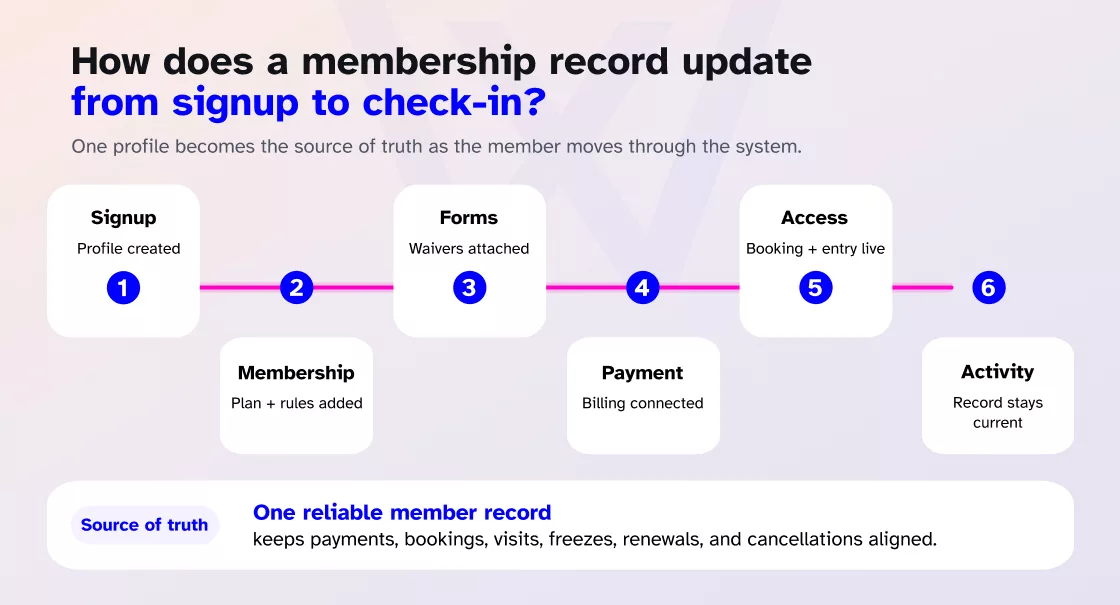
- The member signs up. An online form or staff registration creates a unique profile.
- The membership is assigned. The plan adds its price, dates, booking limits, locations, services, and access times.
- Forms attach to the profile. Agreements and waivers remain connected to the correct person.
- The payment method is connected. A payment provider processes the financial credentials needed for recurring billing.
- Booking and access are activated. The member can reserve eligible classes and use an approved entry credential.
- New activity updates the record. Payments, visits, freezes, renewals, bookings, and cancellations become part of the current account picture.
This does not mean every function must be built by one vendor. Platforms often rely on processors, door controllers, and other integrations. What matters is whether the gym has one reliable source of truth and clear rules for synchronizing changes.
Where do manual membership records usually break down?
Each example below is primarily a synchronization problem rather than a lack-of-data problem. The information exists somewhere, but the systems aren’t reading from the same place.
An unpaid membership remains active at the door
A payment fails, but the access system is using a separate list. The member continues entering, and staff must compare systems before deciding what should happen.
Integrated software can apply a defined policy. One gym may block access immediately. Another may allow a short grace period while recovery attempts and member notifications run. The behavior should be deliberate and consistent.
A freeze request stays in an inbox
A member requests a 60-day medical or travel freeze. Someone replies, but the change never reaches the membership record. Billing continues, and the team must reconstruct the conversation later.
A proper workflow records the dates, pauses the relevant billing or entitlements, preserves the account, and schedules the expected return. Wellyx supports temporary membership freezes and resumption rules so the process does not depend on a future calendar reminder.
A waiver cannot be found
The member signed a paper form, but it was scanned under another name. Or the waiver is stored in a shared drive while the membership lives elsewhere.
Collecting the form during signup or onboarding and attaching it directly to the member profile removes that scavenger hunt.
One person has two profiles
A member signs up online using one email, then a second profile is created at the desk. Billing appears under one record and attendance under another.
Duplicate prevention and controlled merging matter. Old records should also be cleaned before migration rather than copied into a new system untouched.
What should gyms check before choosing membership software?
A polished demonstration usually shows the cleanest possible journey. Real gym operations are less tidy. Ask the provider to show how the software handles a member whose account includes a failed payment, future booking, signed form, family connection, freeze, and limited access period.
That is a much better test than watching someone create a basic monthly membership.
Is there one complete member profile?
Staff should be able to see the information they are authorized to use without opening several systems. The profile should bring together the membership, payment status, bookings, attendance, documents, communication history, and relevant notes.
Do billing and access stay synchronized?
Ask what happens when:
- A payment fails.
- A membership expires.
- A member enters a grace period.
- A freeze begins.
- A package runs out.
- A contract is canceled.
The provider should explain both the default behavior and the rules the gym can configure.
Can it handle the memberships the gym actually sells?
Test the platform against real plans, including:
- Monthly recurring memberships.
- Annual contracts.
- Family memberships.
- Corporate accounts.
- Class packs.
- Off-peak access.
- Service-specific packages.
- Multi-location plans.
- Promotional periods.
- Temporary freezes.
A platform may look flexible until the business tries to reproduce one unusual but commercially important plan.
What can members manage themselves?
Useful member self-service may include:
- Updating contact information.
- Changing an eligible payment method.
- Booking or canceling classes.
- Viewing receipts.
- Reviewing membership details.
- Managing linked family members.
- Completing required forms.
Self-service is not only a convenience feature. It can reduce repetitive front-desk work and improve the accuracy of details that change over time.
How are staff permissions controlled?
Not every team member needs access to the same information.
Ask whether the system supports role-based permissions for member records, forms, reports, financial information, exports, and account changes.
Can the gym export its own data?
The gym should understand:
- What records can be exported?
- Which file formats are available?
- Whether attendance and billing history are included?
- Whether forms and notes can be transferred?
- How family relationships are represented?
- What happens to payment references?
- Can access credentials be moved?
Data export is not only a migration question. It also affects reporting, audits, business continuity, and ownership of the gym’s operational history.
What does migration support include?
There is a large difference between uploading a CSV and managing a complete software migration.
Ask who will:
- Map the old fields
- Identify duplicates
- Import memberships
- Verify balances
- Transfer attendance history
- Handle future bookings
- Review forms
- Test billing dates
- Check access permissions
- Support staff after launch
How Wellyx connects membership details
At Wellyx, we approach membership information as an operational record, not simply a digital filing cabinet. A membership record should help the appropriate parts of the platform respond when something changes.
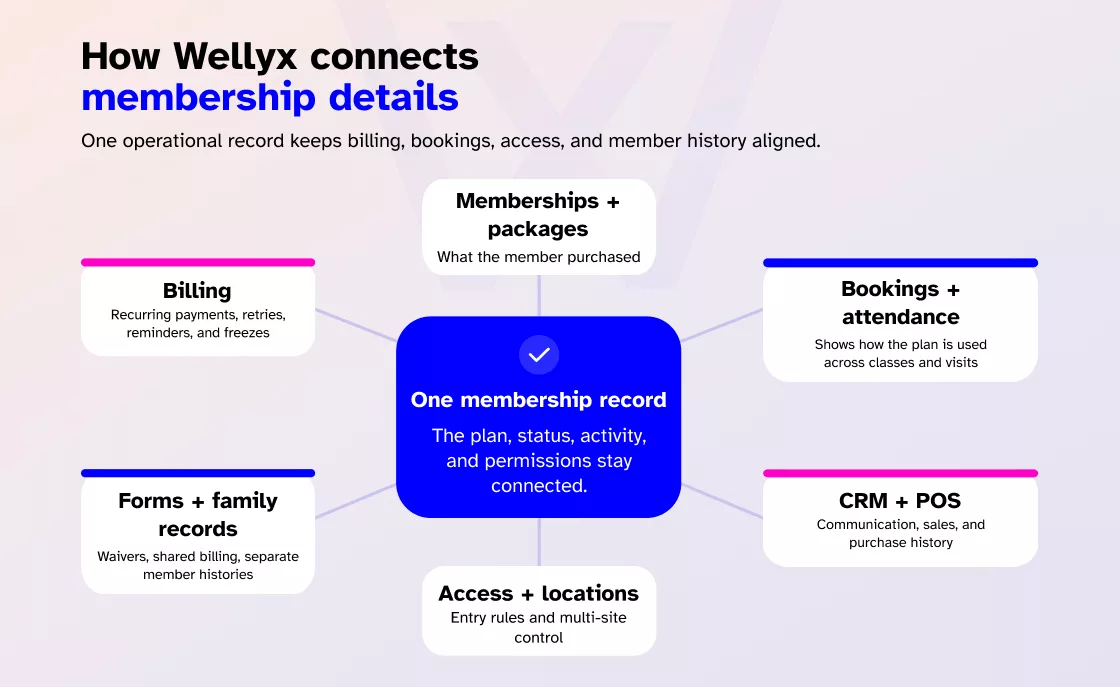
The membership defines what the person purchased. Billing shows whether the account is current. Bookings and attendance show how the plan is being used. Digital forms preserve required information. Family tracking connects parents and children while maintaining individual histories. Access control applies the gym’s entry rules.
Simply put, Wellyx brings together:
- Custom memberships and packages
- Recurring billing
- Failed-payment retries
- Automatic card updates
- Payment reminders
- Family and corporate accounts
- Membership freezes
- Digital forms and waivers
- Member self-service tools
- Class bookings and attendance
- CRM and communication
- Point-of-sale records
- Membership-based access control
- Multi-location management
- Data migration and onboarding
These capabilities are documented across the Wellyx membership, family tracking, access-control, pricing, and support resources. The practical value lies in the connections.
A parent can manage a shared billing relationship while each family member keeps a separate membership and attendance record. A gym can define how payment status affects entry. A temporary freeze can preserve the account history rather than forcing staff to cancel and rebuild the membership later.
In this way, all-in-one does not simply mean that a vendor has placed many feature names on one page. It means that front-desk staff, finance teams, coaches, members, and access points are not relying on contradictory versions of the same account.
How can a gym migrate membership records safely?
Changing gym software requires care. Wellyx offers migration support designed to move records from the previous system while preserving important connections between revenue, contracts, member relationships, and physical access.
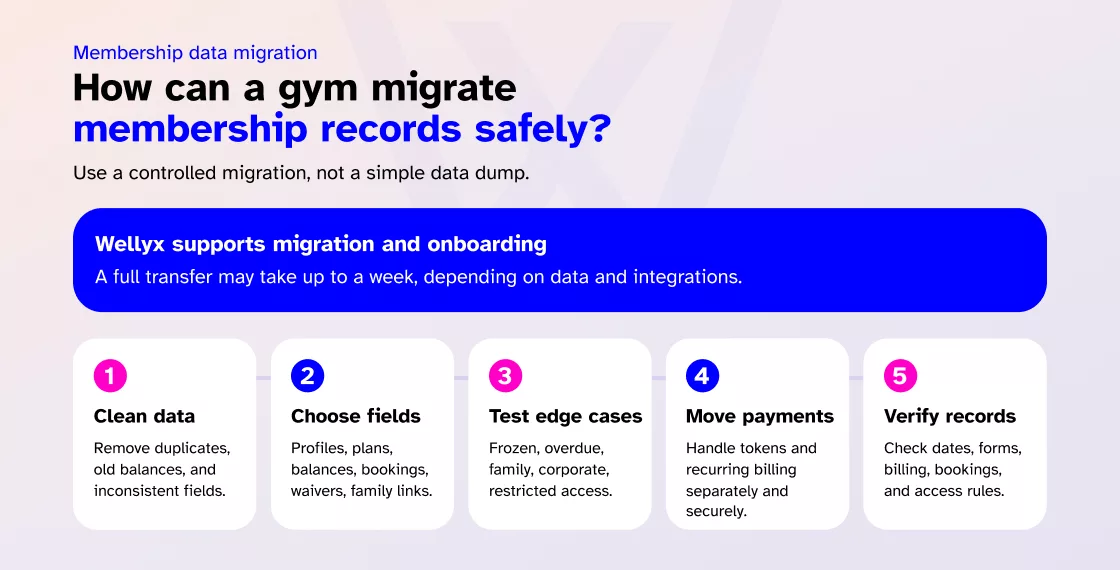
The migration process can be divided into 4-5 phases and can take up to a week for complete migration:
Clean the existing data first
Review duplicate profiles, expired memberships, incomplete contact details, inconsistent plan names, old balances, and unused custom fields. Migrating inaccurate data faster still leaves the new platform with inaccurate data.
Decide what needs to move
Common migration fields include:
- Member profiles
- Active memberships
- Start and renewal dates
- Account balances
- Attendance history
- Future bookings
- Notes
- Waivers
- Package balances
- Family relationships
Some items may require additional work, particularly payment tokens, custom automation history, door credentials, and data stored in third-party integrations.
Test complicated accounts
Do not test only a standard monthly membership.
Include:
- A frozen membership
- An overdue account
- A family plan
- A class package
- A corporate member
- A multi-location member
- A person with future bookings
- A member with an access restriction
The difficult accounts are the ones most likely to reveal a mapping problem.
Plan payment migration separately
Saved payment methods and recurring-payment references depend on the processors and technical arrangements involved.
Raw card details should not be placed in an ordinary spreadsheet export. Both the outgoing and incoming providers should explain how recurring payments will continue and whether members need to complete any action.
Verify the new database
After migration, check a representative sample against the agreed plan.
Review membership dates, balances, forms, billing schedules, family links, future bookings, and access permissions before treating the migration as complete.
Wellyx includes data migration and onboarding support, but the exact scope should be agreed for each business, particularly where external processors, access hardware, or custom integrations are involved.
Wrap up
Gyms use membership management platforms such as Wellyx, Mindbody, Gymdesk, Wodify, GymMaster, and Zen Planner to manage member records. The stronger systems do more than store a list of members. They connect membership data with recurring billing, bookings, attendance tracking, digital waivers, communication, reporting, and gym access control.
That connection is what we have built Wellyx around: not just recording membership details, but helping fitness businesses use them consistently throughout the member journey.
Frequently asked questions
Can a gym use Excel to record membership details?
Yes. A very small gym can use Excel or Google Sheets to record basic contact and membership information. But a spreadsheet becomes harder to manage when the gym grows and wants to introduce recurring payments, several membership types, family accounts, digital forms, class bookings, staff permissions, and electronic access.
What is the difference between a gym CRM and membership software?
A gym CRM primarily manages prospective members, sales conversations, follow-ups, and lead stages. Membership management software handles active members, plans, payments, bookings, attendance, forms, and access permissions. Many modern gym management platforms combine both functions.
A gym CRM is particularly useful for managing leads and pre-membership communication, while membership software manages the operational record once someone becomes a member.
Does gym software store complete credit card numbers?
Secure payment environments commonly rely on payment processors and protected references rather than displaying complete card details to gym staff.
The exact arrangement depends on the provider and processor. Gym owners should ask where cardholder data is handled, what their own PCI DSS responsibilities are, and how stored payment methods are treated during migration.
Can membership status control gym door access?
Yes. A gym access-control system like Wellyx can connect entry permissions with active memberships, permitted services, locations, payment status, and access times. However, the exact rules, hardware requirements, grace periods, and internet-outage behavior vary by provider.
Can membership details be imported from Excel or CSV?
Basic information can usually be imported from a structured CSV file. More complex records, such as family relationships, signed forms, access credentials, payment tokens, future bookings, and historical automation activity, may require additional mapping.
How much does gym membership software cost?
The total cost depends on the number of locations, selected features, payment arrangements, messaging use, access-control hardware, mobile apps, migration, and support. It is better to compare the complete operating cost rather than only the starting subscription price.