





We usually notice the software problem after the member problem.
A payment fails on Saturday night, but nobody sees it until Monday. A trial lead leaves smiling and never hears back. A class pack expires quietly. A renewal reminder goes to an old email address.
None of these issues feels dramatic on its own. They look like normal gym admin. But small misses build up. At 100 members, they’re inconvenient. At 500 members, they take real hours from staff. At 1,500 members, they create revenue gaps and reporting confusion.
That is where a connected fitness membership management system becomes important, not because every gym needs another tool, but because memberships, billing, payments, emails, scheduling, CRM, POS, access, and reporting need to work from the same member record.
The market has grown too large for loose systems. According to the Health & Fitness Association’s 2026 report, 81 million Americans belonged to a gym or studio in 2025, an all-time high and a 5.2% increase from 2024.
For a broader look at why operators consolidate their tools, this piece on the benefits of membership management software covers the rationale.
What is fitness membership software?
Membership management system for fitness studios is a cloud-based platform that helps gyms, studios, health clubs, and wellness businesses manage memberships, billing, payments, scheduling, communication, CRM, POS, access, and reporting from one place.
In simple words, it replaces the patchwork.
A gym may start with a spreadsheet, a booking calendar, an email tool, a POS terminal, and a shared inbox. Then the business grows, bringing more members, more payments, more failed cards, more freeze requests, more retail sales, and more leads. That’s when the setup starts to strain.
A proper platform within the broader fitness business management software category should maintain the central member record and consolidate these functions: member records, recurring billing, payment processing, class and appointment scheduling, communication across email/SMS/WhatsApp, sales and CRM, POS for retail and services, reporting, access control, and member self-service.
The catalog matters less than the connection between the items. If a lead becomes a member, the CRM should know. If a card fails, billing should trigger the right reminder. If a member freezes their plan, access, emails, billing, and reporting should update together. Most frustration for operators doesn’t come from a missing feature. It comes from the assumption that eight separate tools will voluntarily talk to each other.
Is membership software for fitness studios the same as gym management software?
The two terms overlap, but they’re not identical. A membership-focused platform emphasizes member records, plans, renewals, billing, payments, class packs, communication, and account status.
Gym management software is broader. It also covers scheduling, POS, access control, staff management, payroll, and multi-location dashboards.
Most modern platforms cover both sets of functions; the label usually reflects how a vendor positions itself rather than a hard functional distinction. For a small studio, the difference may not matter at first. For a growing operator, it will.
Why do fitness businesses outgrow disconnected tools?
Disconnected tools create work nobody planned for.
A front desk employee checks one system to confirm whether a member has paid. Then they open the booking calendar to see if the member attended. Then they check the email platform to see if a reminder went out.
Then they update a spreadsheet because the owner wants a weekly report. Then the same member calls again, and the next staff member has to rebuild the story from scratch.
That’s the admin tax. It doesn’t show up as a neat line item. It shows up as slower service, duplicated work, missed follow-ups, and too much staff time spent checking systems instead of helping members.
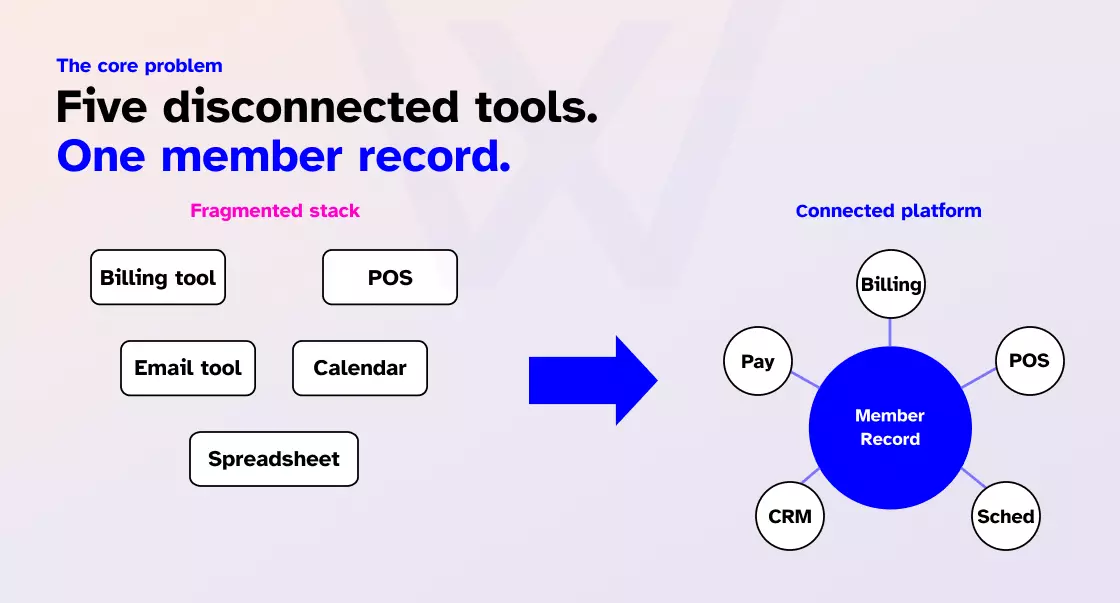
Common admin-heavy tasks include chasing failed payments manually, sending renewal reminders one at a time, managing freezes by email, tracking retail purchases separately, following up with leads from memory, and reconciling POS and membership revenue.
The problem isn’t that staff can’t do these tasks. It’s that every manual task pulls attention away from coaching, sales, retention, and member experience. Comparing automated invoicing vs manual billing on labor, failed payments, and cash flow shows how quickly those hidden costs add up.
For a deeper look at where the hours actually go, this guide on cutting admin time with fitness membership management software is worth reading.
What should a connected membership platform include?
A strong platform should include the features needed to manage the full member lifecycle, not just one piece of it.
| Category | What it should include | Why it matters |
| Membership management | Plans, contracts, freezes, holds, renewals, upgrades, downgrades, family and corporate memberships | Keeps member changes organized without workarounds |
| Billing | Recurring dues, proration, failed payment recovery, invoices, class packs | Protects recurring revenue |
| Payments | Cards, ACH, payment gateway integration, card-on-file storage, tokenization, and refunds | Makes payments secure and flexible |
| Scheduling | Classes, appointments, waitlists, capacity, trainer availability, no-show tracking | Keeps bookings clear and rules enforced |
| Communication | Email, SMS, WhatsApp, push, in-app, segmentation | Sends the right message at the right time |
| CRM | Lead capture, pipeline, follow-ups, source tracking, referrals | Converts inquiries into paying members |
| POS | Retail, services, packages, inventory, member-linked sales | Connects front-desk revenue to member profiles |
| Reporting | Revenue, attendance, retention, sales, staff, locations | Gives owners usable visibility |
| Member self-service | App or portal for bookings, payments, invoices, and profile updates | Reduces admin and improves convenience |
| Access control | Mobile keys, QR entry and turnstile rules tied to billing | Fewer failure points at the door |
| Multi-location tools | Location reports, permissions, dashboards | Helps growing operators manage scale |
This is where many buyers get distracted. Two platforms may both say “billing automation,” but one may only run basic recurring payments while another handles freezes, proration, retries, family memberships, and class packs. Two platforms may both say “email automation,” but one only sends newsletters while another triggers messages for attendance drops, failed payments, or renewal dates.
The better question isn’t “Does the membership management system have this feature?” It’s “Does the connected membership system understand how a fitness business actually runs?”
How does a membership platform handle billing and recurring revenue?
Billing is one of the most important jobs a connected membership platform performs. Because gyms and studios rely on predictable recurring revenue. A fitness business doesn’t bill like a simple retail store. Members may pay weekly, monthly, annually, or through class packs. Some freeze for travel or injury. Some upgrade mid-cycle. Some are part of family or corporate plans. Some pay by card; others by ACH.
A strong gym membership billing platform should support recurring billing on flexible cycles, freeze and hold requests, prorated changes for mid-cycle upgrades and downgrades, failed payment recovery (dunning) with automatic retries and staff queues, contract management, multi-currency support, family and corporate billing, and grace-period logic that keeps a member’s access active while a payment issue is being resolved.
This is where generic billing tools often fall short. They can collect a payment, but they may not understand fitness-specific workflows. Freezing a membership shouldn’t mean deleting the member or manually remembering to restart billing; a proper freeze workflow preserves the account, pauses billing for a defined period, adjusts booking or access rights, and restarts on the correct date.
Billing reporting matters too. A revenue report that doesn’t reconcile with the payment processor’s report because refunds live in one place and adjustments in another is worse than no report at all. Look for platforms where the billing ledger, payment processor, and accounting export all speak the same language.
How does a membership management system for fitness studios help recover failed payments?
Failed payment recovery deserves its own section because it directly affects recurring revenue.
A failed card isn’t always a lost member. Sometimes the card expired, the bank declined the charge, or the member changed accounts and forgot to update details. Recurly notes that involuntary churn is unintentional and that some industry reports have found 20% to 40% of subscription churn is involuntary, a familiar pattern for any recurring-membership business.
The fix is a process, not just software. A useful dunning workflow should detect the failed payment quickly and categorize the reason, retry based on rules that respect card-network limits, refresh expired cards automatically through a card-updater service, and notify the member with a secure payment-update link by email and SMS, giving staff a clean queue of accounts that still need a human conversation.
A calm reminder with a simple update link feels very different from an awkward phone call two weeks later.
Practically, this changes the front desk’s Monday morning: instead of the manager working through a decline report and calling members one by one, the platform has already retried the charge, emailed the member, and flagged only accounts that still need a human conversation.
What should a modern gym payment stack include?
Billing decides what should be charged, when, and under which rules. Payment processing moves the money. A modern payment stack should cover both recurring and one-time transactions: dues, drop-ins, class packs, personal training, retail, and online bookings.
Core capabilities to look for:
- Multiple payment methods: cards, ACH, mobile wallets (Apple Pay, Google Pay)
- Card-on-file (tokenization) so members don’t re-enter details for every purchase
- POS at the front desk that writes back to the member profile
- Refunds and adjustments managed through the same interface that processed the payment
- PCI DSS compliance at the platform and processor level
- Multi-currency and 3D Secure (SCA) support for international or cross-border members
Cards, ACH, and the failure-rate trade-off
ACH is worth calling out. The ACH Network, described by Nacha as an electronic system that moves funds between accounts, is the backbone of US direct-debit billing, and it generally carries lower processing fees than credit cards. Card costs also shift with pricing models and card types, so it pays to understand card processing fees for gyms before choosing a processor.
There’s a reliability gap too: GoCardless reports a 97.3% average success rate on the first collection attempt for Direct Debit, versus card failure rates commonly in the 10–25% range for recurring billing.
The trade-off is settlement speed. ACH takes longer to clear. Software that abstracts both cleanly gives operators room to steer members toward whichever method fits the plan.
Security and dispute records
The PCI Security Standards Council defines requirements for environments that store, process, or transmit payment account data. Staff should never store card numbers in notes, emails, spreadsheets, paper forms, or message threads; a proper system reduces that risk through secure gateways and tokenized card-on-file storage.
Chargebacks are the other quiet expense. A platform with clean transaction records, timestamps, IP addresses, member acknowledgments, signed contracts, and receipts makes disputes easier to contest. Without them, most disputes default to the member, and the gym absorbs the reversal plus a chargeback fee.
Why should gym POS system connect to memberships?
A gym point of sale system is often treated as separate from membership software, but in a fitness business, it should be connected. A gym’s revenue doesn’t come only from dues. It may come from retail, guest passes, personal training packages, recovery services, merchandise, events, workshops, and class packs.
Learn more: 10 gym revenue streams you must know about
If POS sales live outside the member profile, the business loses valuable context. A member who buys recovery sessions every month may be a good candidate for a recovery membership. A studio that sells more add-ons at one location than another may need to review staffing, layout, or promotion.
POS reporting should help answer real questions: what products sell most often, which services create repeat purchases, which members buy beyond monthly dues, and which staff drive package sales. When POS, billing, bookings, and CRM work together, the gym makes decisions from complete data instead of fragments.
How does email automation support the member lifecycle?
Communication is one of the most misunderstood parts of a connected member management system.
Many gyms think it means newsletters. That’s only one piece. A better system follows the full member lifecycle: trial confirmations and tour follow-ups at the prospect stage, welcome sequences and first-week check-ins during onboarding, class reminders and milestone celebrations for active members, attendance drop-off alerts and re-engagement offers for at-risk members, receipts and dunning sequences around billing events, and exit surveys plus 30/60/90-day win-back campaigns after cancellation.
Segmentation is where integrated data earns its cost
The advantage of running these from the same system as your member data is segmentation. When your ESP is separate from billing, “email everyone whose card expires this month” becomes an export-import-scrub exercise. When it’s one system, it’s a saved segment. Deeper segmentation compounds: “members who attended more than twice a week in the last 90 days and haven’t booked in 10 days” is a message no fragmented stack can send without a data analyst.
Match the channel to the moment
Email still matters for onboarding, policies, and longer messages. Mailchimp’s benchmarks suggest aiming for open rates around 35.63%, though performance varies by industry and list quality.
SMS and WhatsApp are stronger when timing matters: class reminders, urgent schedule changes, payment links, and quick follow-ups.
A simple rhythm: a new lead gets an instant SMS confirmation, then an email with class options. A new member gets a welcome email and a reminder before their first booked session. An inactive member gets a check-in at 14 days. A member with a failed payment gets a clear payment link, not an awkward phone call.
Deliverability and preferences
Deliverability matters. Emails from a shared inbox address hit spam folders faster than emails from a properly authenticated sending domain. A good platform configures SPF, DKIM, and DMARC during onboarding.
Preference management is the other quiet failure mode: members who feel over-messaged silently mark future emails as spam, damaging the sending-domain reputation for every other member. Good automation should feel like a helpful front desk that remembers, not a marketing engine trying to hit a quota.
Why should scheduling connect with membership rules?
Scheduling is often the first feature members actually touch. They may not see your billing rules or care how your CRM works, but they notice if booking a class feels clunky, if the waitlist doesn’t update, or if they show up for a session that was already full.
In a connected setup, scheduling should talk to membership rules, payment status, staff availability, room capacity, and attendance reporting. The real test is not whether a membership system includes a calendar. It’s how the calendar behaves when something changes.
If a member cancels, does the waitlist move automatically? If a member’s payment fails, does the system pause booking rights? If a member is on a limited class pack, does the booking deduct the right credit?
Scheduling is also an early retention signal. A member who stops booking is often drifting before they cancel. Attendance tells you who’s building a habit. Booking gaps tell you who may need support. This is why scheduling data should feed retention reports, not sit in a separate booking app where only the front desk sees it.
How does fitness CRM turn interest into growth?
Growth doesn’t start when a member pays. It starts when someone first shows interest: a website form, a phone call, a social message, a walk-in, a referral, or a trial booking.
If that first inquiry is not tracked properly, the gym is already losing growth before the sales conversation begins.
A CRM inside a connected membership platform should let staff see where the lead came from, what they asked about, whether they booked a tour or trial, who owns the follow-up, what message was last sent, whether they attended, whether they converted, and what revenue came from that source.
This turns lead management from memory into a process. A lead who fills out a form shouldn’t wait two days for a reply. A trial member shouldn’t be forgotten after class. A referral should be linked to the member who referred them.
When CRM connects with billing, bookings, and communication, the business can see which lead sources actually produce paying members. That insight is more useful than simply counting form submissions. Without source attribution tracked from capture through to first payment, marketing spend gets allocated by feel, not by return.
Why is member self-service part of modern gym apps?
Member self-service is no longer a nice extra. It’s part of the expected experience. Members want to book classes, update payment details, view invoices, buy packages, join waitlists, and check account information without calling the front desk every time.
That doesn’t make staff less important; it means staff stop being the bottleneck for simple tasks. A capable self-service portal or app should let members book and cancel classes, join waitlists, buy memberships or packages, update payment details, view invoices, submit freeze or hold requests, and see rewards or credits where available.
Self-service works best when member actions remain visible to staff. If a member submits a freeze request, staff should see it. If a member updates a card, billing should update. If a member cancels a booking, the waitlist should move.
The goal is not to remove staff from the relationship; it’s to remove unnecessary back-and-forth so staff can focus on moments that need a human.
How do retention analytics help gyms keep members?
Retention is often discussed after the member is already gone. That’s too late.
A strong membership management system should help operators spot warning signs earlier. A member rarely cancels out of nowhere; behavior changes first. They stop booking, visit less often, miss more classes, stop opening messages, freeze more frequently, or stop buying add-ons.
A strong retention dashboard should surface these signals: attendance frequency, days since last visit, missed bookings, class-pack usage, renewal dates, failed payment history, freeze patterns, and cancellation reasons. Industry benchmarks help contextualize the challenge.
The HFA 2025 Fitness Industry Benchmarking Report reported a 66.4% member retention rate in 2024, meaning roughly one in three members leaves each year. That’s the lagging number. Good analytics show the drop-off patterns before members disappear, turning retention from a lagging KPI into a leading one.
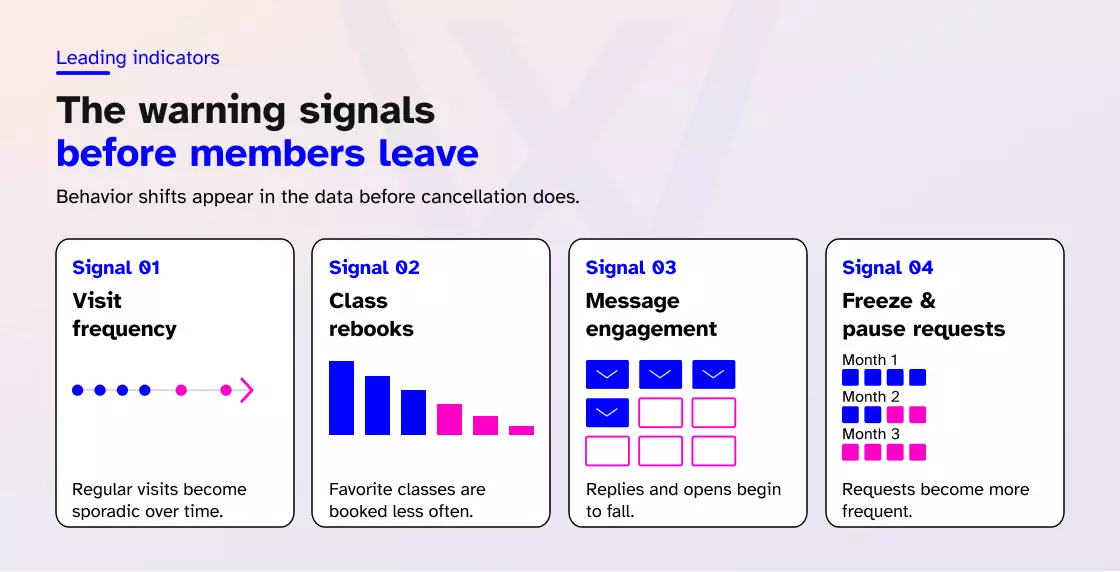
Retention analytics should also help operators compare groups. Annual members may behave differently from month-to-month members. Members who join through referrals may stay longer than those who join through discounts.
Cohort analysis matters: members who joined in January should be tracked against those who joined in July, so seasonality doesn’t hide a real drop.
The practical question is whether your team can see who needs attention before they leave.
What reports should a connected membership system provide?
Reporting is where disconnected systems usually expose themselves. The owner asks, “How did we do this month?” and the answer should not take three exports, a spreadsheet, and half a day of cleanup.
A capable member management platform should surface revenue, attendance, failed payments, new and canceled members, freezes, class utilization, POS sales, lead conversion, staff activity, and retention signals in one place.
Reports should answer real business questions rather than surface totals: which membership plans are shrinking, which members are at risk of canceling in the next 30 days, which classes are consistently full and which are underused, which staff drive trial-to-paid conversions, and which lead sources produce members who stay longer than 90 days.
Reporting also changes how decisions feel. Instead of guessing, the owner sees the pattern. That’s usually the first thing that breaks when data lives across five systems that each track their own version of the truth.
How does access control connect with billing and retention?
A gym access control used to feel separate from membership system. For many gyms today, it shouldn’t. If a gym offers 24/7 access, unstaffed hours, key fobs, QR entry, or mobile check-in, access rules need to connect with membership status, payment status, bookings, and attendance data.
A member with an active plan should enter smoothly. A member with a frozen plan shouldn’t accidentally access areas or services excluded during the freeze.
A member with a failed payment may need a grace period or a rule based on your policy. A member’s entry for a specific class should be validated against their booking at the door.
Entry data is also retention data. If a regular member stops checking in, that’s a signal. When access, billing, bookings, and reporting share the same member record, the door becomes another observation point in the retention picture, not an independent system where the billing platform doesn’t know who came in.
Which membership management platforms should you compare?
This is a neutral overview, not a ranking. Different businesses need different systems, and the right shortlist depends less on market share than on the workflows the business needs to get right.
| Platform | Often researched for | What to look at closely |
| Wellyx | Gyms and studios looking for an all-in-one platform that combines memberships, billing, POS, CRM, marketing, scheduling, access control, and reporting. | Best suited for operators who want to replace multiple disconnected tools with a single platform that keeps all member data in one record across daily operations. |
| Glofox (now part of ABC Fitness) | Boutique fitness studios and class-based businesses. | Evaluate branded mobile app capabilities, class booking rules, member experience, and communication workflows. |
| Wodify | CrossFit affiliates and performance-focused gyms. | Compare performance tracking, workout management, athlete progress monitoring, and class-based training features. |
| Gymdesk | Small gyms, martial arts schools, and independent fitness studios. | Review transparent pricing, ease of use, and whether the feature set matches simpler operational needs. |
| GymMaster | Gyms focused on member management, bookings, sales, communication, and access control. | Assess how well access control integrates with billing, reporting, and day-to-day member management. |
| Mindbody | Larger fitness studios, wellness businesses, spas, and multi-location operations. | Compare pricing, add-ons, migration process, customer support, and multi-location reporting capabilities. |
A comparison like this shouldn’t determine the final purchase decision. It should help you ask better questions. A CrossFit gym may care deeply about performance tracking. A boutique studio may care more about branded apps and waitlists.
A 24/7 gym may care about access control. A multi-location business may care most about reporting consistency. The right choice depends less on the longest feature list and more on which platform matches your operating model.
How do you evaluate software without getting sold to?
Membership software demos can look polished. The dashboard is clean, the reports look nice, and the salesperson says the system can do almost everything. That’s why operators should evaluate workflows, not screenshots.
During a demo, ask to see real tasks: add a new member, sell them a membership, freeze a plan, upgrade a membership mid-cycle, process a failed payment, book a class, move a member from waitlist to confirmed, sell a retail item through POS, and pull a retention report.
Ten questions worth asking on every demo
| Area | Question to ask | Why it matters |
| Billing | Can the system handle freezes, proration, failed payments, and class packs without manual workarounds? | Billing errors damage trust and revenue |
| Payments | Which gateways are supported, and how are payment details stored securely? | Payment security and flexibility matter |
| Communication | Can messages trigger from behavior, not just from lists? | Better timing improves member experience |
| CRM | Can staff see the full lead journey from inquiry to paid membership? | Leads are lost when follow-up is unclear |
| POS | Do purchases connect to the member profile automatically? | Add-on revenue only informs retention when connected |
| Reporting | Can reports show revenue, retention, attendance, and payment issues clearly? | Owners need usable data, not exports |
| Self-service | Can members manage basic tasks themselves? | Reduces front-desk pressure |
| Migration | What data can be moved, and who manages the process? | Switching risk is often about migration |
| Support | Is support human, responsive, and available when the business needs help? | Connected system issues affect daily operations |
| Scale | Can the system support more members, staff, services, and locations later? | Growth shouldn’t force another rebuild |
Also, ask what the system does not do. That question often reveals more than the feature list. And ask about the second year: most gym platform horror stories are about year two, when roadmaps stall, support degrades, or prices rise without added value.
What are the most common mistakes when choosing gym membership software?
The most common mistake is choosing based only on price. Cheap platforms become expensive if staff spend hours fixing gaps manually, and expensive platforms isn’t automatically better if the team can’t use it during a busy shift.
Other patterns worth avoiding:
- Choosing scheduling first and billing second. A class calendar is visible; billing is invisible until it breaks
- Ignoring failed payment recovery. A system without strong dunning leaves money on the table
- Buying too many disconnected tools. For most gyms, the integration burden becomes too heavy to maintain
- Skipping migration questions. Bad migration creates duplicate records, billing errors, and staff frustration on go-live day
- Forgetting staff usability. If front-desk staff can’t use the system during a rush, the platform creates work instead of removing it
- Not checking reporting depth. Reports should answer real business questions, not surface totals
- Overlooking member experience. Members should be able to book, pay, update, check in, and communicate without friction.
The best software choice isn’t the one with the most features. It’s the one that matches how the business operates now and plans to grow.
When does a gym or studio actually need a fitness membership platform?
Most fitness businesses need a connected membership system earlier than they think.
You may be ready if you manually chase payments every week, use spreadsheets to track memberships, switch between several tools to answer a single member question, fail to follow up with leads consistently, cannot quickly see who’s at risk of canceling, keep POS sales separate from member profiles, rely on exports for basic reports, or still hold too much operational knowledge in the owner’s head.
For a very small studio, simple tools may work for a while. But once the business relies on recurring memberships, staff handoffs, class scheduling, communication, payment recovery, and reporting, a connected system becomes less of a luxury and more of an operating need.
The earlier you build clean workflows, the easier growth becomes; waiting too long usually means switching after the business is already under pressure, and that is the hardest time to change a core system.
Where Wellyx fits in this category
Wellyx is one platform designed around the operational depth this guide describes: memberships, billing, payments, scheduling, communication, POS, CRM, access, and reporting, working from a single member record. It is positioned for gyms, studios, health clubs, and multi-location businesses that have outgrown a stack of point tools.
Practical capabilities that operators evaluate the platform for include:
- Reliable billing that supports freezes, proration, and failed payment recovery
- Payment processing across Stripe, GoCardless and PayTabs
- A CRM that tracks the lead-to-member journey end-to-end
- Communication triggered by member behavior, not just lists
- Reporting that connects revenue, retention, attendance, and staff performance
- Access control that reads from membership status and payment health
Free data migration, guided onboarding, and 24/7 human support are included, so operators can move away from fragmented stacks without disrupting daily operations.
Frequently Asked Questions
What is fitness membership software used for?
Fitness membership software manages memberships, billing, payments, bookings, communication, CRM, POS, access, and reporting for gyms, studios, and fitness clubs. It replaces disconnected tools with one connected system for the full member journey.
Why is billing automation important for gyms?
Billing automation collects recurring dues, manages renewals, recovers failed payments, handles freezes, and keeps invoice records accurate, reducing manual admin and protecting predictable monthly revenue.
How much does membership software cost?
Fitness membership software pricing depends on the number of locations, members, staff accounts, and features your business needs. A basic plan may cover memberships, billing, and scheduling, while more advanced plans may add CRM, marketing automation, POS, reporting, mobile apps, and access control.
Always request a complete quote based on your current operations. The advertised monthly fee may not include setup, payment processing, branded apps, hardware, or optional modules.
What affects the cost of a fitness membership platform?
The biggest pricing factors are business size, location count, feature requirements, and payment volume. Some providers charge a fixed monthly subscription, while others price by location, active member, staff account, or feature package.
Costs may also increase when you add access-control hardware, a branded member app, advanced marketing tools, premium support, custom integrations, or additional payment terminals. Compare the full operating cost rather than the starting price alone.
Are there hidden costs when buying a gym-connected membership system?
There can be additional costs beyond the advertised subscription price. These may include onboarding, data migration, payment processing, SMS messages, email limits, access-control hardware, mobile apps, staff training, integrations, and early contract termination.
Before signing, ask the provider for a written breakdown of subscription fees, transaction fees, setup costs, optional add-ons, contract length, and future price increases. This makes it easier to compare platforms fairly.
Is a cheaper fitness membership system always better for a small studio?
Not necessarily. A lower-priced platform can be a good fit when your studio has simple billing, scheduling, and reporting needs. However, it may become expensive if staff need to complete important tasks manually or pay for several separate tools.
Consider how much time the software can save, how well it handles failed payments, and whether it can support your business as it grows. The best-value option is the one that covers your essential workflows without unnecessary features or manual workarounds.
How should I compare fitness membership system pricing?
Compare each platform using the same business requirements. Ask vendors to quote for the number of members, locations, staff accounts, payment terminals, and communication tools you expect to use.
Your comparison should include:
- Monthly or annual subscription fees
- Payment-processing and transaction charges
- Setup, onboarding, and migration costs
- SMS, email, and mobile app fees
- POS and access-control hardware
- Contract length and cancellation terms
- Support and training availability
A transparent total-cost comparison is more useful than comparing advertised starting prices.
Final Thought
A connected membership platform is worth what it saves you from having to notice. It’s about giving people a clearer system to work inside. Members still need coaching. Staff still need judgment and warmth. Owners still need to understand the numbers. But people do better work when the system isn’t fighting them.
When billing connects to payments, communication connects to behavior, scheduling connects to attendance, POS connects to member profiles, access connects to membership status, and reports connect to the full journey, the business becomes easier to read. The small problems are still there: failed cards, missed classes, freeze requests, quiet members. But they stop hiding.
The fix isn’t picking software with the longest feature list. It is choosing one that matches how the business makes money, communicates with members, and plans for growth. That’s the whole category, in one line: fitness membership software is worth what it saves you from having to notice.