



Why gym payroll isn’t standard small-business payroll
A front-desk employee clocks in and out like any hourly worker. A personal trainer might earn a flat rate per session, a percentage of the session price, and a bonus for renewing a client’s package, sometimes all three in the same pay period. A group fitness instructor is paid per class regardless of how many members show up. A sales associate earns a base wage plus commission on memberships and retail. Add contractors, shift differentials for early-morning or late-night coverage, and seasonal staffing swings around New Year’s resolutions, and “run payroll” stops being a five-minute task.
A staff payment feature is not always the same thing as a complete payroll service that calculates, withholds, files, and pays employment taxes. That distinction, whether a platform manages staff earnings or processes full-service payroll, runs through every comparison in this guide.
Why gym payroll gets complicated: the underlying pain points
An analysis of gym-specific payroll and HR issues by HR-and-payroll platform Netchex identifies contractor misclassification as one of the costliest mistakes fitness businesses make: trainers who follow a gym’s schedule, use its equipment, and train under its brand can be reclassified as employees by the IRS regardless of what a contract says, exposing the business to back payroll taxes and penalties.
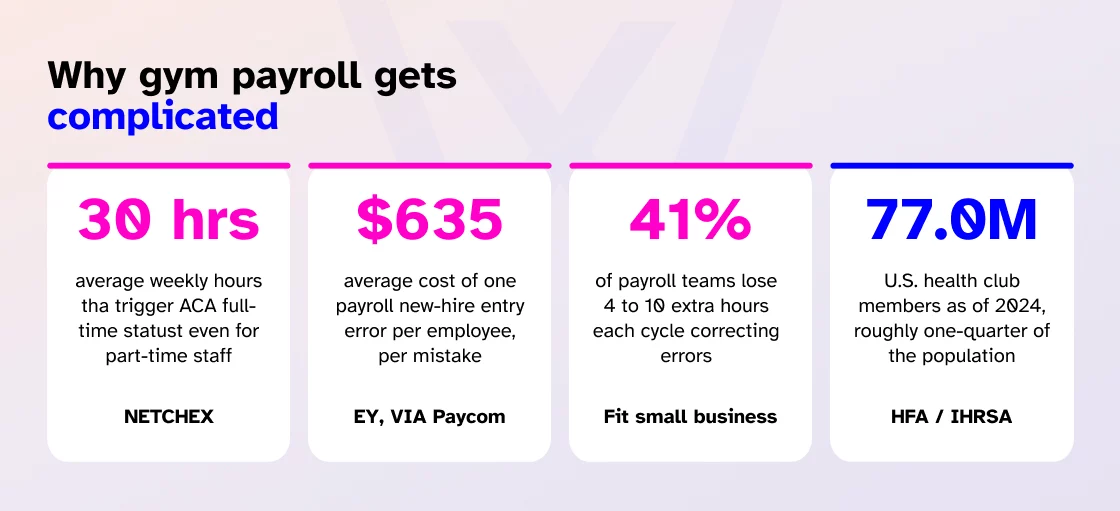
The same analysis points to variable pay itself as the core operational risk: a single trainer might earn hourly base pay, per-session rates, and commission in the same pay period, and manual calculation of that mix is where underpayment and overpayment errors both start. It also flags that gyms with employees crossing 30 average weekly hours can trigger ACA full-time benefits eligibility even when those employees are scheduled as part-time, which requires tracking averages over a measurement period rather than a single week’s schedule.
These aren’t hypothetical concerns. Research cited by payroll-technology company Paycom, based on a December 2022 EY study, put the average cost of failing to correctly enter a new hire into payroll at $635 per employee, a mistake that recurs constantly in an industry with high seasonal and front-desk turnover. Separate industry data compiled by Fit Small Business found that 41 percent of payroll teams spend an additional four to ten hours per pay cycle just correcting errors, turning a routine task into a recurring administrative drain.
The U.S. gym, health, and fitness club industry itself is a $47.0 billion market in 2026, growing 1.3 percent that year and at a 3.6 percent compound annual rate since 2021, according to IBISWorld, with more than 100,000 fitness businesses in the country. HFA’s most recent consumer research put U.S. health club membership at 77.0 million people as of 2024, roughly a quarter of the population. At that scale, the payroll structure a gym chooses isn’t a back-office footnote; it’s directly tied to whether staffing, compliance, and margin hold up as the business grows.
Quick comparison: gym payroll and staff-pay software
| Software | Best for | Scheduling & attendance | Commission/piece-rate pay | Tax filing (W-2) | Member/gym management | Starting price |
| Wellyx | Connected gym ops + staff pay in one system | Yes, native | Yes, sliding-scale commissions | Yes | Yes, native | $99/month (Excel tier) |
| Homebase Payroll | Hourly teams needing scheduling + payroll in one place | Yes, native (time clock) | Tip pooling only | Yes | No | $39/month + $6/active employee |
| Gusto | Small-business payroll and tax administration | Add-on/integration | No native commission engine | Yes | No | $49/month + $6/employee |
| QuickBooks Payroll (Workforce) | Gyms already on QuickBooks for accounting | Add-on (QuickBooks Time) | No native commission engine | Yes | No | $50/month + $6-$6.50/employee |
| Square Payroll | Simple employee + contractor pay, POS-linked | Via Square Team App | Tip import from Square POS | Yes | No | $35/month + $6/employee |
| RUN Powered by ADP | Payroll support and compliance hand-holding | Third-party integrations | No native commission engine | Yes | No | Quote-based |
| Rippling | Multi-location fitness businesses | Add-on module | No native commission engine | Yes | No | ~$8/employee/month base + payroll module |
Pricing and feature claims below were checked against vendors’ official websites and independent pricing trackers as of July 2026. Several vendors’ tier prices are reported inconsistently across sources; this is flagged explicitly wherever it applies. Confirm current numbers directly with each provider before budgeting.
What “gym payroll software” actually means
Gym payroll software helps fitness businesses calculate and manage pay for employees, instructors, personal trainers, sales staff, and contractors, but “helps manage pay” covers a wide range of actual functionality. Some platforms only calculate what someone is owed; others also withhold taxes, submit tax payments, file quarterly and year-end forms, and generate 1099s for contractors. Before assuming a platform “does payroll,” check specifically whether it:
- Calculates gross pay across hourly, salaried, per-session, and commission structures
- Withholds federal, state, and local employee taxes
- Submits employer tax payments
- Files quarterly and year-end payroll tax forms
- Produces W-2s and 1099-NEC forms
- Supports multi-state tax requirements
Gym management platforms with staff-payment features (Wellyx) and dedicated payroll providers (Gusto, Homebase Payroll, QuickBooks Payroll, Square Payroll, ADP RUN, Rippling) sit on different sides of that list, and workforce-management platforms try to bridge both.
How we evaluated these platforms
We weighted five areas specific to how fitness businesses actually pay staff, using each vendor’s product pages, documentation, and independent pricing trackers:
- Payroll and payment capabilities: Does the system calculate earnings only, or also process full-service payroll with tax withholding and direct deposit?
- Scheduling and time tracking: Does clocked time (not just scheduled time) flow into pay calculations?
- Trainer and staff commission handling: Can the system calculate session rates, percentage commissions, tiered structures, and sales bonuses without manual entry?
- Tax and compliance tools: Does the platform file taxes, or only calculate what’s owed?
- Fitness-business integrations: Does staff pay connect to booking, attendance, and membership records, or live as a separate system?
Wellyx: best for connected gym operations and staff pay in one login
Wellyx fits gyms that want scheduling, attendance, commissions, and member management reading from the same system as staff compensation, without exporting data between separate tools.
Wellyx introduced a dedicated payroll management feature on February 3, 2026, publicly announced later that month. The system lets gyms build department- or category-specific payroll templates on a weekly, monthly, or custom basis, and supports both fixed and variable compensation, hourly pay, block time, and commission structures tied to services, classes, or product sales, including sliding-scale commissions that increase with performance. It also tracks paid and unpaid leave alongside compensation. Wellyx’s CEO, Dominic Stone, described payroll as “one of the most operationally sensitive areas of a fitness business” when the feature launched.
What isn’t yet confirmed in Wellyx’s public materials is whether Payroll handles statutory tax withholding and filing, or whether it calculates gross earnings for export to a tax-filing provider; the launch coverage describes compensation, commission, and leave management, not tax administration. Confirm this specifically during a demo if it matters for your business.
Pricing: Wellyx’s own pricing page lists three tiers, Excel at $99/month, Exceed at $199/month, and Ultimate at $299/month, with POS, inventory tracking, and lead management appearing on Exceed and above.
Who should avoid it: Gyms that need confirmed, built-in tax filing today rather than staff-pay calculation; anyone who needs firm documentation of exactly which tier includes the new Payroll feature before signing.
Homebase Payroll: best for hourly staff scheduling and time tracking
Homebase fits gyms whose main challenge is converting front-desk and hourly staff time records into accurate pay without re-entering hours.
Homebase Payroll is built on top of Homebase’s scheduling and time-clock product, so hours worked flow directly into payroll instead of requiring manual entry. According to a comparison published by Homebase in mid-2026, Homebase Payroll runs $39/month plus $6 per active team member, and includes unlimited payroll runs, multi-state filings, earned wage access, and automated tax submissions. The platform automatically calculates, withholds, and files federal, state, and local payroll taxes, and produces W-2s and 1099s at year-end. Add-ons include Tip Manager ($25/location) and Task Manager ($13/location).
A payroll specialist review by PayrollDetective, written by a Certified Payroll Professional, found Homebase functions as a genuine payroll service for basic needs but lacks benefits administration, garnishment processing, and the reporting depth of dedicated providers like Gusto or OnPay at similar price points, and found multi-state tax setup cumbersome compared with providers built for distributed teams from the start. Other vendor and reviewer sources describe wage garnishments as included, so this is worth confirming directly for your specific state mix before relying on it.
Who should avoid it: Gyms with staff across several states who need mature multi-state compliance tooling out of the box; businesses that need benefits administration bundled with payroll.
Gusto: best for small-business payroll and tax administration
Gusto fits gyms and studios that want a dedicated, tax-filing-first payroll provider and are comfortable managing scheduling and commissions separately.
Gusto raised its entry-level Simple plan base fee from $40 to $49 per month effective March 2026. Current pricing sits at three tiers: Simple ($49/month + $6/employee) for single-state payroll and basic onboarding; Plus ($80/month + $12/employee) adding multi-state payroll, time tracking, scheduling, and next-day direct deposit; and Premium ($180/month + $22/employee) adding a dedicated Customer Success Manager, certified HR expert access, and priority support. A Contractor Only plan runs $35/month plus $6 per contractor for businesses paying 1099s exclusively. All plans include unlimited payroll runs at no extra per-run charge, and Gusto does not offer a free trial.
Gusto does not have a native trainer-commission or per-session pay engine built for fitness businesses specifically; It handles hourly and salaried pay and allows commissions to be entered as a standard pay type, but it does not calculate them from gym bookings or attendance records.
Who should avoid it: Gyms that want commission calculations linked directly to bookings, attendance, and class delivery rather than entered as a standard pay type; anyone deciding purely on lowest entry price, since QuickBooks Payroll and Square Payroll both start lower.
QuickBooks Payroll (Workforce): best for gyms already using QuickBooks
QuickBooks Payroll, rebranded in 2026 as QuickBooks Workforce Payroll, Premium, and Elite, fits gym owners who already run their books in QuickBooks Online and want payroll to post directly to the same ledger.
Intuit’s own pricing lists Workforce Payroll starting at $50/month plus roughly $6-$6.50 per employee, covering automated payroll, federal and state tax filing, and next-day direct deposit. Independent pricing trackers disagree meaningfully on the two higher tiers: reported Premium pricing ranges from $85 to $88 per month plus $9 to $15 per employee, and reported Elite pricing ranges from $130 to $134 per month plus $11 to $19 per employee, depending on when each source was checked and whether it reflects a July 2025 price increase or a further update taking effect July 1, 2026.
Multi-state filing carries an additional $12/month per extra state on the Payroll and Premium tiers; Elite is reported by some sources to include multi-state support without that surcharge. Given the spread across sources, confirm exact current pricing directly at quickbooks.intuit.com before budgeting rather than relying on any single third-party figure, including this one.
Premium adds same-day direct deposit, QuickBooks Time integration, and workers’ compensation administration; Elite adds tax penalty protection and access to a personal HR advisor.
Who should avoid it: Gyms not already using QuickBooks for accounting, since the main advantage is the direct books integration; anyone who needs firm pricing before a sales call, given how much reported tier pricing varies across sources.
Square Payroll: best for simple employee and contractor payments
Square Payroll fits small studios and personal-training businesses that already run point-of-sale and bookings through Square and want payroll to pull hours and tips from the same system.
Square offers two plans: a full-service option at $35/month plus $6 per employee for businesses paying W-2 employees (and optionally contractors alongside them), and a contractor-only option at $6 per contractor per month with no monthly base fee at all. The full-service plan handles federal, state, and local tax calculation, payment, and filing, including quarterly filings, new-hire reports, W-2s, and 1099-NECs, with digital delivery included and paper mailing at $3 per form.
Time-card data from Square POS or the Square Team App imports directly into payroll, and PTO tracking and labor-cost calculation are automated. An add-on called Square Advanced Access, at $35/month, unlocks multiple wage rates, break-violation reporting, and separate access levels for HR staff versus employees.
Customer support runs Monday through Friday, 6 AM to 6 PM Pacific by phone, with a limited chatbot and no dedicated email channel.
Who should avoid it: Gyms not already on Square for point-of-sale, since the main draw is that integration; businesses needing weekend or after-hours human support.
RUN Powered by ADP: best for payroll support and compliance hand-holding
RUN fits growing gyms and small chains that want human payroll and compliance support alongside the platform.
RUN is used by more than 900,000 small businesses and automatically calculates, deducts, and files federal, state, and local payroll taxes. Features include AI-assisted error detection intended to catch payroll mistakes before submission, automatic tax filing, and a “RUN & DONE” option to automate recurring payroll runs. Higher tiers add an HR HelpDesk with access to HR business advisors, and an HR Pro tier bundling legal assistance and small-business consulting through Upnetic.
ADP does not publish RUN pricing; it’s quote-based, and industry coverage consistently flags this as a transparency drawback compared with Gusto, Homebase, or Square, all of which publish their tiers openly. Some sources report the entry Simple plan starting near $79/month, but one independent reviewer that attempted to trace this figure to a primary source found only “blogs citing blogs, with nothing underneath” and removed the number from their own coverage; treat it as directional rather than a quote.
ADP also bills per payroll cycle, which makes weekly payroll noticeably pricier than biweekly or monthly. Reviewer feedback on support is mixed: many describe responsive, knowledgeable phone and chat support, including 24/7 phone access reported by some users, while others report long wait times during peak periods. Do not describe RUN’s support as 24/7 without confirming this for your specific plan tier, since reviewer experiences vary.
Who should avoid it: Gyms that want published, comparable pricing without a sales call; very small studios where ADP’s HR-advisory tier would be overkill relative to cost.
Rippling: best for multi-location fitness businesses
Rippling fits multi-location gym operators or chains that also want IT and device management, benefits, and payroll unified under one login rather than stitched together from separate vendors.
Rippling’s core platform is priced modularly rather than in fixed plans. Rippling’s own marketing cites a base platform fee starting around $8 per employee per month for basic HR management, with payroll, benefits, and time tracking sold as separate modules layered on top. Independent pricing analyses report meaningfully different real-world totals once the payroll module is added; estimates range from roughly $25 to $35 per employee per month combined with the base platform fee, and one source cites a flat $35/month base fee rather than the $8 per-employee figure Rippling advertises.
This inconsistency reflects how much Rippling’s actual bill depends on which modules a business turns on; treat any single “starting price” for Rippling as a floor, not a realistic estimate, and request a scoped quote. Implementation fees reported by pricing-analysis firm Vendr range from roughly $2,000 for basic setups to $10,000-$20,000+ for multi-location, multi-integration implementations.
Rippling supports payroll across all 50 U.S. states and more than 185 countries and 50 currencies in one workflow, automatically calculates and files federal, state, and local taxes, and reimburses penalties caused by its own filing errors. For a fitness chain with locations in several states, that multi-state depth, plus unified IT and device management for point-of-sale hardware and access-control systems across sites, is the platform’s clearest advantage over single-location-first providers like Square or Homebase.
Who should avoid it: Single-location studios and small gyms, where Rippling’s module-stacking pricing and implementation cost outweigh the multi-location and IT-management benefits; anyone who wants one clear published number rather than a scoped quote.
Which gym payroll software integrates with staff scheduling?
Scheduling and payroll can connect in three different ways, and the difference matters for accuracy:
- Native, built-in: Scheduling and payroll live in the same system (Homebase, and, pending confirmation of its tax capabilities, Wellyx). Hours flow automatically with no export step.
- Direct integration: Scheduling lives in one tool, payroll in another, connected by an API (QuickBooks Time feeding QuickBooks Payroll; Square Team App feeding Square Payroll).
- Manual export: Scheduling and payroll are entirely separate, requiring timesheet exports and manual entry, the highest-risk, highest-error option, and the one every platform in this guide is designed to replace.
Before choosing an integration, confirm: does data move automatically or require a manual sync? How frequently does it sync? Can a manager approve hours before they hit payroll? What happens if a class is canceled after a trainer was scheduled? Can the system prevent a trainer from being paid twice for the same session if a substitute also logs it? Is the integration included in the base price, or a paid add-on?
Which payroll systems handle personal trainer commissions?
Commission handling is one of the clearest differences between general small-business payroll and gym-specific staff software. None of the dedicated payroll providers in this guide, Gusto, QuickBooks Payroll, Square Payroll, ADP RUN, or Rippling, has a commission engine built around bookings, class attendance, or session delivery. They can process a commission as a pay type once someone calculates the dollar amount, but they don’t calculate it from underlying gym data themselves.
Common personal-trainer and sales-staff pay structures include a flat rate per session, a percentage of session revenue, different rates by service type, tiered commission scaled to monthly sales volume, membership and retail-product commissions, and renewal or performance bonuses. For software to calculate these automatically rather than requiring manual entry, it needs to connect booking, attendance, payment status, refunds, and trainer assignment before a commission is finalized, which is why gym-native platforms with built-in scheduling and POS, like Wellyx, are positioned for this specific problem in a way that standalone payroll providers are not. To avoid disputes, look for clear, staff-visible calculation rules, an approval workflow before commissions are finalized, and an audit trail covering refunds and adjustments.
Can gym software combine payroll, attendance, and member management?
The workflow that connected systems are built to support looks like this: a member books a personal training session; the trainer delivers it; attendance is confirmed; the member’s payment clears; the trainer’s commission is calculated from that specific session; and the approved earnings move into a payroll run. Fewer manual exports and less duplicate data entry are the direct benefits, along with more accurate commission calculations and clearer staff performance reporting.
Even with a connected system, most gyms will still need a separate step, or a separate provider, for tax withholding, tax filing, direct deposit, year-end forms, and benefits deductions unless the gym-native platform has confirmed, built-in tax administration. That’s the practical reason many fitness businesses end up running a gym management platform for operations and a dedicated payroll provider for taxes, rather than expecting one system to do both fully.
What gym payroll software actually costs
Common pricing models in this category include a flat monthly subscription (Wellyx), a base fee plus a per-employee charge (Homebase, Gusto, QuickBooks, Square), and quote-based enterprise pricing (ADP RUN, Rippling at scale). Costs that don’t always show up in the headline number include setup fees, additional-state filing surcharges (QuickBooks charges $12/month per extra state on its lower tiers), year-end filing charges, benefits administration, add-on modules (Rippling), and implementation fees for more complex platforms.
Approximate monthly cost for a 10-employee gym, base fee plus per-employee charge, using the pricing above:
- Square Payroll: $35 + (10 x $6) = $95/month
- Homebase Payroll: $39 + (10 x $6) = $99/month
- Gusto Simple: $49 + (10 x $6) = $109/month
- QuickBooks Workforce Payroll: $50 + (10 x $6-$6.50) = $110-$115/month
- Gusto Plus: $80 + (10 x $12) = $200/month
- QuickBooks Premium: $85-$88 + (10 x $9-$15) = $175-$238/month
Wellyx doesn’t fit this model directly, since it charges a flat tier price regardless of staff count; Because Wellyx uses flat pricing, its relative cost depends on the provider, plan, team size, and included operational features. The break-even point is not consistently 10 to 15 employees.
Which platforms automate tax calculations and filing?
There’s a real difference between software that calculates deductions and software that actually withholds the money, submits the payment to tax authorities, and files the associated forms. Homebase Payroll, Gusto, QuickBooks Payroll, Square Payroll, RUN Powered by ADP, and Rippling all describe full withholding-through-filing tax administration in their own product materials, including W-2 and 1099-NEC preparation. Wellyx’s payroll feature is documented for compensation, commission, and leave management, but tax administration specifically isn’t confirmed in available coverage; verify this directly before assuming it covers withholding and filing.
Federal, state, and local payroll tax rules vary and change; nothing here is tax advice, and gym owners should verify current requirements with a qualified payroll or tax professional before relying on any platform’s default configuration.
How to choose gym payroll software
- Document how every role is actually paid, hourly, salaried, per-session, commission, tips, contractor, before comparing vendors, since this determines whether a general payroll provider or a gym-native platform fits better.
- Map your commission rules precisely: rates, percentages, thresholds, bonuses, refund and cancellation adjustments, and ask each vendor directly whether their system calculates these or only records a number you calculated elsewhere.
- Decide whether you need full-service tax filing or whether your gym management platform’s staff-pay data will feed into a separate payroll provider.
- Check integrations with your existing gym management system, scheduling tool, POS, and accounting software before signing.
- Calculate total monthly cost including every per-employee fee, add-on, and multi-state surcharge, not just the advertised base price.
- Test support before buying by contacting the team with a real payroll question; response quality varies more than most pricing pages suggest, based on the mixed reviewer feedback on ADP RUN’s support above.
Common gym payroll mistakes to avoid
- Treating a staff-earnings calculator (unconfirmed for Wellyx) as equivalent to full-service tax-filing payroll
- Paying for scheduled sessions that were never actually delivered, instead of confirming against attendance records
- Applying one commission rate across every service type when rates should vary
- Ignoring refunds and cancellations when calculating commission
- Overlooking per-employee and multi-state add-on fees when comparing headline pricing
- Assuming any provider’s support is available 24/7 without confirming for your specific plan
- Choosing flat-rate gym software for a large team without checking whether per-employee payroll pricing would actually be cheaper, or vice versa
What is the best payroll software for a small gym?
It depends on staff size and pay complexity. Square Payroll and Homebase Payroll have the lowest entry pricing for straightforward hourly and contractor teams. Gyms with complex commission structures may get more value from a gym-native platform like Wellyx for the operational side, paired with a payroll provider for taxes.
Can gym management software process employee payroll?
Some can calculate staff earnings, including commissions and session pay, but that isn’t the same as full-service payroll with tax withholding and filing. Confirm specifically whether a gym platform files taxes or only calculates gross pay before assuming it replaces a dedicated payroll provider.
Which gym payroll software integrates with staff scheduling?
Homebase Payroll builds scheduling and pay calculation into one native system. QuickBooks Payroll and Square Payroll connect to scheduling through their own time-tracking products (QuickBooks Time and the Square Team App).
How do gyms calculate personal trainer commissions?
Common structures include a flat rate per session, a percentage of session revenue, tiered rates based on monthly sales volume, and membership or retail commissions. Software with native booking and attendance data, rather than standalone payroll platforms, is best positioned to calculate these automatically instead of requiring manual entry.
Does gym payroll software calculate and file taxes automatically?
Homebase Payroll, Gusto, QuickBooks Payroll, Square Payroll, RUN Powered by ADP, and Rippling all describe full tax withholding, payment, and filing in their own materials. Wellyx’s tax-filing capability specifically isn’t confirmed in available public materials as of this writing.
What does payroll software cost for a fitness studio?
Dedicated payroll providers generally run $35-$50/month base plus $6-$22 per employee depending on plan tier, before add-ons or multi-state surcharges. Gym-native platforms like Wellyx charge flat monthly tiers from $99 to $299 regardless of staff count.
Which payroll provider offers the most transparent pricing?
Homebase, Gusto, Square Payroll, and QuickBooks Payroll publish at least some pricing, although the article found conflicting figures for QuickBooks’ higher tiers. RUN Powered by ADP and Rippling (beyond its base platform fee) are quote-based, which multiple independent reviewers flag as a transparency drawback relative to the rest of the category.
Can payroll software manage staff across multiple gym locations?
Rippling is well suited to multi-location and multi-state operations, supporting payroll across all 50 states and more than 185 countries in one workflow. QuickBooks Payroll and Gusto support multi-state payroll on their higher tiers, with per-state filing surcharges on some QuickBooks plans. Wellyx also offers multi-location support as a gym-native alternative, subject to the same tax-filing caveat noted throughout this guide.
Final verdict
There isn’t one universal winner in gym payroll software, because “best” depends on what a gym actually needs solved. Choose a gym-native platform like Wellyx when connected bookings, attendance, membership data, and commission tracking are the daily priority, understanding that tax filing may still need to be confirmed or handled separately. Choose a dedicated payroll provider, Homebase Payroll for hourly-heavy teams, Gusto or QuickBooks Payroll for general small-business tax administration, Square Payroll if you’re already on Square POS, RUN Powered by ADP for compliance hand-holding, or Rippling for multi-location and multi-country operations, when automated tax withholding, filing, and compliance support are the priority. Many fitness businesses end up running both: a gym management system for operations and commissions, and a payroll provider for taxes.