




A member arrives before sunrise.
The front desk is empty. The coach is not in yet, and the music hasn’t started. The member taps their phone, the door opens, the visit is logged, and the system already knows three things: the membership is active, the member can access the gym floor, and they cannot enter premium areas.
This moment shows what modern gym access control really is. It’s not just a lock, fob, or gate. It’s a live decision engine connecting memberships, billing, bookings, staffing, premium areas, guest passes, and 24/7 operations. Access control now sits at the center of your business. The electronic access control market was valued at $53.92 billion in 2025 and is projected to reach $143.71 billion by 2035 (SNS Insider).
Gyms handle more members, visit patterns, and service layers than ever. The Health & Fitness Association reports the U.S. Fitness industry hit 77 million members in 2024, serving nearly 96 million total customers. Access control is evolving too: HID notes 61% of security leaders rank mobile credentials as a top trend, nearly two-thirds are deploying or planning mobile solutions, and ASSA ABLOY’s 2025 report shows 17% of environments fully mobile, 42% with wireless locks, and 26% planning mobile adoption within two years.
The old question, “How do I lock the door?” is outdated. The right question is, “How do I control access in a way that fits how my gym actually runs?” This guide answers that, covering fobs vs. mobile entry, 24/7 access, quiet revenue leakage, internal studio access, automation, metrics, and a real case study with financial results.
That is the trap with disconnected access setups. The monthly software cost is one issue. The hardware and workarounds can keep a bad system in place much longer than expected.
What is a gym access control system?
Access control is the system that decides who can enter, where they can go, and when they are allowed in.
That is the simple definition.
In a gym, though, the simple definition gets bigger fast. A useful access control setup is not just a piece of hardware fixed to a door. It is a connected system made up of credentials, readers, locks or gates, controllers, and the gym management software. The hardware handles the physical moment. The software handles the rules. That is where the real difference lies.
A weak setup can still open a gate. A stronger setup can do much more. It can block access the moment a membership fails. It can restore access as soon as a payment is recovered. It can let a trial member into reception and a booked intro session, but nowhere else. It can allow a coach into the PT room, but not the office. It can unlock a class studio only during a valid booking window. It can restrict premium zones to the right plan tier. It can send alerts when a door is forced open or held open. It can log every entry for later review.
That is why access control belongs inside your operating system, not on the side of it.
Expert tip: Before you compare readers, gates, or biometric options, check whether access control talks properly to memberships, billing, bookings, and staff permissions. If those systems are disconnected, the hardware will not save you. You will just end up managing exceptions by hand.
If your gym management software handles memberships, billing, scheduling, waivers, staff permissions, and reporting, but your door system sits off in a disconnected corner, you create a problem you will keep paying for. One system says the member is active. Another says they are not. One system says the booking is valid. Another has no idea. Then the member is standing there, phone in hand, wondering why the gym they pay for will not let them in.
That is not just a security problem. It is an operational problem.
The easiest way to think about modern access control is as a chain of live questions. Who is this person? What plan do they have? What did they book? What site can they use? Which room can they enter? What time can they enter it? What happens if the internet drops? What happens if the door is forced open?
That is access control in a modern gym.
Not just a lock decision. A business-rule decision.
Access control vs. check-in system
A lot of gym owners use these terms as if they mean the same thing. They overlap, but they are not the same thing.
A gym check-in system records attendance. It confirms that a member arrived, logs the visit, and sometimes helps staff manage reception flow. It is mostly about visibility.
An access control system decides whether a person should be allowed through a door, gate, or internal zone in the first place. It is about permission.
That difference matters because a gym can have a check-in process without having real access control. A staffed front desk with a receptionist and a barcode scanner may record every visit, but it still depends on staff to stop the wrong person, catch an expired membership, or block access to premium areas.
A stronger setup connects the two. The system confirms identity, checks whether access is allowed, opens or denies the door, and logs the visit at the same time.
In simple terms:
- Check-in system: tracks who came in
- Access control system: decides who is allowed in
- Connected setup: does both together
For modern gyms, especially 24/7 sites, premium facilities, and multi-zone clubs, that combined model is usually the better fit.
Why gym access control matters beyond security
A lot of owners still think access control is mainly about keeping the wrong people out. That is part of it. It is not the whole thing.
Gyms need access control because entry touches safety, revenue, retention, labor, premium upsells, and brand experience at the same time. Once you see that clearly, the category starts to make more sense.
First impressions count
You need it because the front door is part of the member experience. People judge a gym early, before the warm-up, class, sales conversation, recovery room, or results.
If the first minute feels slow, awkward, confusing, or public, the gym starts on the back foot. If it feels quiet and smooth, the member moves on with confidence.
Managing complex access rules
You need it because gyms run on time-sensitive rules. A gym may have:
- Active members, frozen members, canceled members
- Trial users, day-pass users
- Personal training clients, class-only members
- Premium-tier members, women-only windows
- Staff-only zones, contractor access, and cleaner access
- Off-hours access rules
A normal key cannot handle that. A real access-control setup does.
Shaleah Facey – Owner, Blackfuse Fitness
“When a membership expires, if a client has um an access card… it continuously runs on unless you manually go in and discontinue it and that takes a lot of effort… sometimes we even miss one or two.”
True 24/7 access needs smart systems
You need it because 24/7 access is only real when the rules are real. Marketing “always open” is easy. Delivering consistency is harder.
A proper system ensures:
- Right members get in
- Unauthorized entry is blocked
- Logs and alerts are accurate
- Doors behave sensibly even if the network goes down
Anant, owner of King Swing, said:
“We’ve been able to get it to a point where it is mostly automated, so we can have our members go in on their own and leave on their own.”
Avoid small, cumulative tasks
Staff time is expensive. Weak access setups create a pile of small jobs:
- Checking active memberships
- Opening doors manually
- Fixing shared code manually
- Replacing lost fobs
- Handling denied entry
- Granting guests access by hand
- Resolving billing-entry mismatches
Individually manageable, but hundreds of instances per month add up.
Prevent membership leakage
Membership leakage is real. Some is obvious; some is quiet but costlier. Examples include:
- Shared fobs or PINs
- Screenshots of QR codes
- Tailgating through gates
- Canceled members still getting access
- Former staff are still using the doors
- Basic members accessing premium areas
Spaces carry different values
Gyms are no longer one flat access space. You may have:
- Main floor, PT room, reformer studio
- Golf simulator bay, women-only zone
- Recovery room, cold plunge suite
- Premium coaching pod, office, storage room, class studio
Not all spaces carry equal value, so access should vary.
Sell access cleanly and strategically
Internal studio access control allows:
- Base members to get base access
- Premium members to get premium rooms
- Trial users to have limited windows
- Booked clients to enter only when their booking is valid
The door becomes part of the product, directly influencing revenue.
Type of access control
There are two easy ways to understand access control.
The first is by entry method, meaning the thing a person presents to get in. The second is by access model, meaning the logic the system uses behind the scenes.
Start with the methods. The right choice depends on how your gym runs, what your members are comfortable with, and how much flexibility you need.
Key fob
A key fob is still one of the most common access methods in fitness businesses. It is small, familiar, fast to tap, and easy to explain. That is why key fob systems for gyms are still common even as mobile options grow.
They work well in smaller or mid-size gyms where members want something simple and where the front door is the main control point. Fobs are also useful as a fallback method in more advanced systems.
The weakness is obvious. Fobs get lost. They get handed to a friend. They get forgotten in the car. They create replacement work and steady inventory costs.
So the question is not whether fobs still work. They do. The question is whether they are still the best default for your gym.
Access card
Access cards do the same basic job in card form. They are common in clubs that already issue branded member cards, in shared-use facilities, and in sites that want a physical credential that feels more formal.
They carry the same weaknesses as fobs. Cards can be lost, bent, shared, or forgotten. They also create a printing and reissue burden over time.
Still, for some brands, especially where member ID cards already exist, they can fit well.
NFC / Bluetooth
This is where the phone starts to take over the credential role. NFC works like a tap. Bluetooth often works at short range through an app. In both cases, the phone becomes the thing that proves access rights.
This is growing because the appeal is easy to understand. The member already carries the phone. The gym does not have to issue as much plastic. Guest access is easier. Temporary credentials are easier. Revocation is easier. And the app can connect access with scheduling, payments, messaging, and the rest of the member experience.
The main concerns are practical. What happens if the battery dies? What happens if the app is poor? What happens if permissions fail in the background? What happens when a member upgrades phones?
That is why mobile access works best when the whole system, not just the reader, has been thought through.
PIN codes
PIN codes are simple. A member enters a code on a keypad. The system checks it. The door opens or stays closed.
This is attractive because it is cheap and easy. It is often used for temporary access, contractor access, cleaner access, fallback access, or budget-first setups.
The trade-off is obvious. PINs are easy to share. Once a code spreads, the system loses integrity quickly unless you are disciplined about unique codes, expiry windows, and regular changes.
PINs are fine in the right role. They are rarely the strongest long-term primary credential for a growing gym.
QR codes
QR codes are useful when access is temporary, event-based, or tied to specific sessions. They work well for day passes, one-off classes, guest access, workshops, intro offers, and event entry.
The advantage is convenience. You can sell access online, send the code, and let the access expire on time.
The weakness is that QR systems can be abused if they are static, screenshot-friendly, or too loosely timed. QR access should be treated as a temporary-access tool, not automatically as the main access layer for all users.
Mobile app
This deserves its own place beyond NFC or Bluetooth because the app is more than a credential holder. A good app can carry access, bookings, membership details, push messages, waivers, account status, payment prompts, and guest passes.
That is where access becomes part of the brand experience.
“I was sold on the branded app, right? I was sold on that one.”
That lands because when your app is also your access experience, your members do not feel like they are dealing with five disconnected tools.
The value here is not just convenience. It is coherence.
Turnstiles
Turnstiles are not just a credential type. They are a physical-control choice. They can include tripod turnstiles, full-height turnstiles, speed gates, optical lanes, and swing gates.
Turnstiles help where traffic is high, tailgating is a problem, or the gym wants visible control over flow. They are common in 24/7 clubs, multi-lane entrances, and higher-security or premium-access setups.
They also change the feel of arrival. Some operators want that. Some do not. The decision should match the brand and the building, not just the security brief.
Access methods comparison table
If you want the quick version, this is the simplest way to compare the main methods side by side.
| Access method | Best for | Main strength | Main weakness |
| Key fob | Small to mid-size gyms, simple entry setups | Familiar, fast, easy to explain | Easy to lose, share, and replace |
| Access card | Clubs with formal member cards or shared-use sites | Works well with branded member ID systems | Can be lost, bent, shared, or forgotten |
| NFC / Bluetooth | App-led gyms, mobile-first member experience | Phone-based access, easier revocation, less plastic | Depends on app quality, phone battery, and permissions |
| PIN code | Temporary access, cleaners, contractors, fallback use | Cheap and simple | Easy to share, weaker as a primary method |
| QR code | Day passes, workshops, events, class-only access | Easy to issue and expire | Can be screenshot, shared, or misused if static |
| Mobile app | Gyms that want one connected member experience | Ties entry to bookings, payments, messaging, and brand | Needs strong app UX and reliable setup |
| Turnstiles / speed gates | High-traffic, 24/7, or higher-control sites | Better flow control and reduced tailgating | Higher cost, more installation complexity, changes arrival fee |
Core features and differentiators
Regardless of method, there are a few features that really matter in a gym context.
Zone-restricted access
This lets you decide which members can enter which parts of the building. That matters for trial members, premium areas, women-only spaces, PT rooms, recovery suites, and internal studios. It is also one of the cleanest ways to stop soft misuse without asking staff to police the building all day.
Danielle from Grit to Greatness Performance described why this matters in practice: door access can be set so class-only visitors can enter only during class time, with no “free reign” across the rest of the facility.
That is the value of zone-restricted access. It makes limited-access products easier to sell and easier to enforce without asking staff to monitor every movement manually.
Offline authorization
This means the system can still make access decisions even if the internet drops. Not forever, and not under all conditions, but enough to keep the gym functioning.
This is one of the most practical questions in any demo. If connectivity is lost at 5:30 a.m., what still works? Are permissions cached locally? Can the phone still unlock? Do some doors behave differently from others?
Do not leave this vague.
Role-based access
Staff access should never be broadened by accident. A coach should not automatically have manager privileges. A cleaner should not be able to enter every room at every hour. A contractor should not stay in the system three months after the job is done.
Role-based access brings order to that.
Real-time breach alerts
You want live alerts for things like forced entry, held-open doors, tamper alerts, repeated denied attempts, odd after-hours activity, and anti-passback breaches.
These are not only security alerts. They are operations alerts too.
Multi-factor authentication
Most gyms do not need multi-factor authentication at the main member door. Some absolutely need it in selected places.
Think about the office, the cash room, server and network equipment, medication or first-aid storage, premium locker areas, or selected staff-only entrances.
That could mean mobile plus PIN, card plus biometric, or app plus another factor.
Internal studio access control
This is the feature that deserves more attention than it gets.
A lot of operators think only about the front door. The front door matters. But the internal doors often carry the sharper business logic. If you sell premium access, internal studio control makes it real. If you run bookable rooms, internal control makes them cleaner. If you operate women-only windows or premium recovery areas, internal control makes those offers easier to manage and easier to charge for.
This is where internal access rules become commercially useful.
Anti-passback: preventing credential sharing
Anti-passback helps stop one credential from being used to let multiple people in unfairly. In simple terms, the system expects an entry to be matched by an exit before the same credential can be used again in the same way.
That makes it harder for members to share fobs, cards, or app credentials with friends. In a gym, this matters most in 24/7 sites, premium areas, and unmanned periods where staff are not standing nearby.
Some systems use hard anti-passback, which blocks repeated use automatically. Others use soft anti-passback, which allows the action but flags it for review. Either way, it gives operators a better way to reduce credential sharing without relying only on suspicion, manual checks, or after-the-fact complaints.
Access control models
Behind the visible method sits the logic. You asked for these three models to be explained simply, so here they are.
RBAC
RBAC means role-based access control. Permissions are based on role.
Members can enter the main gym. Coaches can enter coaching zones. Managers can enter the office. Cleaners can enter service doors during set windows.
RBAC is common because it is easy to understand.
ABAC
ABAC means attribute-based access control. Permissions are based on attributes, not just roles.
A member can enter if the membership is active, the plan includes that room, the booking is valid, the waiver is signed, the location is correct, and the time window is open.
ABAC fits gyms well because gyms run on layered conditions, not just fixed roles.
PBAC
PBAC means policy-based access control. Permissions depend on broader policies.
Trial members may only enter during staffed hours. Under-18 members may have restricted access rules. Emergency mode may unlock some doors and lock others. Premium rooms may require both an active membership and a current booking.
PBAC is useful when your gym has more layered operating policies.
Most good systems use a mix. Staff may follow RBAC. Members may use ABAC. Special scenarios may use PBAC.
Those models explain the logic. The next step is understanding how that logic plays out in a working system.
The 5-step system process
Every good access system usually follows the same five steps:
- Authorization: the system stores the rule
- Authentication: the user presents proof
- Access: the door opens or stays locked
- Management: admins update users, roles, and permissions
- Auditing: the system logs what happened and when
That last part matters more than many people think. If you cannot review what happened, you do not really have control. You just have a barrier.
One way gyms tighten that identity check further is through biometrics.
Biometrics
Biometrics should not be treated like a flashy extra.
In the right gym, it solves a real problem.
If your gym struggles with shared credentials, weak after-hours identity checks, or premium spaces that need tighter control, biometrics can make sense. If your setup is simple, staffed, and low-risk, it may be more than you need.
That is the right way to think about it. Not as “advanced equals better,” but as “does this solve a real operational problem for this gym?”
The market itself shows why biometrics keeps coming up in access-control conversations. One older benchmark projected the biometric system market from $10.74 billion to $32.73 billion, at a 16.79% CAGR. A more current benchmark puts the biometric system market at $53.22 billion in 2025 and projects it to reach $95.14 billion by 2030, at a 12.3% CAGR. That tells you the same basic story in two different time frames: biometrics has moved from niche to mainstream planning.
HID’s 2025 trends report adds the practical side. It says about 35% of respondents already use biometric technology, while another 13% plan to. ASSA ABLOY’s 2025 wireless access findings also show that biometrics is now seen as useful by the large majority of access decision-makers.
The 3-step biometric process
Biometric access is simple on paper.
Register
The member enrolls a biometric marker, such as a fingerprint, face template, or palm scan.
Verify
At entry, the system compares the live scan to the stored template.
Access
If the match is valid and the rules are satisfied, the door opens.
That is the neat version. In real life, success depends on reader quality, enrollment quality, lighting, hygiene expectations, and what your fallback process looks like when something goes wrong.
8 pros of biometrics
- It is harder to share than a fob, card, or code.
- It reduces the chance of membership sharing.
- It can strengthen 24/7 access certainty.
- It can reduce long-term credential replacement costs.
- It supports tighter control in premium or sensitive zones.
- It gives you a stronger audit trail than shared credentials.
- It fits well inside multi-factor access setups.
- It can improve confidence where identity accuracy matters most.
5 cons of biometrics
- The hardware costs more.
- Some members will have privacy concerns.
- False positives can happen.
- False negatives can happen.
- User acceptance can be limited.
Those last two matter.
A false positive means the wrong person is accepted. A false negative means the right person is denied. In a gym, false negatives are especially frustrating because they happen right at the door, often in front of other people.
That is why biometrics should not be treated as automatically better. It should be treated as a tighter identity tool that is worth the extra cost and complexity only when the gym has the right reason to use it.
That trade-off becomes clearer when you compare fingerprint, palm vein, and facial recognition in real gym conditions. A reader that works well in an office can behave differently around sweat, chalk, rush-hour check-ins, privacy concerns, and 24/7 access rules. For gyms considering biometric access control, the better question is not which option looks most advanced, but which one fits the risk at the door and the way members actually use the facility.
For many gyms, the smartest answer is not biometrics everywhere. It is biometrics where misuse would cost the most.
GDPR, BIPA, and biometric data compliance
If you are considering biometric access, this is the part you should not treat as a footnote.
Biometric access does not just change how a member enters the building. It changes the type of data your business handles. Fingerprints, face templates, and similar identifiers are more sensitive than a fob number or a PIN.
That means the question is not only whether biometrics works. It is whether your gym can use it responsibly.
Under frameworks such as GDPR in Europe and BIPA in Illinois, biometric data handling can carry stricter expectations around consent, storage, retention, and deletion. The exact legal position depends on where your business operates and where your members are located, so this is not an area to handle casually.
At a practical level, gym operators should ask five questions before enabling biometrics:
- What biometric data is actually stored?
- Is it stored as a reusable image or as a secure template?
- How is member consent collected and documented?
- How long is the data kept after cancellation or inactivity?
- How is it deleted when a member leaves or requests removal?
If a vendor cannot answer those clearly, pause there.
For many gyms, the safest approach is to use biometrics only where the operational reason is strong, keep fallback credentials available, and make sure the vendor can explain its consent, storage, retention, and deletion process in plain language.
Biometrics can reduce misuse. But if the data side is sloppy, the risk shifts from the door to compliance.
Cloud vs traditional systems
This is one of the most important decisions in the whole category.
A traditional access-control system is usually more on-premise. It relies more heavily on local hardware, local programming, and sometimes local servers or fixed infrastructure.
A cloud-based system pushes more control into software and remote management.
That sounds abstract until you look at the day-to-day difference.
Traditional systems can still work well. They often make sense in simpler buildings or older setups where a legacy system is already in place. They may also feel more familiar with teams that prefer local control and limited dependence on web dashboards.
The downside is that they become harder to manage as soon as your gym wants more flexibility, more locations, easier permission changes, stronger reporting, or better member-facing digital access.
Cloud systems have become more attractive because they support remote management, easier updates, easier permission changes, better multi-site control, stronger visibility, better mobile support, and lower dependence on on-site IT. Honeywell says 2025 access-control buying is increasingly shaped by touchless systems, mobile credentials, cloud integration, unified platforms, and AI-led anomaly detection.
This is where the network setup behind the system starts to matter. An IP-based gym access control system connects readers, controllers, locks, permissions, and access logs through the gym’s network, instead of treating every door like a separate island. For gyms comparing cloud and on-premises options, that IP layer is often what makes remote updates, mobile credentials, multi-site control, and real-time visibility easier to manage.
Comparison table
| Factor | Traditional systems | Cloud-based systems |
| Upfront feel | Can seem straightforward in simple sites | Often feels more flexible from the start |
| Remote management | Often limited | Usually much stronger |
| Multi-location control | Harder to manage | Easier to centralize |
| Updates | More manual | Usually easier and faster |
| Mobile access | Often more limited | Usually a core strength |
| Scaling | Slower | Faster |
| Reporting | Can be fragmented | Usually richer |
| IT burden | Higher | Lower |
| Flexibility | Lower once rules get more complex | Higher |
| Best fit | Very simple or legacy-heavy sites | Growth-minded gyms, 24/7 clubs, multi-site operations |
Once that system choice is clear, the real buying question becomes how to shape the setup around your gym’s actual operating model.
Offline mobile unlocking
One of the common objections to cloud-based systems is, “What happens if the internet goes down?”
That is the right question.
A good vendor should answer it clearly. Some cloud systems still support local cached permissions, controller-level decisions, or offline-capable reader behavior. Some support forms of offline mobile unlocking depending on device design and credential type. Others are much weaker once connectivity is lost.
So the issue is not simply cloud versus traditional.
The real issue is resilience.
If your gym is pushing toward 24/7 access, low-staff operations, or app-led entry, you need to know exactly what still works when the network does not.
Which one is usually better for a gym?
For most modern gyms, cloud-based access is the better long-term fit.
Not because cloud is fashionable, but because gyms increasingly need live permissions, app access, internal zone control, reporting, and flexibility across multiple products and locations.
Traditional systems can still make sense when the site is simple and the needs are fixed. But the more your gym behaves like a modern service business, the more cloud-led access makes sense.
Access control strategy framework for gyms
The audit was right about one thing: buyer advice is not the same as a strategy framework.
So here is the framework plainly.
Before you buy any hardware, before you choose fobs or mobile credentials, before you compare a maglock with a speed gate, you need to answer five strategic questions in order.
What kind of gym are you really running?
Not the gym you hope to run in three years. The gym you run now.
Are you staffed all day? Partly unstaffed? Moving toward 24/7? Do you rely more on classes, open-gym memberships, PT, or premium add-ons? Do you have one main door or multiple internal revenue spaces?
The access design should follow the real operating model, not a fantasy version of it.
Where is the money at risk?
This is the part most people skip.
Your biggest access-control risk may not be the front door. It may be shared credentials. It may be a premium room leakage. It may be frozen members still getting in. It may be staff time lost to manual fixes. It may be after-hours confusion. It may be classroom access not syncing with bookings.
Find the money leak first. Then solve that.
Which rules must happen automatically?
Write these down before you talk to vendors.
Do you need billing-triggered access changes? Booking-triggered room unlock? Trial-member limits? Guest-pass expiry? Automatic revocation when staff leave? Premium-room rules? Multi-site updates?
If the system cannot do the rules you actually need, the rest of the feature list does not matter.
What happens when the system fails?
A real strategy includes the ugly questions.
What happens if the internet drops? If power fails? If the app lags? If a reader dies? If the wrong member is denied at 5:15 a.m.? If staff need emergency override? If a door is forced? If a premium room remains open?
A gym that depends on access control needs a failure plan, not just a success plan.
How will you know if it is working?
Access control should not live in a blind spot.
You should know what you are measuring from day one: denied-entry rate, credential replacements, premium-zone usage, after-hours access uptake, mean time to permission update, and how often staff intervene manually.
That is strategy.
Everything after that is tooling.
The five features to prioritize before anything else
If you want a simple way to compare vendors without getting buried in demo talk, focus on five features first.
Live membership sync
If a member freezes, cancels, or fails payment, access should update fast. Not next week. Not after a manual fix. Right away.
Booking-linked room access
If a member books a class, simulator bay, reformer room, or recovery slot, the right internal door should open only within the valid booking window.
Internal zone control
This is what turns premium space into a real product. It is how you stop base members wandering into premium areas and how you make upsells feel tangible.
Offline resilience
You need to know what still works when the internet drops. A 24/7 setup is only as good as its behavior on a bad day.
Open integrations and data visibility
If the access system cannot connect cleanly to your memberships, billing, app, and reporting stack, it becomes another isolated tool your team has to work around.
If a system is weak on two or three of those five, the rest of the feature list matters a lot less.
How to choose a system
This is where owners either save themselves months of headaches or buy a problem dressed up as a solution.
The biggest mistake is choosing hardware first.
Do not start with the reader. Start with the business.
Expert tip: Start with the workflow, not the door. Map what should happen when a member’s payment fails, when a class is booked, when a coach leaves, or when a guest pass expires. Once those rules are clear, the right hardware choice usually becomes much easier.
Start with your real operating model
Be honest about how your gym actually runs.
Are you fully staffed, partly unstaffed, or planning 24/7 use? Do you have one entrance or several? Do you need internal room control? Do you sell day passes or trial access? Do you run personal training, classes, or both? Do you have premium areas? Are you planning another location? Do you want app-led member experience?
A boutique studio, a premium recovery-led club, and a budget 24/7 gym do not need the same setup.
Decide what must happen automatically
Make a list of access actions staff should not have to manage by hand. That list usually includes blocking access after failed billing, restoring access after payment recovery, allowing trial users only in limited areas, granting class-based access only within valid windows, revoking access when staff leave, issuing guest passes, and updating permissions after upgrades.
If the system cannot handle those cleanly, it will create labor and frustration later.
Check integration depth, not just integration claims
A sales page saying “integrates with access control” or “integrates with memberships” does not tell you much.
Ask harder questions.
Does access change in real time when membership status changes? Can a class booking open the right studio door automatically? Can a premium room be tied to a premium membership? Can a trial user be blocked from the rest of the gym? Can the app issue a temporary guest credential? Do access logs feed into reporting? Is there API or webhook support?
This is where good gym automation software becomes more than a convenience. It becomes the thing that stops systems from arguing with each other. This is also where gym access control integrations start to matter.
The door should not sit apart from your CRM, member app, billing system, class schedule, digital signage, or health-tracking tools. When these systems work together, access becomes more than entry control. It can support personalized member journeys, cleaner communication, smarter promotions, and fewer manual fixes at the front desk.
For a deeper look at how these connected systems work together, you can explore this guide on gym access control integrations.
Vladimir, owner of Cartev Fit, described the issue clearly:
“That’s what I didn’t like in other companies that were offering services that would require a third party. I don’t want these broken phones with the two, three, five companies… I just don’t need that headache.”
He then reduced the decision to what actually mattered:
“I just need membership, payments, and access control in one place… that’s it.”
If you are still comparing readers, fobs, mobile access, turnstiles, or biometric entry, step back before choosing the hardware. The smarter move is to first map how access should work across payments, memberships, staff permissions, guest passes, class bookings, and 24/7 entry.
You can find details in guide on how to choose the best access control system for your gym, including what to ask vendors, how to avoid poor integrations, and why the best setup is the one that fits your real operating model, not just the one with the flashiest door reader.
Think about the member experience
A system can look smart on paper and still feel annoying in real life.
Walk yourself through the first thirty seconds of arrival. Will your members prefer a phone, a fob, a card, a QR code, a gate lane, or a light-touch front-desk check-in plus room access inside?
This is where Zack Camilleri’s view is useful. He valued a system that was not “over-sophisticated” and said,
“We got the best software, the most appropriate for us and what we were looking for, and we even got it for the cheapest price.”
That is the right buying instinct. The best system is not the most complicated. It is the one that fits your use case cleanly.
Plan for failure, not just success
Good buying questions sound a bit uncomfortable.
Ask what happens when the internet drops, the power fails, the app crashes, the member forgets their phone, the door is forced, the wrong member is denied, a coach needs emergency override, or a billing sync is delayed.
If the vendor cannot answer those clearly, remember that.
Judge onboarding and support seriously
A lot of owners underestimate this point.
The installation is not finished when the reader lights up. Access systems create live member moments. If permissions are wrong, if the sync is late, or if the room rules are not clear, the issue shows up immediately and publicly.
Phil Baltimore, Co-founder of Train Better, made that point well. He said the program looked “very user-friendly,” and that the team “bent over backward” during the launch phase.
He also said,
“Customer service has been second to none.”
Danielle made the same point from another angle: “I was really impressed with the 24/7 support I could attain… a lot of times you need help now to make that sale.”
That is why support quality should be part of your buying decision, not an afterthought.
Common mistakes gym owners make with access control
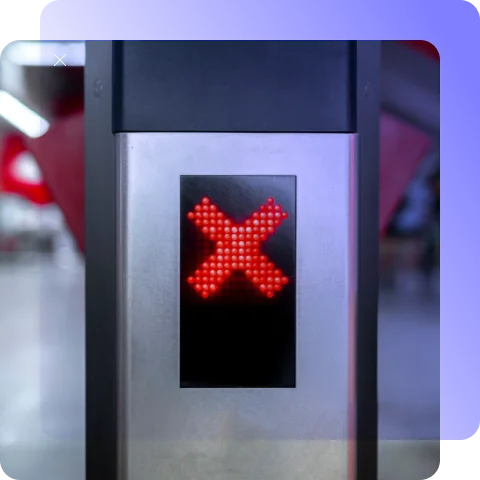
Before choosing or installing any system, it helps to understand where most gyms go wrong. These common mistakes can cost money, reduce control, and limit the full value of access control.
Buying hardware before confirming software integration
This is the classic mistake. A gym falls in love with a reader, a lock, a gate, or a turnstile before it has confirmed whether the memberships, bookings, billing logic, and staff permissions will actually sync cleanly. Then the business ends up working around the door instead of the door supporting the business.
Hardware should follow workflow, not the other way around.
Ignoring offline resilience
A lot of buying conversations stay in demo mode. Everything works because the demo is happening on a clean connection, under daylight, with no real pressure.
Then the internet drops at 5:20 a.m., and nobody knows what still works.
If you are running early, late, or unstaffed hours, offline behavior is not a nice detail. It is part of the core decision.
Skipping internal zone configuration
Too many gyms think about the front door and ignore the rooms inside.
That is where a lot of money leaks. If you have premium areas, women-only windows, simulator bays, recovery rooms, or bookable studios, those spaces need their own logic. If they do not, you end up depending on staff memory or member honesty.
That is not a system. That is wishful thinking.
Under-budgeting for hidden costs
This is exactly where many gyms get stuck.
Chanelle Ramsey from Factory Fitness explained why switching can be delayed even when the current setup is not working well:
“Stay with Mindbody until we kind of had a chance cuz it’s like £5,000… and it wasn’t for software. It was just literally for hardware [for the entry system].”
That is a useful reminder that access control costs are not only about monthly software. Retrofitting hardware, wiring, and door changes can keep a weak system in place longer than expected.
Failing to maintain stale permissions
Former staff, former contractors, test users, expired trials, and old role assignments should not sit in the system forever.
This is one of the least dramatic mistakes and one of the most common. It is also one of the easiest to fix if you build a monthly review habit.
Treating access control like a security purchase only
This one is subtle. If you treat access control only as a way to stop the wrong person from getting in, you miss the bigger value. You miss labor savings. You miss premium-zone monetization. You miss 24/7 operating leverage. You miss data. You miss smoother member experiences.
The best access systems protect the building. But they also help the business run better.
Security best practices for gym access control
Good access control is not only about buying the right hardware. It is also about how the system is used, monitored, and maintained once real members start moving through the building. A gym can have strong readers, locks, and mobile credentials and still create avoidable risk if the daily operating habits are weak.
Start with the doors themselves. Main entrances should be visible, well-lit, and covered by the right cameras if your site uses CCTV. Internal premium rooms, staff-only spaces, and after-hours entry points deserve the same attention. A door that works technically but sits in a blind spot creates a different kind of weakness.
Next, think about tailgating and door behavior. One valid credential should not become access for two or three people. That is where turnstiles, anti-passback rules, door-held-open alerts, and clear entry design all help. Even a simple alert for a held-open door can prevent a small mistake from becoming a repeated habit.
Power and emergency planning matter too. If the internet drops, what still works? If power fails, which doors unlock and which stay secure? Does the system follow fire code and safe egress rules? These are not edge cases. They are part of responsible setup, especially in gyms with early-morning, late-night, or unstaffed access.
Finally, review permissions as seriously as you review payments. Former staff, test users, contractors, frozen members, and expired trial users should not stay active by accident. Monthly review habits, access logs, and breach alerts are what turn a technically good system into a reliable one.
The strongest gyms do not treat access control as a one-time install. They treat it as a live part of operations.
Pricing
Access control pricing is not one number. It is a stack of costs shaped by doors, gates, locks, readers, software, wiring, installation, integrations, and ongoing support.
Current commercial pricing guides put professional deployments anywhere from roughly $500 to $8,000 per door, with many complete commercial installations landing closer to $3,000 to $5,000 per door once hardware, labor, installation, and first-year licensing are included.
Oloid reports that installation labor alone often runs around $1,000 to $2,500 per door, while software licensing and maintenance can add $30 to $200 a month, depending on scope.
Hayward says turnstile pricing can range from $3,000 to $50,000 per lane, and FDC says optical or speed-gate lanes often land in the $7,000 to $15,000 range (Florida Door Control), with premium models above that.
The 8 pricing factors
The final number usually moves because of these eight things:
- Number of doors and gates
- Credential type
- Lock type
- Wiring complexity
- Software and licensing
- Integration depth
- Installation labor
- Ongoing maintenance and support
A one-door studio with simple fobs is not the same project as a five-door gym with internal premium zones, mobile access, and speed gates.
That is also why pricing should be planned around your actual operating model, not just a per-door estimate.
If you need a deeper breakdown of how door count, hardware, software, installation, monthly fees, turnstiles, and hidden costs affect the final number, this guide on gym access control system cost explains how to budget the full setup before comparing vendor quotes.
Hardware examples
You asked for two examples here, and they should stay.
- A magnetic lock (~$1,500) is a reasonable installed planning figure once you include the reader, controller, power supply, mounting, cable work, labor, and compliance requirements. The lock body alone is not the whole story.
- A turnstile (~$13,000) is also a realistic working figure for many mid-level optical or speed-gate lane setups, even though simpler tripod units can cost less and premium lanes can cost much more.
Wired vs wireless cost differences
Wired systems usually cost more upfront because they need more drilling, more cable work, and more labor. Wireless systems are often easier to retrofit and less disruptive to install, especially on interior doors or in older buildings.
A simple rule works well here.
- Wired is often better where traffic is heavy, permanence matters, and the site is being built or renovated properly.
- Wireless is often better where the building is awkward, the doors are internal, or you want faster expansion without major disruption.
Hidden costs
This is where budgets usually go wrong. The quote looks fine. The extras appear later.
Common hidden costs include electrical upgrades, network changes, door-frame work, mounting brackets, backup power, software setup fees, onboarding, credential replacement, battery replacement for wireless locks, API or integration work, extra support, after-hours service calls, extra readers, and a contingency for building surprises.
If you budget only for what is visible on the first quote, you will almost always under-budget the project.
Hardware breakdown
It helps to know what you are really buying because access control is an umbrella term. The actual hardware stack usually includes several parts working together.
Readers
Readers are the devices that accept the credential. That might be a fob reader, a card reader, a keypad, a QR scanner, a Bluetooth or NFC reader, or a biometric reader.
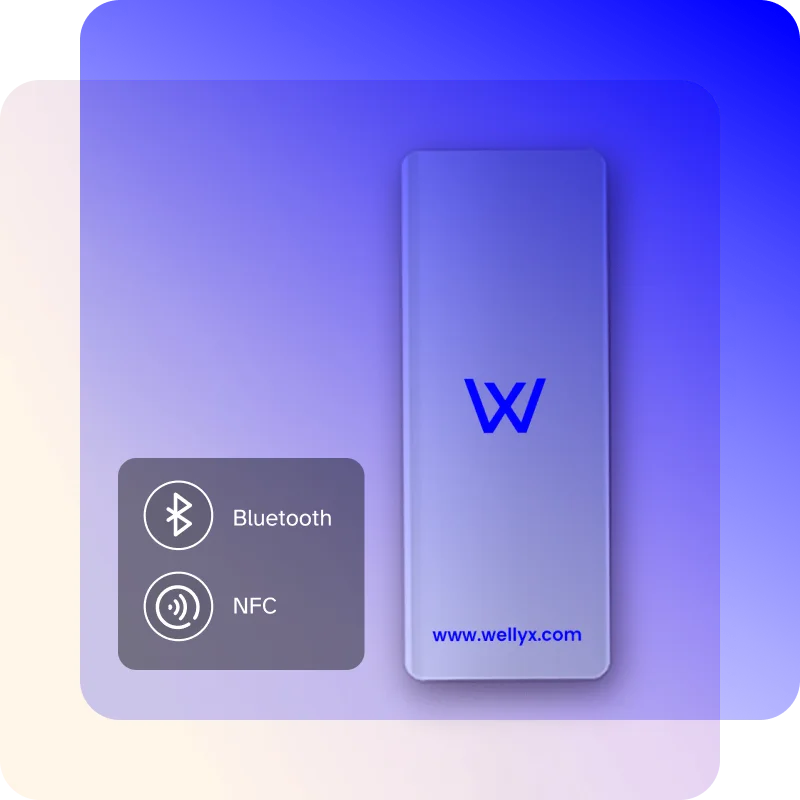
Some readers are simple. Some are multi-tech. Some are good only for one credential type. That matters because gyms evolve. A site that starts with fobs may later want phone access. A site that starts with QR day passes may later want app-led entry. If the reader layer is too rigid, upgrades get messy.
Controllers
Controllers are where the decision logic happens. They connect the credential, the reader, the software, and the physical locking hardware. They can be local, cloud-connected, or part of a hybrid setup.
The controller is part of the system backbone, not just another box. That matters because a lot of access problems come from logic and sync, not from the reader on the wall.
Locks and strikes
This is the physical securing layer.
Depending on the door, that might be a magnetic lock, an electric strike, a smart lock, a cabinet or storage lock, or a specialty lock for glass or unusual doors.
The right lock depends on door construction, traffic level, code requirements, and release behavior.
Sensors, exit devices, and accessories
This part gets overlooked, but it affects reliability. You may need door-position sensors, request-to-exist devices, push-to-exit buttons, alarms, power supplies, backup batteries, brackets, video intercom, or emergency-release hardware.
These pieces are what make the system behave properly in real life, not just in a polished demo.
Turnstiles and speed gates
Where traffic or control demands are higher, these become part of the hardware breakdown too. They add structure to flow, help reduce tailgating, and can make the access point feel more intentional. But they also change the atmosphere, the budget, and the complexity of the installation.
That is why they should be chosen for a clear operational reason, not just because they look more secure.
Hardware installation
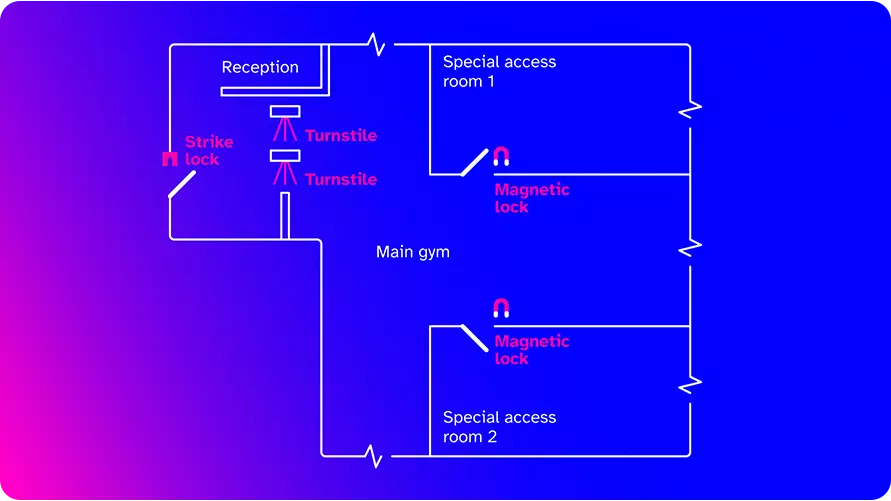
A good system can still fail at the human level if the installation is rushed or the logic is unclear.
The right installation process is not just about fitting hardware. It is about making sure the building, the software, and the business rules all match.
Step 1: Map every entrance and internal zone
Do not just count doors. Label them by purpose. Main member entrance. Staff entrance. Service entrance. Internal studio. PT room. Recovery room. Office. Premium room. Storage room.
This is where the system starts to reflect the business.
Step 2: Define your permission logic before the install
Before anything is fitted, write the actual access rules.
Who can enter which doors? When can they enter them? What happens on failed billing? What happens when you freeze? How do trial users work? How do guest passes work? How do internal premium rooms work?
This is where RBAC, ABAC, and PBAC stop being theory.
Step 3: Choose hardware based on door type, not just price
A glass front door, an outdoor gate, a back-office door, and an internal studio door will not always use the same hardware. This is where lock type, reader type, and wired-versus-wireless choice should be matched to the actual entrance.
Step 4: Confirm software flow before the hardware goes live
This is one of the most common mistakes.
A gym installs the hardware and assumes the membership, booking, and billing logic will hook up later. That is backwards.
Confirm the flow fast. Membership sync. Booking sync. Guest rules. Trial rules. Premium-zone logic. Alert routing. Reporting flow.
Step 5: Check wiring compliance and power properly
This step is easy to rush and expensive to fix later.
Review cable paths, power availability, backup power, fire-release behavior, emergency egress, ADA implications, and local code requirements.
This is the step that saves you from “why didn’t anybody mention that?” problem later.
Step 6: Plan for multi-entrance behavior
If your gym has several ways in, decide which one works after hours, which one is staff-only, whether members can use all of them, whether internal spaces need time-window restrictions, and what happens when one entry point goes offline.
This is where a lot of confusing member moments can be prevented early.
Step 7: Install, label, and document everything clearly
Readers, sensors, panels, override points, and cable paths should not become a mystery after installation. A clean install includes clear documentation. It saves time when maintenance is needed and keeps you from relying on one installer forever.
Step 8: Test both normal use and bad-case use
This was one of the audit requirements, and it should be non-negotiable.
- Unauthorized access test means presenting the wrong credentials, such as an expired card, frozen-member status, invalid QR, wrong-role user, or out-of-time-window booking. Check that the system denies access correctly, logs it, and alerts where needed.
- Forced entry test means simulating a forced-door event and making sure the system records it, triggers the alert, and follows the right response logic.
You should also test valid member entry, mobile unlock, internal room access, guest expiry, power interruption, and network interruption.
Step 9: Train staff and create a review routine
The job is not done when the door opens.
Your staff needs to understand how access is granted, how it is revoked, what to do when a member is denied, who handles emergency override, what alerts matter, and how to spot sync problems early.
Thamar Hewsen’s, Asylum Gym owner said,
“They need clear expectations, they need training, and they need tools.”
That line belongs in access control as much as it belongs anywhere else in gym operations.
Gym access control automation
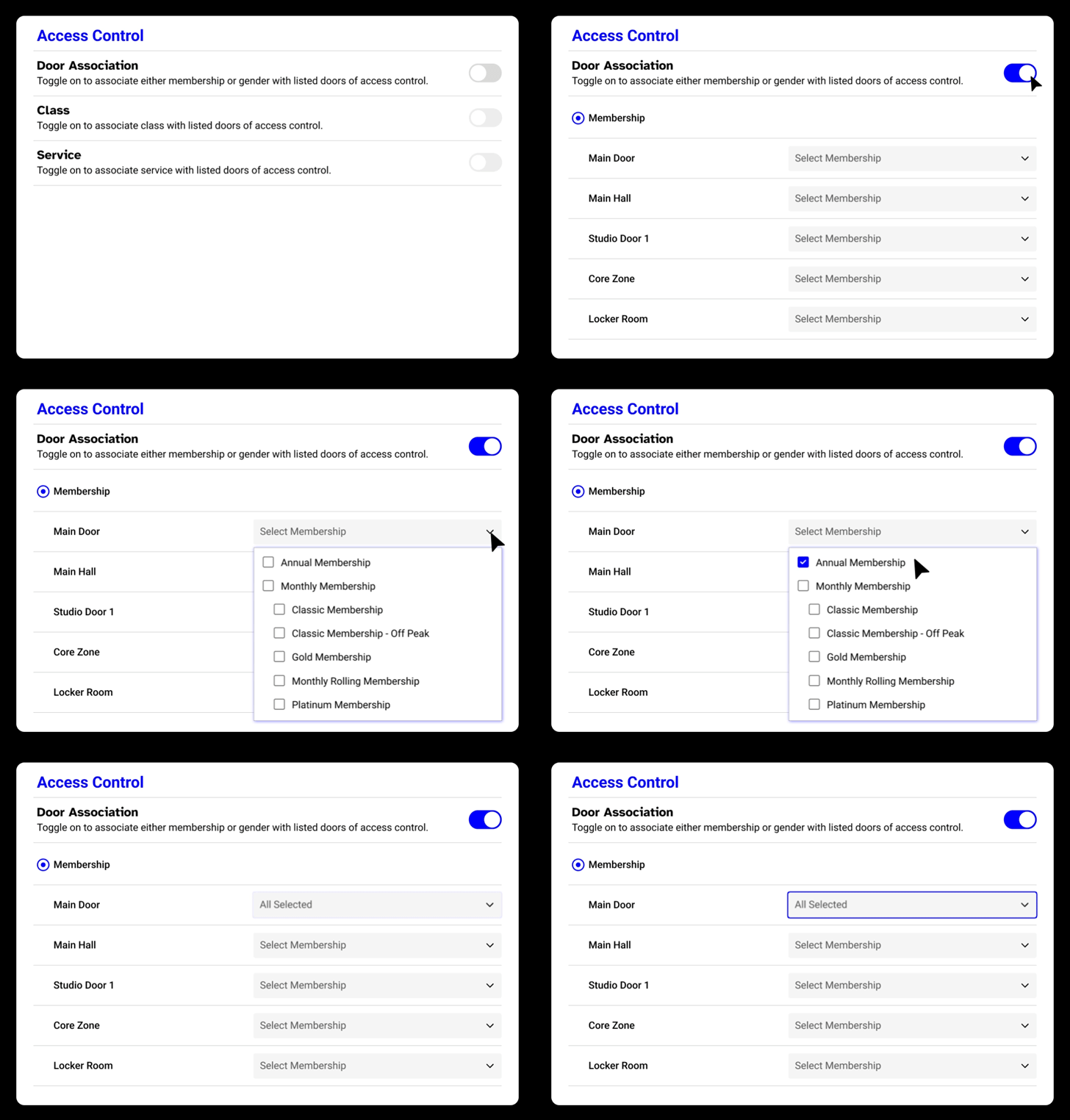
The easiest way to think about automation is this: which entry decisions should happen without staff touching anything?
The answer is usually “more than you think.”
Billing-triggered access changes
If a member’s payment fails, their access should update automatically according to your rules. If the payment is recovered, access should come back automatically too.
That removes arguments, delays, and manual patchwork.
Booking-triggered room unlock
If a member books a studio class, reformer session, simulator bay, or recovery slot, the right internal door should unlock only for that valid window.
That is one of the cleanest uses of automation in a premium or hybrid facility.
Guest pass automation
A guest or day-pass user should be able to buy access, receive the credential, use the correct door, and then lose access when the window ends.
No paper list. No front-desk workarounds. No staff texting codes by hand.
Permission sync
When a member upgrades, freezes, cancels, changes location, or adds a premium service, permissions should update automatically. The same goes for staff role changes.
This matters even more across multiple sites.
Alert routing
A held-open door, forced entry, repeated denied attempts, or after-hours anomaly should not just appear in a forgotten dashboard. It should go to the right person, through the right channel, fast enough to matter.
Why automation is the real differentiator
Automation is not just a feature. It is the difference between a gym that feels busy and a gym that runs smoothly in the background.
What real operators say about it
You can see this clearly in how gym owners talk about these systems.
Danielle highlights the power of having everything in one place: scheduling, payments, door access, and automation working together.
Anant, owner of King Swing, shows the same idea from another angle. For him, automated access made it possible to run a mostly self-service, unstaffed entry system.
That is what strong automation removes. Fewer handoffs, fewer mismatches, and far fewer chances for access, payments, and bookings to fall out of sync.
What good automation actually feels like
When automation works, you notice it immediately:
- Less fixing
- Fewer awkward member moments
- No manual checks at the door
- No confusion between systems
It feels like the business is finally moving in one direction.
Why this matters for growth
It directly impacts:
- Member experience
- Staff workload
- Operational clarity
- Revenue protection
And if you want to build a system that truly works, this is the point where everything connects.
Maintenance
A lot of access-control failures are not truly surprises. The warning signs were there. The check just did not happen.
That is why maintenance matters. Not in a vague way. In a scheduled, useful, repetitive way.
8-step checklist
- Test every controlled door monthly
- Run an unauthorized card test
- Run a door force test
- Review door alignment and physical wear
- Check battery health on wireless devices
- Review stale permissions
- Check integration health
- Review logs and breach alerts
Monthly testing routine
Each month, check active member entry, frozen-member denial, canceled-member denial, trial-user limitation, guest-pay expiry, mobile app unlock, internal premium-zone access, unauthorized card denial, door-force alert, held-open alert, reporting visibility, and emergency-release behavior.
Write the result down.
That last part matters. If nobody records it, the routine disappears.
A simple maintenance schedule that actually works
One reason maintenance gets skipped is that it feels vague. So make it specific.
- Weekly: Glance at breach alerts, denied-access patterns, and doors showing unusual open times.
- Monthly: Run the full access test set, including the unauthorized card test and the door force test.
- Quarterly: Review all staff roles, trial-user flows, guest access rules, internal-zones permissions, and device battery health.
- Twice a year: Inspect physical door alignment, hinges, brackets, readers, backup power, and any gate or turnstile wear.
That is not glamorous. It is how reliable systems stay reliable.
Why maintenance matters to the member experience too
It is easy to talk about maintenance as if it only affects the operator. It does not.
A badly maintained system shows up directly in the member experience. The app does not unlock consistently. The fob reader works only sometimes. The premium room denies the right person. The main door becomes unreliable after hours.
That kind of friction damages trust quietly.
This is another reason why access control should sit inside the broader gym automation software conversation. It is not just hardware upkeep. It is operating reliability.
Keeping the system reliable is one part of the job. The next is knowing whether it is actually performing well.”
How to measure access control performance
If you do not measure access control, you cannot tell whether it is helping the business or just existing in the background. Here are the six metrics that matter the most.
- Door-denial rate
This is the percentage of total access attempts that are denied.
A rising denial rate is not automatically bad. Sometimes it means the system is enforcing rules properly. But if the rate spikes because valid members are being blocked, you have a sync or configuration problem.
A simple formula works:
Door-denial rate = denied attempts / total attempts
- False-positive rate
This is how often the wrong person is allowed in.
In many gyms this will be low or hard to measure directly, but tailgating, shared credentials, and weak guest controls are the real-world versions of it.
- Credential-replacement volume
How many fobs, cards, or credentials do you replace each month?
If the number is high, it may be time to shift more users toward mobile.
- Off-peak access uptake
How much of your early-morning, late-night, or low-staff access window is actually being used?
This matters if you are trying to justify 24/7 operation or extended-hour memberships.
- Premium-zone utilization rate
If you have a recovery room, simulator bay, studio zones, or premium coaching area, track how often paid users actually use it.
This is one of the most useful metrics in the building because it tells you whether the premium benefit is valuable, underused, or priced badly.
- Mean time to permission update
How long does it take for a billing change, plan upgrade, cancellation, or staff-role change to show up correctly in access permissions?
That number should be very close to real time in a strong setup.
Extra metrics worth tracking
You can go further if you want more operational visibility.
Track:
- Manual staff overrides per month
- After-hours incident rate
- Average guest-pass conversion rate
- Tailgating incidents per 1,000 entries
- Held-open-door alerts
- Time to resolve access tickets
- Number of stale permissions found in monthly reviews
How to use these numbers without drowning in them
Do not build a huge dashboard on day one.
Pick five core metrics:
- Denial rate
- Credential replacements
- Premium-zone utilization
- Off-peak access uptake
- Mean time to permission update
Review them every month. That is enough to tell you whether the system is getting better or merely getting older.
Revenue, retention, and ROI impact
This is where access control becomes most interesting for an owner. Because once the hardware is in, the real question becomes simple:
What is it doing for the business?
The strongest answer is, “it helps the gym make more money, waste less time, and deliver a smoother experience.”
Guest and non-member charging
A modern access setup should let you sell temporary access without turning your staff into gatekeepers.
That can include day passes, guest passes, workshop entry, class-only access, weekend access, off-peak access, or one-time recovery-room passes.
The value is not just in selling the access. It is in making the process clean. The guest buys the pass. The system sends the access. The right door opens. The access expires on time.
No paper list. No front-desk workaround. No awkward conversation.
24/7 gym monetization
This is one of the clearest ROI cases in the whole category.
If your gym can operate safely outside staffed hours, you can widen the offer without widening payroll in the same proportion. That can open the door to 24/7 memberships, off-peak memberships, staff-light satellite sites, and stronger appeal to shift workers and early-morning users.
That is what real ROI looks like.
Cleaner operation. More pricing confidence. Less staff friction.
Reduced staff costs
This does not mean replacing people with doors.
It means using people for work that is more valuable than constantly solving entry problems. A front-desk team that spends too much time on access disputes, failed fobs, guest-entry workarounds, or membership mismatch issues is being pulled away from tours, sales, retention, and member care.
A better access stack shifts that balance.
A simple ROI formula for gym access control
A basic way to think about ROI is this:
(staffing cost per entrance hour × entrance hours per day × days per year) − annual system cost = potential operating gain
For example, if a gym would otherwise need front-desk coverage at the entrance for 4 hours a day at $18 an hour, across 365 days, that is $26,280 per year. If the access-control system costs $8,000 per year across software, support, and upkeep, the remaining operating gain is about $18,280 before you even factor in reduced membership leakage, fewer manual fixes, and added off-peak revenue.
That is why operators like Anant at King Swing matter here. The value is not only that members can enter on their own. The value is that the business can extend access without matching every extra hour with the same staffing cost.
Fraud prevention
This is the less glamorous but very real part of ROI.
Access control helps reduce membership sharing, guest misuse, premium-zone freeloading, stale staff access, after-hours misuse, and untracked internal movement.
In other words, it protects the value of the access you are already selling.
Data-driven decisions
A connected gym check-in system gives you more than an audit trail. It gives you usable signals.
What are the real peak arrival hours? Which doors are actually used most? Which premium zones justify expansion? Which time windows need staff presence? Which offer types drive the strongest off-peak use?
Good operators do not just want to know whether members entered. They want to know what the pattern is telling them.
Retention through smoother experience
A member rarely cancels because of one bad door event.
But repeated friction adds up.
If entry feels uncertain, if premium rooms do not match what people paid for, if the app fails, if the system denies the right person and lets the wrong person through, the gym starts to feel messy.
The best access system feels quiet. That is what you want.
Quiet at the door is half the story. The other half is what your access logs tell you about members who have gone quiet. That data is where gym access control and member retention actually meet.
Internal studio access control as a revenue driver
Internal studio access control can support clearer pricing and cleaner premium-space management.
Internal studio access control is a revenue driver.
Expert advice: If premium access is part of your offer, make it visible and enforceable. Recovery rooms, simulator bays, women-only windows, and booked studios should open only for the right members at the right time. That makes the upgrade feel real, and it stops staff from policing access manually.
It lets you build clearer pricing ladders. It helps you protect premium space. It reduces the need for staff policing. It makes upsells easier to justify because the benefit becomes tangible.
A standard membership gives main-floor access. A plus plan adds classes. A premium plan adds recovery access. A simulator add-on opens a separate room. Women-only access applies in designated windows. Special workshops open only to those who booked.
That is a much cleaner business model than relying on staff memory or informal enforcement.
Multi-location scaling
The more locations you add, the more dangerous “we just know how things work here” becomes.
At one site, informal knowledge can hide weak systems. At three or five sites, it breaks.
That is why access control matters even more when you scale.
Centralized access control
If you are managing more than one site, you want one place to add users, remove users, assign sites, update roles, change schedules, review alerts, manage premium zones, and monitor logs.
This is one of the strongest arguments for cloud-based systems in a growing gym business.
Instant permission updates
This sounds small until you imagine the alternative.
A member upgrades. A staff member leaves. A contractor finishes work. A premium add-on is canceled.
Should the access change happen next week after someone notices?
Of course not. It should happen now.
That is why permission speed matters much more in multi-site operations than it may seem at first.
POS integration
If access, billing, and point of sale are tied together, you can sell and control things like day passes, premium-room sessions, cross-site access, special-event entry, one-time recovery use, and guest-access add-ons.
That makes the offer cleaner and the reporting more useful.
Peak hour analytics
With access data, you can see which sites really justify longer staffed hours, which entrances create bottlenecks, which times are crowded versus quiet, which internal spaces are underused, and which site deserves the next premium add-on investment.
That helps you make better expansion decisions instead of louder ones.
Why scaling makes software quality matter more
Vladimir put it simply:
“I felt like this company has everything that I need. I didn’t need much… I just need the membership. I need a payment… I need active control and this is it.”
That mindset works when you’re small. It becomes critical when you grow.
One broken integration at a single location is frustrating. The same problem across multiple locations? It turns into lost revenue, confused members, and constant operational headaches.
Scaling does not just increase size. It multiplies every weakness in your system.
That is why software quality matters more as you expand. You need everything connected: Memberships, payments, bookings, and access—working as one system, not separate tools stitched together.
This is not just a gym problem. The same challenge shows up in class-based and hybrid businesses too. If you are running or planning to expand into studios, it is worth exploring yoga studio software that handles multi-location access and scheduling with the same level of control.
Because at scale, simplicity is not optional. It is survival.
Mobile access and trends
Mobile access isn’t a novelty anymore. It’s becoming the default.
You already saw the big numbers up top, so no point repeating them. What’s worth flagging is a smaller stat that says more about where this is going: ASSA ABLOY’s 2025 report found only 19% of access decision-makers now think mobile is unsuitable for their sites. That number used to be much higher. It’s dropping fast. Honeywell’s buyer data points the same way — people are now shopping for touchless entry, cloud, unified platforms, and AI alerts, not just locks and readers.
This matters for gyms because your members already live on their phones. They book classes on it. They pay on it. They check their schedule on it. Asking them to carry a separate fob or card forever starts to feel a bit odd once you say it out loud.
The wider device backdrop
Statista reports show mobile subscriptions reached nearly 6.4 billion in 2022 and are expected to pass 7.7 billion by 2028.
At the same time, Ericsson reports that global 5G subscriptions hit 2.9 billion by the end of 2025 and could reach 6.4 billion by 2031.
What This Means for Gyms
The exact number may vary depending on whether you count users, devices, or subscriptions. But the real takeaway is simple:
The smartphone is no longer optional. It is now a default access device.
People already use their phones for payments, bookings, and communication. Using it to enter a gym feels natural.
The Real Shift
This is not just a tech trend. It is a behavior shift.
Members expect:
- Tap-and-go entry
- No cards or fobs
- Instant access control
In simple terms:
The phone has become the new gym key.
The rise of touchless access (post-COVID)
The pandemic changed expectations around contact, hygiene, and friction in public spaces. That does not mean every member is still thinking about infection control every time they open a door. It does mean people got used to low-touch systems, and many prefer them now.
In a gym, touchless entry also just feels smoother.
Why mobile access keeps winning
It removes the plastic credential cost. It makes guest access easier. It fits the branded member experience.
It supports touchless behavior. It is easier to revoke when membership status changes.
And when it is tied properly to bookings and billing, it reduces the number of awkward front-desk exceptions.
Where mobile can still fail
Mobile is not magic.
It can still fail because of dead batteries, poor app design, Bluetooth inconsistency, permissions problems, offline gaps, or member confusion.
That is why a fallback plan still matters. Often, that means keeping a secondary credential option for staff or edge cases, even if mobile becomes the default.
Mobile access is only one part of the bigger shift happening in gym security and operations. If you want to see how mobile entry fits with biometrics, AI alerts, cloud-based access, 24/7 gym models, and billing-connected permissions, we’ve covered the wider picture in guide to gym access control trends.
It gives gym owners a clearer view of which trends are worth watching and which ones actually make daily operations easier.
The branded-app angle
This is where access control stops feeling like a tool and starts feeling like part of your brand.
Anmarie, Kokobeenz owner, captured it perfectly:
“I was sold on the branded app.”
That line says a lot. Because today, the app is not just for entry. It is where members book sessions, make payments, check their status, and unlock the door.
When all of that happens in one place, the experience feels simple and connected.
And when the experience feels connected, the business feels more professional, more modern, and more trustworthy.
In short, mobile access is not just about convenience. It shapes how your gym is experienced every single day.
Real-world cases
Theory is easy. Operating reality is harder. This is where named examples help.
Growth makes all-in-one systems essential
When a gym grows, complexity grows with it. More members, more zones, more rules.
Danielle – Owner, Grit to Greatness Performance
After expanding from a small studio to a large facility, she realized disconnected tools create friction fast.
She explains it simply:
“In Wellyx you can do everything in one, and that’s what I really loved about it.”
She also highlights the importance of support during live operations:
“A lot of times you need help right now to make that sale.”
Scenario insight: Growth increases operational pressure. Access control must be integrated, not separate.
Launch phase depends on usability, not features
New gyms fail systems when they are too complex to use.
Phil Baltimore – Co-founder, Train Better
During launch, usability mattered more than feature depth.
“The program looked very user-friendly… it wasn’t just talk, it was action.”
He also emphasizes onboarding and support:
“They really cared about us being successful at launch.”
Scenario insight: A powerful system is useless if your team cannot use it on day one.
Simplicity reduces operational headaches
Too many tools create more problems than they solve.
Vladimir – Owner, Cartev Fit
“I just need membership, payments, and access control in one place… that’s it.”
Scenario insight: Simplicity is not a limitation. It is a strategy for smoother operations.
Mobile apps shape the access experience
Access is no longer just physical. It is part of your brand.
Anmarie – Owner, KokoBeenz
“I was sold on the branded app… being on the app store mattered.”
Scenario insight: When access, bookings, and accounts live in one app, the experience feels unified.
Automation enables staff-light operations
Modern gyms are moving toward automation.
Anant – Owner, King Swing
“We’ve been able to automate it so members can enter and leave on their own.”
Scenario insight: Access control is the foundation of 24/7, low-staff business models.
The right fit beats the most advanced system
Not every gym needs high-end complexity.
Zack Camilleri – Owner, Prestige Fitness
“We got the most appropriate system for us… and at the best price.”
Scenario insight: Choose what fits your business, not what looks impressive in demos.
Delaying the switch has hidden costs
Sticking with the wrong system is expensive over time.
Shaleah Facey – Owner, Blackfuse Fitness
later summed up the difference clearly:
“Wellyx providing the gym management plus the access system that runs concurrent… that is a game changer for me.”
Scenario insight: Poor access systems do not just create friction. They can leave expired members active until somebody catches the error manually, which turns access into a quiet operational leak.
Integration matters beyond traditional gyms
Access logic applies to hybrid businesses, too.
Brent – Bio Functional Clinic
“I needed something that handles memberships and services together… not separate systems.”
Scenario insight: Access control is now relevant for wellness, clinics, and hybrid models.
Poor access systems directly cause revenue loss
Most case studies say, “things improved.” This one shows exactly how much.
At Factory Fitness, Chanelle Ramsey faced a common problem: the access control and membership systems were not working together. The result was confusion at the door, frustrated members, and lost revenue.
Chanelle put it plainly:
“Door integration was absolutely critical.”
After switching to an integrated system with built-in access control, the impact was clear:
- £3,000 to £4,000 saved per year
- That’s roughly $4,000 to $5,300 annually
- At a cost of about £180/month (~$240/month)
When your access control sits outside your system, you lose control.
When it is fully integrated, the door becomes part of your operations.
That means:
- Fewer errors
- No membership mismatches
- Better member experience
- And most importantly, revenue you stop losing quietly
This is the difference between having a system… and having one that actually works.
Taken together, these examples point back to the same question: what should you check before committing to a system?
Buying checklist
Use this before you sign anything.
Business fit
- Are you staffed, unstaffed, or hybrid?
- Do you want true 24/7 access?
- How many doors need control now?
- How many will you need in two years?
- Do internal premium rooms matter to revenue?
Membership logic
- Can trial members be limited to specific zones?
- Can failed billing block access automatically?
- Can booked classes unlock only the right doors at the right times?
- Can you issue digital guest access easily?
Technology fit
- Does it connect properly to your gym management software?
- Is mobile access strong?
- What happens when the internet fails?
- Are logs and alerts easy to use?
- Is there offline authorization?
Staff fit
- Can you set different staff roles cleanly?
- Can you revoke permissions instantly?
- Is onboarding included?
- Who helps if it fails at 5 a.m.?
Cost fit
- What is the real installed cost?
- What are the monthly software fees?
- What does expansion cost per new door?
- What hidden costs are not in the quote?
Growth fit
- Can it scale to more sites?
- Can it support premium-room monetization?
- Can it support better reporting and analytics over time?
FAQs
How do I choose the right access control system for my gym?
For most gyms in 2026, the best system is a cloud-based setup that connects directly to memberships, billing, bookings, staff roles, and mobile credentials. That gives you faster updates, stronger reporting, easier scaling, and a better member experience than a disconnected or heavily manual setup.
How much does gym access control cost?
A very small setup may begin in the low thousands, but real commercial systems usually cost more than owners first expect. Many installed systems land in the $2,500 to $9,000 range for a small site, $10,000 to $35,000 for a mid-size site, and $35,000+ for large facilities or turnstile-heavy setups, with monthly or annual software costs on top.
Can a gym run 24/7 without staff?
Yes, but only with the right setup. You need live membership control, dependable logs, emergency procedures, offline-capable behavior, and a system that can confidently tell who should and should not enter. Anant’s example is a good real-world picture of that kind of mostly automated operation.
Is mobile access better than key fobs?
For many growing gyms, yes. Mobile access reduces plastic credential costs, supports branded-app experience, makes guest access easier, and fits how members already manage bookings and accounts. But fobs still make sense as a fallback or for members who prefer something simple.
Is biometric access worth it?
Sometimes. It is worth it when membership sharing is a real problem, when 24/7 identity certainty matters, or when specific zones need stronger protection. It is less compelling if your gym has low misuse risk and members are likely to resist it. Hardware cost, privacy comfort, and user acceptance are the main trade-offs.
How do you stop membership sharing?
Use a combination of individual credentials, stronger app-based access, time-limited guest access, audit logs, anti-passback logic, photo or biometric verification where justified, and instant sync with membership status.
Shared PINs alone will not fix the issue.
Final thoughts
Gym access control used to sit in the background. A lock. A reader. A fob box at reception.
That is not what it is now.
Now it shapes the way the business runs. It decides whether 24/7 is practical. Whether premium zones can actually be sold as products. Whether your staff spend time helping members or fixing entry errors. Whether a denied payment becomes a clean access update or a public argument at the door. Whether one gym can become three without the operation turning into a patchwork of exceptions.
That is the real shift. The door is no longer just a door. It is part of the product, part of the workflow, and part of the revenue model.
The best gyms already understand that. They do not ask, “What lock should we buy?” They ask, “How should entry work if we want the business to grow cleanly?”
That is the better question.
Want an access control system that works for your gym?
Most systems sit on the side. The best ones run the whole operation.
If you are comparing systems now, it is worth looking closely at how well each one connects access with the rest of the business.
We combine 24/7 gym software, member management, bookings, billing, automation, and 24-hour gym access control into one system. That means the rules at the door always match what’s happening inside your business.
That usually leads to fewer access errors, less manual intervention, better control over premium spaces, and a setup that is easier to manage as the business grows.
And this is not just theory.
Real gym owners say the same things again and again:
- Danielle loved having everything in one place
- Phil valued how easy it was to launch and use
- Anant showed how automation enables staff-free access
- Chanelle proved how poor door integration can cost real money
If you are already comparing options, explore how this connects with:
- Gym management software
- Key fob systems for gyms
- Staff management tools
- How to run a 24/7 gym
Because in the end:
A great gym should feel easy to enter. And a great howsystem should make that feel effortless, every single day.
Book a demo with Wellyx if you want to see how connected access control works in a live gym management setup.