



“What is the best access control system for a gym?”
“Should I use fobs or mobile access for my gym?”
“How do 24/7 gyms manage entry without staff?”
“What happens if a member’s payment fails but they still enter?”
I see gym owners asking these because access control is now an operations decision.
A weak setup can let unpaid members train, frustrate good members, overload staff, and make 24/7 access riskier. And this is not just a gym problem. The broader access control market is growing fast because businesses are moving away from basic locks and toward connected, software-led security.
MarketsandMarkets projects the access control market to grow from $10.62 billion in 2025 to $15.80 billion by 2030, driven by cloud platforms, IoT-enabled systems, and remote monitoring.
We have seen gyms install a reader first, then discover the hard part later. Billing does not sync. Guest passes stay active. A coach leaves, but their credential still works.
That is why the best gym access control system is not just a lock, scanner, turnstile, or app. It decides who gets in, when they get in, and what happens when payments, memberships, bookings, or staff status changes.
To choose the best access control system for your gym, start with your operating model. Then compare hardware, credentials, software integration, 24/7 security, support, and total cost. Wellyx offers a dedicated gym access control system built around gym workflows.
What should a gym access control system actually do?
A gym access control system should do more than open the door when someone scans a credential. It should enforce your business rules.
That means:
- Active members can enter
- Expired members are blocked
- Failed payments pause access
- Trial users get limited access
- Staff access ends when someone leaves
- Premium or class-only access follows the right rules
That is the difference between a simple gym door access system and a real operating tool. A strong setup should manage entry, block unpaid accounts and expire guest passes, control restricted areas, track attendance, manage staff access, and support 24/7 hours.
If access control is not connected to membership logic, it becomes manual work dressed up as automation. Someone still has to update permissions and clean up mistakes.
This is also why connected systems matter. HID’s 2025 security report found that 73% of security leaders now prioritize software-driven unified solutions. That fits what we see in gyms too: owners do not just want a door reader. They want access, billing, bookings, and reporting to stop arguing with each other.
Start with your gym model, not the technology
Before comparing mobile apps, RFID fobs, biometric readers, QR codes, kiosks, or turnstiles, map how your gym actually runs.
A boutique studio does not need the same setup as a budget 24/7 gym. A recovery-led club does not need the same access logic as a CrossFit box.
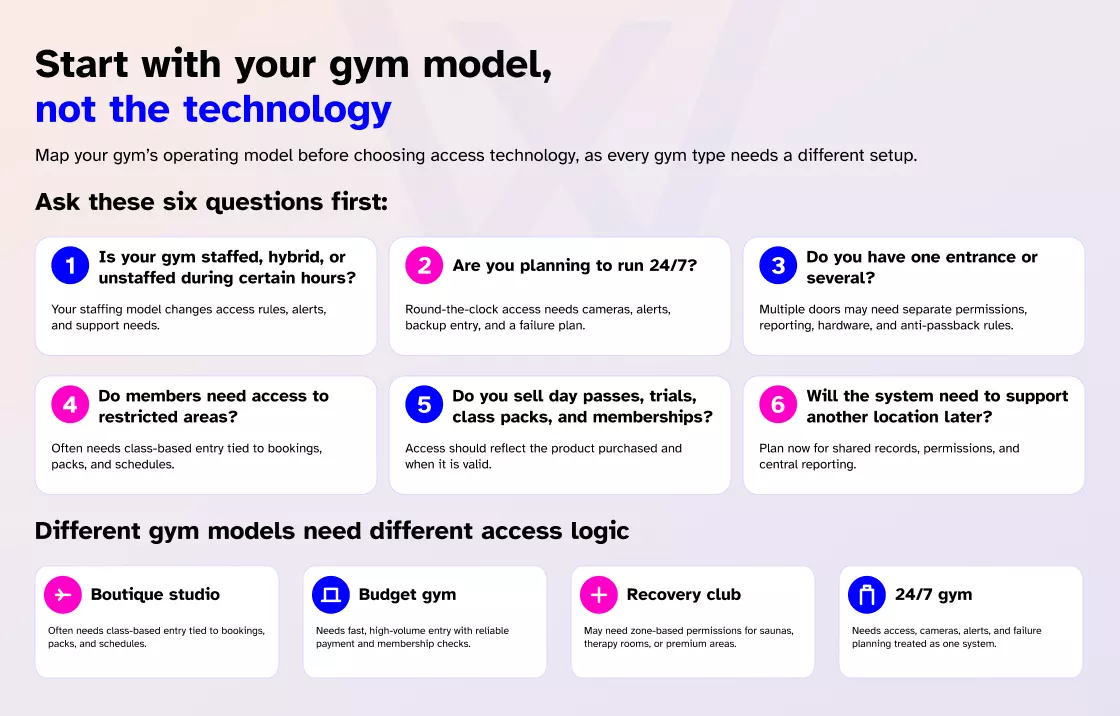
Ask:
- Is your gym staffed, hybrid, or unstaffed during certain hours?
- Are you planning to run 24/7?
- Do you have one entrance or several?
- Do members need access to restricted areas?
- Do you sell day passes, trials, class packs, and memberships?
- Will the system need to support another location later?
A boutique studio may need class-based access. A budget gym may need high-volume entry. A recovery club may need zones. A 24/7 gym needs access, cameras, alerts, and failure planning together.
If you are planning to extend your hours, this guide on how to run a 24/7 gym is useful because access control is only one part of the model.
Choose the right access method for your members
The best access method is the one your members will actually use without creating extra work for staff.
I’ve seen owners choose impressive hardware, then spend months fixing shared codes and access resets.
Mobile access for gyms
Mobile access lets members use their phone to enter through an app, QR code, NFC, or Bluetooth, depending on the setup. It works well when your gym already uses an app for bookings, payments, schedules, or member updates.
The upside:
- No physical fob to lose
- Faster access changes
- Easier revocation
- Better fit for app-led gyms
The watch-outs:
- Phones die
- Apps can crash
- Some members dislike new apps
- Backup access may still be needed
For more context, read about mobile access and app integration.
RFID key fobs and access cards
A gym key fob system is still practical for many facilities. Fobs are simple, familiar, and quick to issue. They work well for small gyms, hybrid facilities, and backup access.
The risk is weak control. Fobs get lost. Members share them. Staff forget to deactivate them. Some systems make replacement expensive or lock you into one vendor’s hardware.
If you choose fobs, make sure:
- Deactivation is instant
- Replacement costs are clear
- Staff can issue credentials easily
- Access connects with billing status
- The hardware does not trap you later
This guide on building a gym key fob system goes deeper into that decision.
QR codes, kiosks, and biometrics
QR codes and kiosk check-in work well for trial users, day passes, class check-ins, and busy front desks. They help visitors move faster without needing a physical credential.
But QR access needs guardrails:
- Screenshots can be shared
- Scanner placement matters
- Entry points can get crowded
- Access should connect with real-time rules
If kiosk entry is part of your plan, this article on kiosk check-in for gyms is worth reading.
Biometric access control for gyms includes fingerprint, facial recognition, or similar identity-based systems. It can make sense for high-security facilities, premium clubs, staff-only areas, or gyms where credential sharing is a serious issue.
But it is not right for every gym. You need to think about cost, privacy, consent, hygiene, member comfort, and local legal requirements. Some members are fine with biometric entry. Others are not.
If you are considering this route, read more about biometric access control for gyms before making it your main entry method.
Quick comparison: which access method fits your gym?
| Access method | Best for | Main risk | Best use |
| Mobile app | Modern, connected gyms | Phone dependency | Primary access |
| RFID fob/card | Simple daily entry | Lost or shared credentials | Backup access |
| QR/kiosk | Trials and guest flow | Screenshot sharing | Temporary check-in |
| Biometric | High-security facilities | Privacy and cost | Restricted access |
| PIN code | Low-risk internal use | Easy sharing | Secondary access only |
For most gyms, I would start with mobile access as the primary option, RFID cards or fobs as backup, and QR codes for guests and trials. Biometrics can work, but only when the security need justifies the responsibility.
Why gym access control software matters more than the reader?
A reader only knows someone scanned something. Your gym access control software should know whether that person is allowed to enter.
The real value sits behind the door, where memberships, payments, bookings, guest passes, and staff permissions live.
Your system should respond to business events automatically:
- Payment fails, access pauses
- Payment succeeds, access restores
- Membership freezes, entry stops
- Membership upgrades, new zones unlock
- Guest pass expires, access ends
- Staff member leaves, permissions are revoked
- Contractor access expires, credential stops working
Do not ask, “Does it integrate?” Ask:
- Does access change instantly when the billing status changes?
- Can a class booking open a specific door?
- Can premium areas be tied to premium memberships?
- Can a trial user be blocked from the rest of the gym?
- Can guest access expire automatically?
- Do access logs feed into reporting?
- What happens if the sync is delayed?
The value is not the door. The value is the logic behind it. That is why integrated gym access control software matters more than a fancy reader with weak rules.
Should you choose cloud-based or on-premises access control?
Many gym owners compare hardware without understanding how the system is managed.
Cloud-based access control is usually managed through a browser, dashboard, or app. It often fits modern gyms better, especially if you want mobile access, remote management, growth, or 24/7 operations.
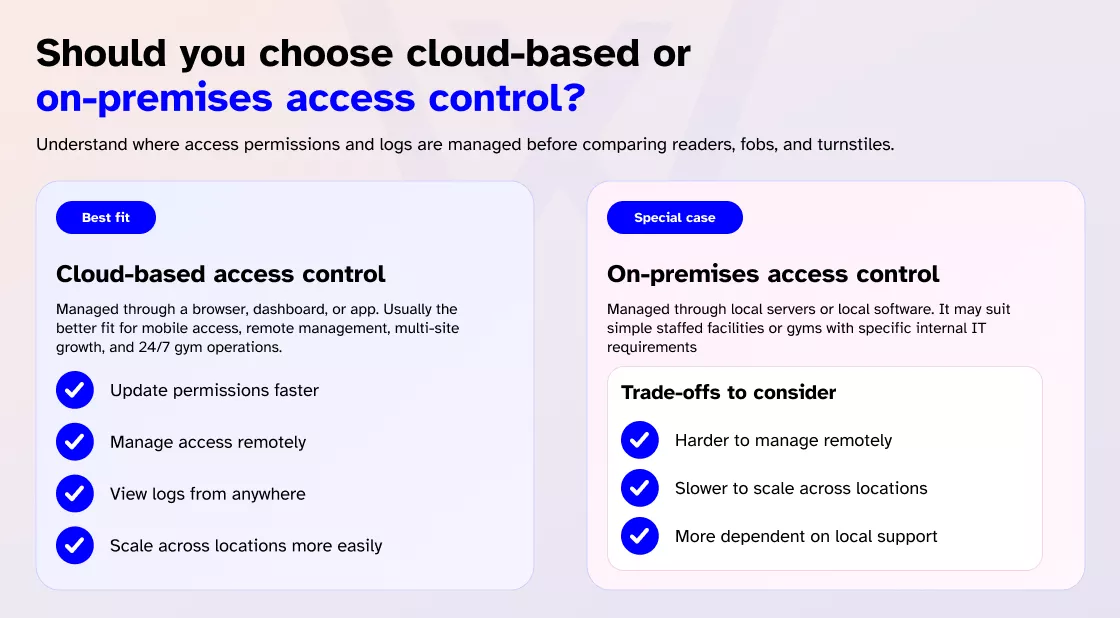
The benefits are practical:
- Update permissions faster
- Manage access remotely
- View logs from anywhere
- Scale across locations more easily
- Reduce dependence on local servers
But you still need to ask about internet outages, vendor uptime, offline access rules, data ownership, and monthly subscription costs.
On-premises systems are managed through local servers or local software. They may suit simple staffed facilities or gyms with specific IT requirements. But they can be harder to manage remotely, slower to scale, and more dependent on local support.
For most modern gyms, especially those thinking about mobile access or 24/7 gym access control, cloud-based access is usually easier to manage. Just do not sign anything until you understand what happens when the internet drops.
Real-world scenarios your system must handle
A polished demo is not enough. A demo usually shows the system at its best. Your gym will test it when things are messy.
Ask the vendor to show what happens when:
- A member’s payment fails at 5 a.m.
- A guest pass is used after expiration
- A member upgrades and expects immediate access
- A coach leaves and needs access to be removed
- A member forgets their phone
- The app crashes
- The internet drops during peak hours
- Two people try to enter on one scan
We have seen owners skip this step because the sales demo looked smooth. Then real life showed up. A billing sync lagged. A member got denied before an early class.
If the system only works in perfect conditions, it is not gym-ready.
What security features matter most for 24/7 gyms?
A 24/7 gym is not just open longer. It runs without staff during the hours when mistakes are harder to catch.
A simple reader may be fine for a staffed studio. But 24/7 gym access control usually needs stronger controls.
Look for:
- Tailgating prevention
- Anti-passback rules
- Door-forced alerts
- Time-based permissions
- Zone-based permissions
- Camera integration
- Remote monitoring
- Staff override access
- Emergency exit planning
Tailgating deserves special attention. If one paying member scans in and two unpaid guests walk in behind them, your access system has technically worked, but your security has failed.
That is why unstaffed gyms often need more than a reader. They may need cameras, alerts, turnstiles, access logs, and clear member policies. The guide on running a 24/7 gym can support owners thinking through staffing, safety, and operations.
What happens when the system fails?
Do not only plan for launch day. Plan for the morning when the system does not behave.
What happens if the internet drops? What happens if power fails? What if the reader stops working? What if the app is down? What if the member’s phone battery dies? What if billing sync is delayed and the wrong member is denied?
Your provider should have clear answers for:
- Offline authentication
- Local permission caching
- Manual override
- Staff emergency access
- Backup power options
- Safe exit requirements
Emergency exits, fire alarms, door locks, and building safety rules should always be confirmed with qualified local installers and safety professionals. Do not rely on a software demo.
A good gym door access system should make normal days easier and bad days manageable.
How to avoid vendor lock-in
Vendor lock-in is one of the quiet risks owners often miss.
A system may look affordable at first. Then later you realize the fobs are proprietary, the reader only works with one platform, the data is hard to export, or switching software means replacing half the setup.
Ask these questions before signing:
- Can the door hardware work with another platform later?
- Are the fobs, cards, or mobile credentials proprietary?
- Can access data be exported?
- Does the vendor support APIs or webhooks?
- What happens if you change gym management software?
- Are integrations included or billed separately?
- Can new doors or locations be added without rebuilding everything?
The cheapest setup can become expensive when your gym grows. A future-proof gym key fob system should give you flexibility, not trap you inside one vendor’s ecosystem.
Cost, support, and the final buying checklist
I would be careful with any article that gives one fixed price for a gym access control system. Costs depend on your doors, hardware, wiring, credentials, installation, software, support, and future expansion.
The real cost drivers include:
- Number of doors
- Reader type
- Locking hardware
- Turnstiles or gates
- Wiring and installation
- Cloud software subscription
- Member credential costs
- Biometric hardware
- Camera integration
- Support and maintenance
- Multi-location scaling
- Switching costs if the system is too closed
The better question is not, “What is the cheapest system?” The better question is, “What will this cost over the next 12 to 36 months, including staff time, support, upgrades, lost access, and future locations?”
Support matters just as much. Access control problems happen at the door, in front of members, usually when everyone is already annoyed. If a member cannot enter before a 6 AM class, they do not care whether the problem is the app, reader, Wi-Fi, billing sync, or access rule. They just know your gym did not work.
Look for:
- Installation coordination
- Launch setup
- Staff training
- Member onboarding
- Emergency troubleshooting
- Access rule cleanup
- Clear escalation
Strong gym access control system support can save your team from a lot of small fires.
Before choosing the best access control system for gyms, check whether it:
- Matches your staffed, hybrid, or 24/7 model
- Connects billing, memberships, bookings, and access
- Blocks access after failed payments
- Restores access after payment recovery
- Supports mobile access and backup credentials
- Manages guest passes and trials
- Controls premium or restricted zones
- Works during internet outages
- Has a clear emergency override process
- Helps prevent tailgating
- Avoids vendor lock-in
- Provides useful access logs and reports
- Shows total cost clearly
- Offers real support when the door becomes the problem
FAQs
What is the best access control system for a small gym?
The best access control system for a small gym supports one to three doors, connects with membership billing, allows quick credential updates, and avoids expensive hardware lock-in.
Do gyms still need key fobs?
Yes. Key fobs still work well as backup access or for members who prefer a physical credential.
Is biometric access worth it for gyms?
Biometric access can reduce credential sharing, but it brings cost, privacy, consent, and member comfort concerns.
Should gym access control connect with billing?
Yes. Billing integration helps pause unpaid access automatically and restore access when payment is recovered.
Choose the system that runs your gym, not just your doors
The best access control system is not the one with the flashiest reader or the longest hardware list. It is the one that fits how your gym actually runs.
It should protect revenue, reduce manual work, support members at the door, and know the difference between an active member, a frozen account, an expired guest pass, a class-only booking, and a staff credential that no longer belongs in the building.
For gyms that want access control, memberships, billing, and operations working from one place, Wellyx gives owners a cleaner way to manage member access through an integrated access control system for gyms.